EasyManua.ls Logo

EMX MVP D-TEK - User Manual

Default Icon
14 pages
Print Icon
To Next Page IconTo Next Page
Loading...
O P E R A T I N G I N S T R U C T I O N S
Operating Instructions
4564 Johnston Parkway, Cleveland, Ohio 44128
P. 800 426 9912 F. 216 518 9884
Sales Inquiries: salessupport@emxinc.com
Technical Support: technical@emxinc.com
www.emxinc.com
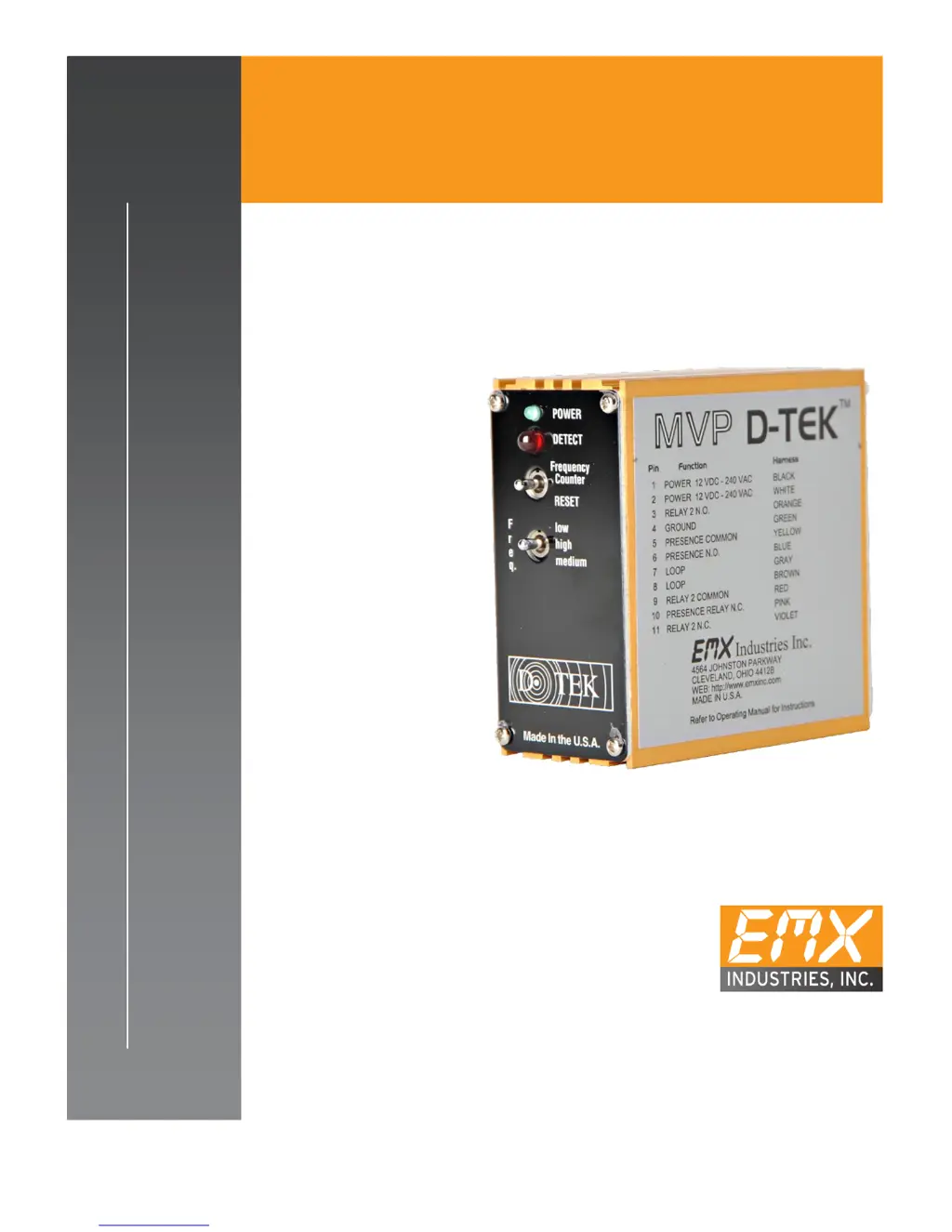
MVP D-TEK
V E HI C L E L O O P DE T E C TO R

Questions and Answers

  • C
    Collin MartinezJul 28, 2025
    Why does my EMX MVP D-TEK detector detect intermittently?
    • B
      Brian HamptonJul 28, 2025
      If your EMX Security Sensors detector intermittently detects vehicles when the loop is empty, the possible causes are: * A faulty loop. * Poorly crimped terminals. * Loose connections. * Cross-talk between adjacent loop detectors. * A loop that is not securely installed, allowing wire movement. To address this, perform the following checks: 1. Megger test between loop lead and ground (should read >100 mega ohms). 2. Ensure the loop is tightly connected to terminals. 3. Verify splices are tightly soldered and sealed against moisture. 4. Set adjacent loops to different frequencies. 5. Confirm the loop is securely installed in the pavement and the site is in good condition to prevent loop wire movement.
  • K
    khanchristineAug 3, 2025
    What to do if EMX Security Sensors detector stays in detect mode?
    • K
      Kim CarterAug 3, 2025
      If your EMX Security Sensors detector remains in detect mode after a vehicle has left the loop, it could be due to: 1. A faulty loop. 2. Poorly crimped connections. 3. Loose connections. Here are the suggested solutions: 1. Perform a megger test from the loop lead to ground; it should read greater than 100 mega ohms. 2. Check loop connections to terminals. 3. Ensure splices are properly soldered and sealed against moisture.
  • M
    michaellucasAug 9, 2025
    How to fix a flashing green indicator on EMX MVP D-TEK?
    • T
      Traci MooreAug 9, 2025
      If the green indicator on your EMX Security Sensors is flashing, it means the loop wire is either shorted or disconnected. To resolve this, check the loop resistance on pins 7 & 8; it should be less than 5 ohms and more than 0.5 ohms.
  • J
    joshua82Aug 14, 2025
    How to troubleshoot EMX Security Sensors when the green indicator is not lit?
    • S
      scott20Aug 14, 2025
      If the green indicator on your EMX Security Sensors is not lit, it indicates that there is no input voltage. To solve this: 1. Check the voltage on pins 1 and 2. 2. Check the wiring to the detector. 3. Verify the voltage used matches the voltage marked on the unit.
  • E
    Elizabeth PrattAug 20, 2025
    What does it mean when the green indicator flashes twice on EMX MVP D-TEK?
    • A
      Ashley CampbellAug 21, 2025
      If the green indicator on your EMX Security Sensors flashes with two consecutive fast blinks, it means the loop wire was temporarily shorted or disconnected. Check the loop resistance on pins 7 and 8; it should be less than 5 ohms and more than 0.5 ohms. The reading should be steady.

Summary

Cautions and Warnings

Product Overview

Product Construction and Features

Details aircraft aluminum housing, gold-plated contacts, and protection features.

Specifications

Operation

Reset and Frequency Control

Explains reset function and frequency adjustment via switches.

Sensitivity and ASB Settings

Describes sensitivity adjustment and Automatic Sensitivity Boost.

Relay 2 Modes

Configures Relay 2 for pulse or presence operation.

Operation Features

Pulse and Presence Operation

Explains pulse detection and constant/4-minute presence settings.

Fail Safe, Filter, and Extend

Details fail-safe modes, filter, and detection extension settings.

Controls and Indicators

Front Panel Controls and Indicators

Describes front panel LEDs and controls like Power, Detect, Reset.

Back Panel DIP Switch Functions

Details the functions of DIP switches on the back for configuration.

Connections

Connector Pin Assignment

Lists connector pins, their functions, and harness wire colors.

Important Connection Notes

Highlights essential notes for ground connection and pin function reversal.

Troubleshooting

Installation

Ordering Information

Available Accessories

Lists optional accessories like loops and harnesses.

Warranty

EMX MVP D-TEK Specifications

General IconGeneral
BrandEMX
ModelMVP D-TEK
CategorySecurity Sensors
LanguageEnglish

Related product manuals