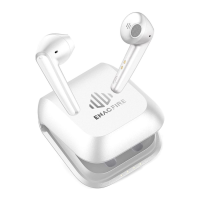
This document describes the ENACFIRE Forte True Wireless Stereo Earphones, providing an overview of their features, usage instructions, and safety guidelines.
Function Description
The ENACFIRE Forte are true wireless stereo earphones designed for audio playback and hands-free calling. They offer a cable-free listening experience and can be used in both stereo and single-ear modes. The earphones come with a charging case that not only protects them but also provides additional battery life.
Important Technical Specifications
Charging Time:
- Earphones: Approximately 1.5 hours for a full charge.
- Charging Case: Approximately 1.5-2 hours for a full charge.
Battery Capacity Indication (Charging Case):
The charging case uses a red LED light to indicate the remaining battery capacity:
- 4 flashes: 75-100% Charged
- 3 flashes: 50-75% Charged
- 2 flashes: 25-50% Charged
- 1 flash: 0-25% Charged
Usage Features
Product Overview:
The earphones and charging case have several key components:
- Charging Case:
- Charging Case LED Light
- Charging Port
- Earphones:
3. Multifunctional Button
4. Earphone LED
5. Magnetic Charging Pin
6. Earphone Mic
Power On & Pairing:
There are two approaches for powering on and pairing the earphones:
Incoming Call Management:
- Answer/End Call: Tap the Left/Right earphone once.
- Reject Call: Touch the Left/Right earphone for 2 seconds.
Music Playback Control:
- Pause/Play: Tap the Left/Right earphone once.
- Change Song: Double-tap the Left/Right earphone.
- Adjust Volume: Touch and hold the Left/Right earphone.
Voice Assistant:
- Activate Voice Assistant: Tap the Left/Right earphone 3 times.
Power Off:
- Mode 2 - Without Charging Case:
- Turn off Bluetooth on your device to disconnect the earphones.
- Touch either earphone for 6 seconds to power off both earphones.
Single Mode:
To use a single earphone:
- Ensure both earphones are off.
- Touch the Left/Right earphone for 4 seconds to enter pairing mode.
- Select 'ENACFIRE Forte' from your device's Bluetooth list.
Maintenance Features
Charging the Earphones:
- Place the earphones back into the charging case.
- The earphone LED light will be on during charging and turn off when fully charged.
Charging the Charging Case:
- Connect the USB Type-C charging cable to the charging port on the case.
- The red LED light on the charging case will flash to indicate charging progress, with the number of flashes corresponding to the remaining battery capacity (as detailed in "Important Technical Specifications").
Safety Instruction:
- Hearing Protection: Avoid using earphones at high to moderate volumes for extended periods to prevent permanent hearing damage. Keep volume levels moderate to low.
- Situational Awareness: Do not use earphones while driving, cycling, operating machinery, or performing other activities that require hearing surrounding sounds.
- Weather Conditions: Do not use earphones in thunderstorm weather, as they may not work properly and could increase the risk of lightning strikes.
- Environmental Conditions: Earphones may not work properly under high temperature or high humidity conditions.
- Cleaning: Do not use corrosive cleaners or oil to clean the earphones.
- Water Exposure: If earphones come into contact with liquids, quickly wipe them away. If submerged in water, do not turn them on until completely dried.
- Warranty: Man-made damage and lost items are not covered under warranty.
- Child Safety: Keep the earphones and packaging out of reach of children.
FCC Statement
This device complies with part 15 of the FCC Rules. Operation is subject to the following two conditions:
- This device may not cause harmful interference.
- This device must accept any interference received, including interference that may cause undesired operation.
Changes or modifications not expressly approved by the party responsible for compliance could void the user's authority to operate the equipment.
FCC Compliance Guidelines:
This equipment has been tested and found to comply with the limits for a Class B digital device, pursuant to part 15 of the FCC Rules. These limits are designed to provide reasonable protection against harmful interference in a residential installation. This equipment generates, uses, and can radiate radio frequency energy and, if not installed and used in accordance with the instructions, may cause harmful interference to radio communications.
However, there is no guarantee that interference will not occur in a particular installation. If this equipment does cause harmful interference to radio or television reception, which can be determined by turning the equipment off and on, the user is encouraged to try to correct the interference by one or more of the following measures:
- Reorient or relocate the receiving antenna.
- Increase the separation between the equipment and receiver.
- Connect the equipment into an outlet on a circuit different from that to which the receiver is connected.
- Consult the dealer or an experienced radio/TV technician for help.

 Need help?

 To Next Page
 General