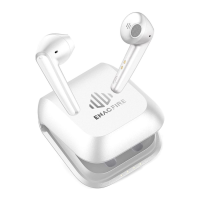
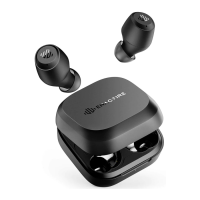
The ENACFIRE E18 Plus are wireless earbuds designed for audio playback and phone calls, featuring a compact and portable design. This user guide provides instructions for setup, operation, and maintenance of the device.
Package Contents:
The package includes two wireless earbuds, a magnetic charging case, a USB charging cable, nine pairs of ear tips (various sizes), a user manual, a guarantee card, and a happy card.
Product Overview:
Each earbud features a microphone and a multi-function button (MFB). The charging case has a micro USB charging port and a charging base with LED indicators. Users are advised to remove the protective stickers from the earbuds before first use.
Power ON/OFF:
To power on the earbuds, remove them from the charging case or quickly press the MFB. To power off, place the earbuds back into the charging case or hold the MFB for 5 seconds. If the charging case is completely out of battery, the earbuds will not automatically turn on or off.
Pairing - Stereo Mode:
- Remove the earbuds from the charging case. They will automatically power on and enter pairing mode. If they don't turn on automatically, quickly press the MFB until the blue light flashes.
- The left and right earbuds will connect to each other automatically. The right earbud (master earbud) will show alternating blue and white lights, indicating pairing mode.
- On your device, go to the Bluetooth menu and select "E18 Plus."
Voice prompts will guide you through the process: "Power on" → "Pairing (right earbud)" → "Connected." The earbuds can be paired with devices up to 1 meter away.
Pairing - Mono Mode (Left Earbud):
- If both earbuds are connected, place the right earbud in the charging case. The left earbud will automatically enter pairing mode.
- If both earbuds are off, power on the left earbud, and it will automatically enter pairing mode.
- Go to your device's Bluetooth menu and select "E18 Plus."
- If you power on the right earbud after pairing the left earbud, both earbuds will automatically connect to each other and return to stereo mode.
Once successfully paired, the earbuds will automatically connect to your device when turned on again.
Controls (Play Music & Phone Calls):
- Pause/Play: Quickly press either MFB.
- Previous Song: Double press the Left MFB.
- Next Song: Double press the Right MFB.
- Activate/Stop Voice Assistant: Press and hold either MFB for 1 second.
- Answer/End Call: Quickly press either MFB.
- Reject Incoming Call: Double press either MFB.
- Switch Call through Earbuds or Phone: Double press either MFB.
Note: Volume adjustments must be made through your smartphone.
How to Charge - Charging the Earbuds:
Simply place the earbuds in the charging case. A white light will illuminate on the earbuds, turning off when fully charged. It takes approximately 1 hour to fully charge the earbuds, and the case can recharge them 3-4 times.
Charging Status (Earbuds):
| State |
Mode |
Case battery percentage |
Case LED Indicator |
| Case Discharging |
Earbuds charging |
0-25% |
Blue indicator flashes 1 time |
|
|
26%-50% |
Blue indicator flashes 2 times |
|
|
51%-75% |
Blue indicator flashes 3 times |
|
|
76%-100% |
Blue indicator flashes 4 times |
Charging the Case:
There are two ways to charge the case:
- Micro USB Cable: Connect the micro USB cable to the charging case until the blue light flashes. This takes approximately 2 hours for a full charge.
- Wireless Charging Pad: Place the charging case on a wireless charging pad. This takes approximately 4 hours for a full charge.
Charging Status (Case):
| State |
Mode |
Case battery percentage |
Case LED Indicator |
| Case Charging |
Charging |
0-25% |
Blue indicator flashes 1 time every 2 seconds. |
|
|
26%-50% |
Blue indicator flashes 2 times every 2 seconds. |
|
|
51%-75% |
Blue indicator flashes 3 times every 2 seconds. |
|
|
76%-100% |
Blue indicator flashes 4 times every 2 seconds. |
|
|
|
If fully charged, the blue indicator will stay on. |
Troubleshooting (Earbuds Fail to Pair or Connection Issues):
- Place both earbuds in the charging case and ensure they are charging.
- Press and hold the power buttons of both earbuds for 10 seconds until blue and white lights flash.
- Remove both earbuds from the charging case.
- Delete "E18 Plus" from your phone's Bluetooth menu and turn off Bluetooth.
- Turn on Bluetooth on your phone and select "E18 Plus."
Q&A:
- Q: Why does the music cut in and out sometimes?
- A: Ensure there are no obstacles between the earphones and your device. Items like microwave ovens or Wi-Fi transmitters can cause electromagnetic interference. Keep your phone and the master earphone (R) as close as possible for a stable connection.
- Q: Will battery life differ with different devices?
- A: The E18 PLUS earbuds support apt-X technology for enhanced audio quality. This may increase battery consumption when using an Android system (resulting in approximately 5 hours of playtime). Battery consumption is not largely affected when using an iOS system.
- Q: How to contact ENACFIRE Customer Service Team?
- A: For assistance, contact support@enacfireglobal.com (US/CA) or moongu@enacfireglobal.com (UK). You can also call +86 755 82792007. The team aims to reply within 24 hours and resolve issues completely.
Specification:
- Bluetooth version: 5.0
- Support: HFP, HSP, AVRCP, APTX, CVC8.0
- Dimension: 20x16x14.5mm
- Support iPhone/iPad battery indication: Yes
- Bluetooth normal distance range: 10m
- Battery Capacity:
- Earbuds: 50mAh
- Dock: 500mAh
- Talk/Music time: 8h
- Standby time: 240h
- Support Voice Prompt: Yes
Note: Please use a 5V 1A adapter for charging to prevent damage to the earbuds.
Certifications:
The device is CE, FCC, and RoHS compliant, indicating adherence to European safety, electromagnetic compatibility, and hazardous substance restrictions. It also features a crossed-out wheeled bin symbol, signifying that it should not be disposed of with general household waste.

 Need help?

 To Next Page
 General