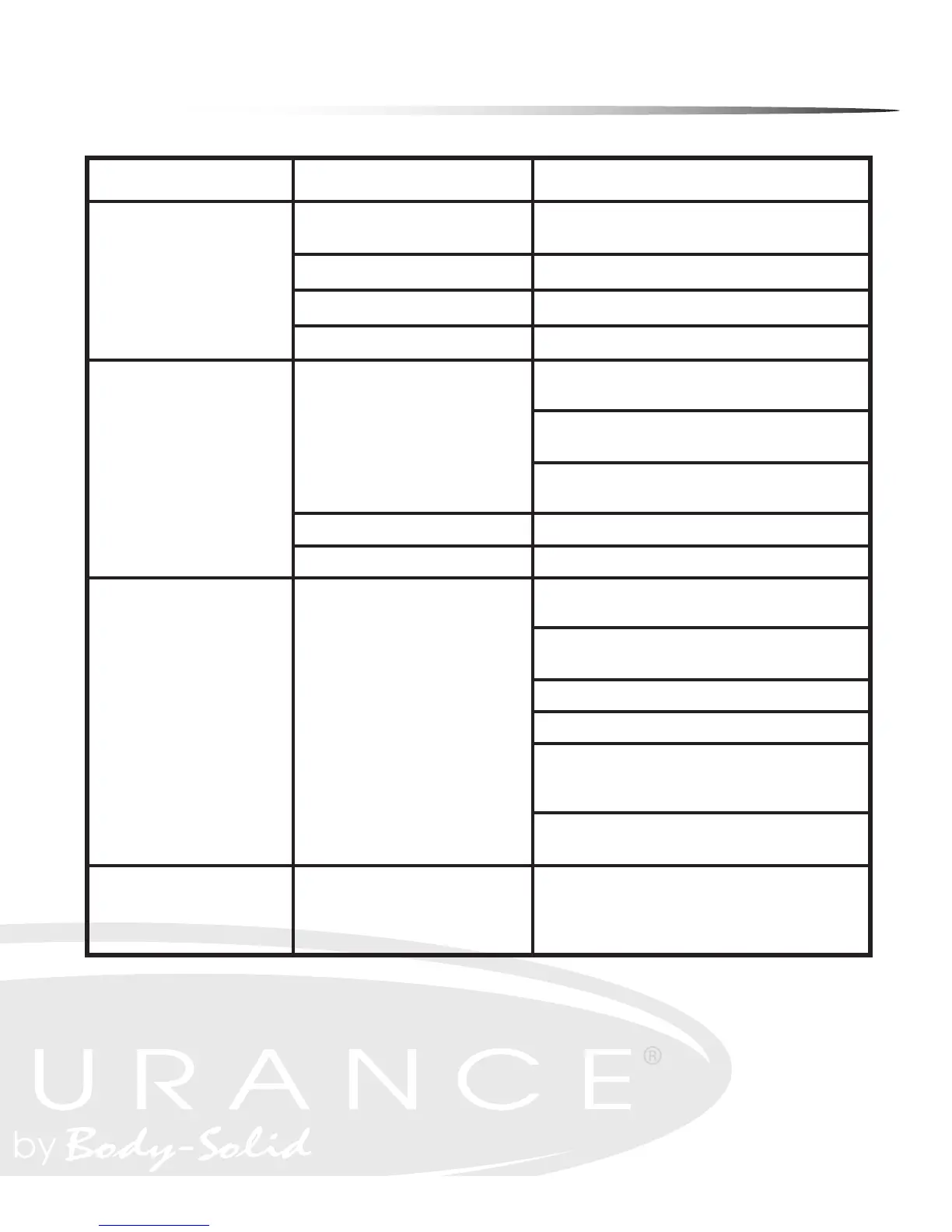
Troubleshooting Guide
Symptom
Possible Cause
Solution
DC adapter is not plugged
into wall outlet?
Plug DC adapter into wall outlet.
DC adapter is not plugged into the E400? Plug DC adapter into the E400 power socket.
Console cable is not connected? Verify that the console cable is connected properly.
The console is faulty?
Call the Endurance
®
service number.
Check that the sensor magnet is correctly
tted and passes in front of the sensor.
Check that the gap between the sensor
and the magnet is 3mm or less.
Check that all the computer plugs and sockets
are correctly and rmly connected.
If all above checks are O.K., then replace sensor.
Call the Endurance
®
service number.
Check that the pulse plugs rmly
inserted into the sockets.
Check to make sure that the batteries in
the chest strap are installed correctly.
Replace the chest strap batteries.
Check to see if the receiver is properly installed.
Check to see if the chest strap is being properly worn by
the user - if skin is extremely dry, then moisten contact
points on chest with water and try again.
If the problem still exists then call the
Endurance
®
service number.
Try reversing the resistance and try again.
If this fails, then replace the motor.
Console has no power.
Strides/Min
or Speed shows 0
No HR signal
or incorrect HR signal
Noise from motor
Computer isn’t receiving a
signal from the sensor?
The sensor is faulty?
The computer is faulty?
Computer is receiving a faint or
intermittent pulse signal.
Symptoms include an unusually loud
noise coming from the motor,
which means the gears are
not meshing correctly.
Any Questions?
Call the Customer Tech Hotline at:
1 (800) 556-3113
49


 To Next Page