Console Operation
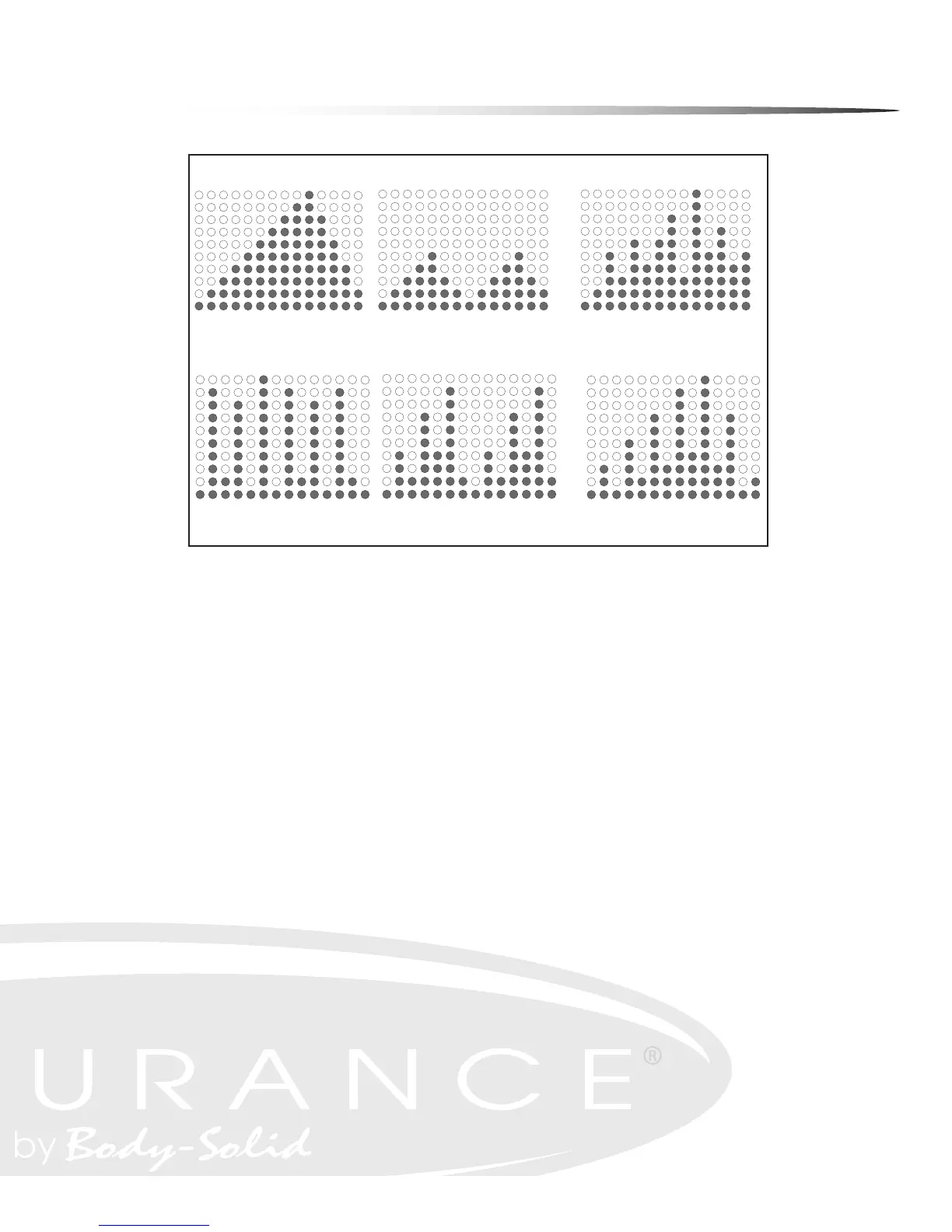
MOUNTAIN
This program takes the user gradually up to a high resistance level, then brings the
resistance level back down to the starting point. This program simulates what one
might encounter on a true mountain course. This is a dicult program since higher
tension levels are maintained for long periods of time.
HILL
This program takes the user through two hill proles. Resistance changes are small
during this program. This is a good program to get started with or for someone look-
ing for a lower stress workout.
RANDOM
This program randomly generates a new program prole every time it is chosen. This
allows you to keep the workouts fresh and motivating. When you scroll thru the pro-
grams to reach the RANDOM program, you will be able to see the program prole.
If this prole is not to your liking, simply scroll thru the programs again and a new
RANDOM program will be generated. The RANDOM program will be dierent every
time you use it.
14
Console Instructions
MANUAL MODE - This program allows the user complete control over their workout. The
user must make all tension adjustments using the +/- buttons. Follow directions in PROGRAM
MODE section to enter and set values in manual mode.
PROGRAM MODE - There are six preset Programs. To enter Program Mode:
The Message Window will display “PRESS PROGRAM KEY TO BEGIN”. Press PROGRAM button
until desired Program name shows in the Message window. The program profile will show in
the Profile Window. See charts below for program names and resistance profiles. When the
Program you wish to use shows in Message Window, Press ENTER/SCAN button to confirm pro-
gram selection. TIME will show in Message Window. Use the +/- buttons to set Time desired.
Press ENTER/SCAN to confirm time setting. Default Time is 30 minutes. Time settings can
range from 1 minute to 99 minutes.
If Time entered <= 14 minutes, each column in the program profile = 1 minute.
If Time entered >14 minutes, each column = Time/14.
WEIGHT will show in Message Window. Use the +/- buttons to set weight. Press ENTER/SCAN
to confirm weight setting. Weight default is 150 pounds. Weight settings can range from 70
lbs to 332 lbs.
AGE will show in Message Window. Use the +/- buttons to set age. Press ENTER/SCAN to
confirm setting. Age default is 30. Age setting can range from 1 to 99. Press START button to
exit Program mode and begin exercise session.
For Information on Heart Rate Programs see HEART RATE Programs section of this manual.
MOUNTAIN
INTERVAL
INTERVAL MOUNTAIN
INTERVAL SPEED
TRAINING
HILL
RANDOM
Example Only
PROGRAM PROFILES
MOUNTAIN
HILL
RANDOM
RANDOM EXAMPLE SHOWN
INTERVAL SPEED
TRAINING
INTERVAL
INTERVAL MOUNTAIN
14
Console Instructions
MANUAL MODE - This program allows the user complete control over their workout. The
user must make all tension adjustments using the +/- buttons. Follow directions in PROGRAM
MODE section to enter and set values in manual mode.
PROGRAM MODE - There are six preset Programs. To enter Program Mode:
The Message Window will display “PRESS PROGRAM KEY TO BEGIN”. Press PROGRAM button
until desired Program name shows in the Message window. The program profile will show in
the Profile Window. See charts below for program names and resistance profiles. When the
Program you wish to use shows in Message Window, Press ENTER/SCAN button to confirm pro-
gram selection. TIME will show in Message Window. Use the +/- buttons to set Time desired.
Press ENTER/SCAN to confirm time setting. Default Time is 30 minutes. Time settings can
range from 1 minute to 99 minutes.
If Time entered <= 14 minutes, each column in the program profile = 1 minute.
If Time entered >14 minutes, each column = Time/14.
WEIGHT will show in Message Window. Use the +/- buttons to set weight. Press ENTER/SCAN
to confirm weight setting. Weight default is 150 pounds. Weight settings can range from 70
lbs to 332 lbs.
AGE will show in Message Window. Use the +/- buttons to set age. Press ENTER/SCAN to
confirm setting. Age default is 30. Age setting can range from 1 to 99. Press START button to
exit Program mode and begin exercise session.
For Information on Heart Rate Programs see HEART RATE Programs section of this manual.
MOUNTAIN
INTERVAL
INTERVAL MOUNTAIN
INTERVAL SPEED
TRAINING
HILL
RANDOM
Example Only
14
Console Instructions
MANUAL MODE - This program allows the user complete control over their workout. The
user must make all tension adjustments using the +/- buttons. Follow directions in PROGRAM
MODE section to enter and set values in manual mode.
PROGRAM MODE - There are six preset Programs. To enter Program Mode:
The Message Window will display “PRESS PROGRAM KEY TO BEGIN”. Press PROGRAM button
until desired Program name shows in the Message window. The program profile will show in
the Profile Window. See charts below for program names and resistance profiles. When the
Program you wish to use shows in Message Window, Press ENTER/SCAN button to confirm pro-
gram selection. TIME will show in Message Window. Use the +/- buttons to set Time desired.
Press ENTER/SCAN to confirm time setting. Default Time is 30 minutes. Time settings can
range from 1 minute to 99 minutes.
If Time entered <= 14 minutes, each column in the program profile = 1 minute.
If Time entered >14 minutes, each column = Time/14.
WEIGHT will show in Message Window. Use the +/- buttons to set weight. Press ENTER/SCAN
to confirm weight setting. Weight default is 150 pounds. Weight settings can range from 70
lbs to 332 lbs.
AGE will show in Message Window. Use the +/- buttons to set age. Press ENTER/SCAN to
confirm setting. Age default is 30. Age setting can range from 1 to 99. Press START button to
exit Program mode and begin exercise session.
For Information on Heart Rate Programs see HEART RATE Programs section of this manual.
MOUNTAIN
INTERVAL
INTERVAL MOUNTAIN
INTERVAL SPEED
TRAINING
HILL
RANDOM
Example Only
PROGRAM PROFILES
Program Prole Chart
31


 To Next Page
 Loading...