34
6.3.3.2 Example for Key Operation in PC- DVR
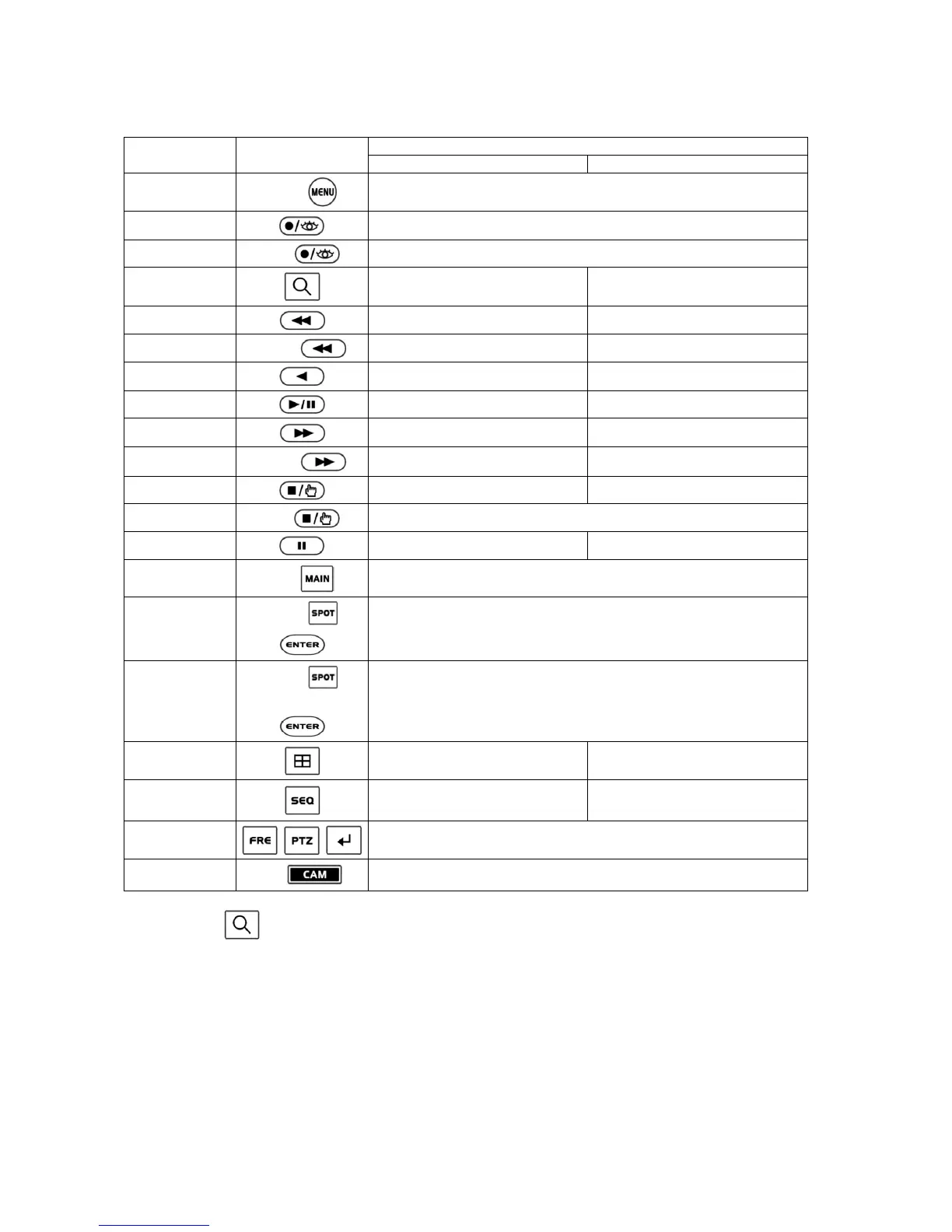
Function Key Label
Descriptions
Live (Guard) Mode Playback Mode
MENU
MACRO
No action
Record Record ON/OFF
Recall Preset
No. +
Recall Preset
Search Go to playback mode Stop
Rewind No action Rewind one image
X times Backward play
1 ~ 9 +
No action Fast rewind at x (No.) times speed
Reverse Play No action Reverse play
Play/Pause No action Play
Fast Forward No action Record
X times Forward play
1 ~ 9 +
No action Fast play at x (No.) times speed
STOP No action Go to Guard mode
Save Preset
No. +
Save the preset number in the PTZ mode.
Pause No action Pause in playing
Full Screen
No. +
No action
Spot Sequence
Spot No. + +
Operate according to the model or not
Spot output
Spot No. + +
Camera No. +
Operate according to the model or not
Display Mode Change Display Mode No action
Sequence Sequence
No action
Freeze, PTZ, Enter
No action
Camera Selection
No. +
Camera Selection
* For example, press
to enter the playback mode.


 To Next Page