38
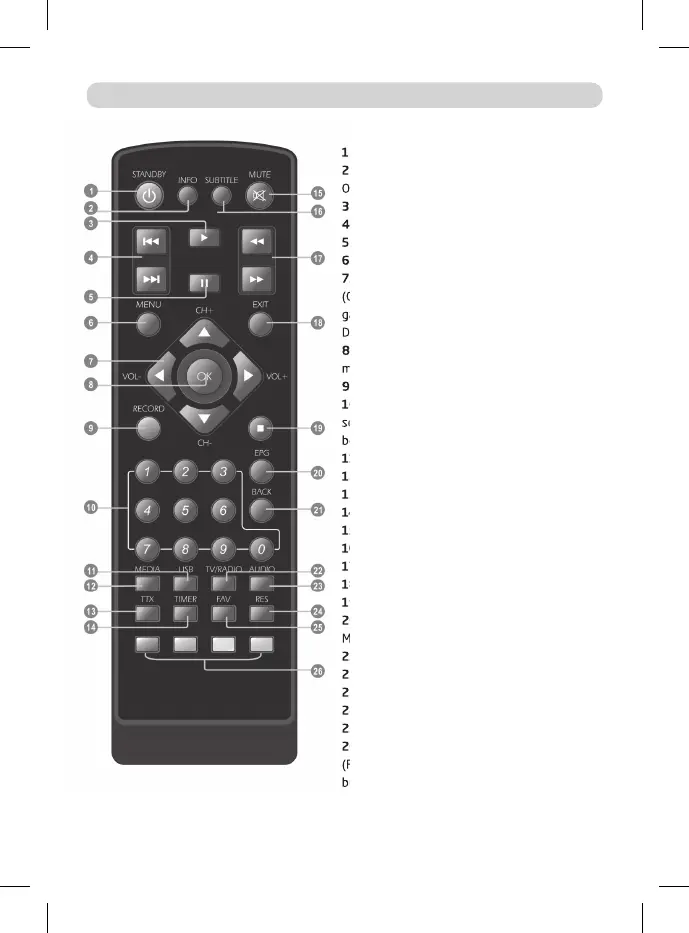
1. STANDBY (Switch the STB on and standby)
2. INFO (Press for current channel information/
Operation guide )
3. PLAY
4. Previous/Next
5. PAUSE (Pause/Active timeshift function)
6. Menu (Open and close the menu screen)
7. Cursor, CH+/ -, VOL+/-
(Cursor: Navigation buttons used to navi-
gate menu’s items) (CH+/-: Channel Up and
Down) (VOL+/-: Volume Up and Down)
8. OK button (Con rm a selection within a
menu)
9. RECORD (Record the TV program)
10. Numeric entry (Enter numeric values and
select the channel directly by entering it’s num-
ber)
11. USB (Enter Device List)
12. MEDIA (Enter Recorder menu)
13. TTX (Open interactive service)
14. TIMER (Timer wake-up)
15. MUTE (Turn o /on the volume)
16. SUBTITLE (On/O Subtitle)
17. Search backward /forward
18. EXIT (Exit from menu)
19. STOP (Stop program playback or recording)
20. EPG (Open up Electronic Program Guide
Menu)
21. BACK (Switch to previous channel)
22. TV/RADIO (Switch between TV and Radio)
23. AUDIO (Select audio mode and audio track)
24. RES (Switch HDMI resolution)
25. FAV (Open the Favorite list)
26. RED/GREEN/YELLOW/BLUE Buttons
(For interactive function/Submenu function
buttons)
REMOTE CONTROL
7. Cursor, CH+/ -, VOL+/-
(Cursor: Navigation buttons used to navi-
gate menu’s items) (CH+/-: Channel Up and
Down) (VOL+/-: Volume Up and Down)
select the channel directly by entering it’s num-
17. Search backward /forward
26. RED/GREEN/YELLOW/BLUE Buttons
(For interactive function/Submenu function



 To Next Page