48
EPG (Electronic Program Guide)
1. Press EPG button on the remote control to enter Electronic Program Guide.
2. Use direction buttons on the remote control to navigate the menu.
3. Press “Timer” button, the menu will display the PVR schedule.
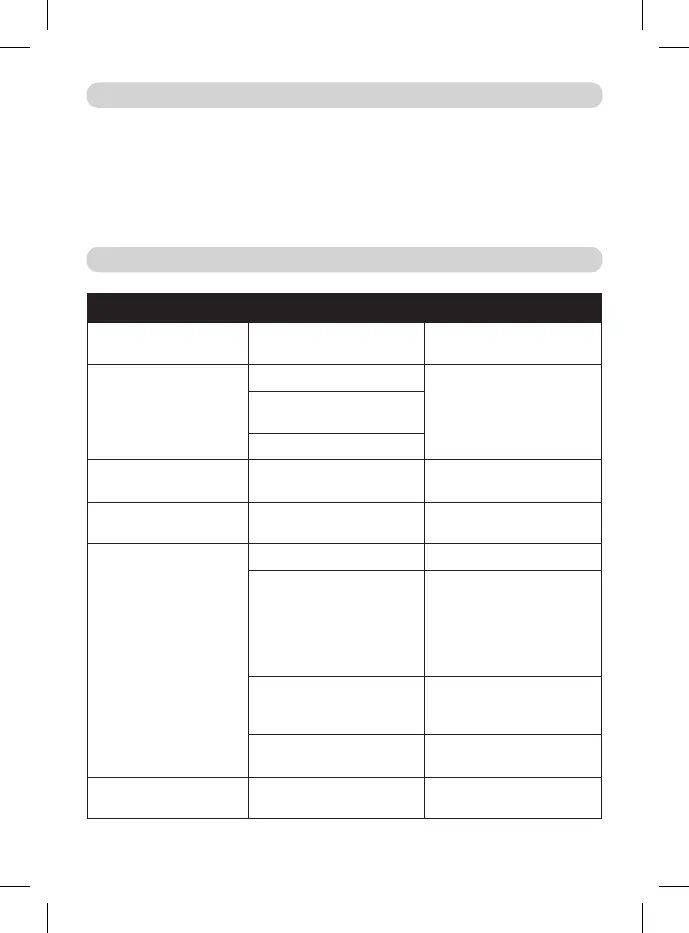
Problem Possible Reason Possible Solution
LED indicator is not on Power adapter is discon-
nected
Check the connection of
power adapter
No signal Antenna is disconnected Check antenna connection
Antenna is damaged / impro-
perly set
No signal is transmitted
No image or sound Improper mode has been
selected on the TV
Choose proper mode on
the TV
Information that the chan-
nel is coded / unavailable
Coded / unavailable channel Choose another channel
Remote control does not
work
The device is turned o Turn on the device
The remote control is not
pointed at the device
Point the remote control
at the device no more than
8 meters from the remote
control sensor and within 30º
horizontally and 30º vertically
of the front of the unit
There are obstacles between
the remote control and the
device
Make sure there are no obs-
tacles between the remote
control and the device
The batteries are discharged Replace the batteries with the
new ones
Forgotten channel
password
Use Power PIN: 1006
MEDIA PLAYER PVR
TROUBLESHOOTING



 To Next Page