Installation and Operation Manual
●
Fan Coil Controller – EZstat
EC-EZstat
Date: 9-2014 Supersedes: NEW
Engineered Comfort reserves the right to change any information concerning product or specification without notice or obligation.
Page 13 of 36
Procedure Steps Display
Starng
Display
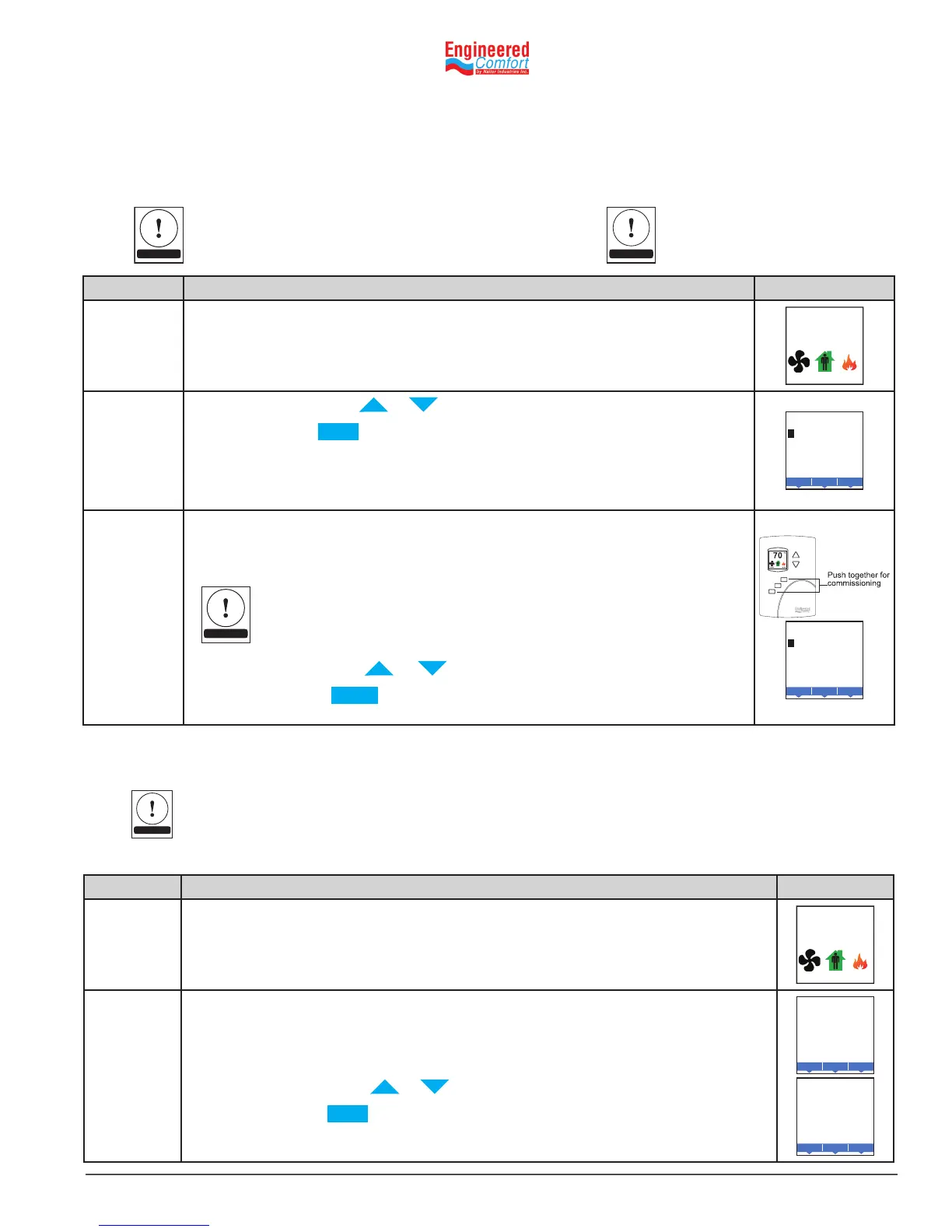
Start at the temperature display.
F
°
AUTO AUTO
Enter
the User
Password
1. Press either the or buon for the rst digit of Password 1.
2. Press the Enter buon to select the next digit. Repeat for all
remaining digits. The Enter buon is the middle of the three buons
below the display.
If the password is correct, the display will advance to the rst menu.
Enter
USER LEVEL
0 0 0 0
Enter the
Admin
Password
1. Press the le and right buons below the display at the same me
and hold them unl the display changes to the SECURITY ADMIN
LEVEL Display
If Password 2 has not previously been entered, the display will change to the
MAIN menu.
2. Press either the or buon for the rst digit of Password 2.
3. Press the Enter buon to select the next digit. Repeat for all
remaining digits.
Enter
ADMIN LEVEL
0 0 0 0
NOTE
5.2 EnteringUserorAdminPassword(Password1&2,respecvely)
User funcons may require a password consisng of four numbers. Once either the User or Admin level password is
entered, the funcons will remain unlocked for 60‑seconds aer the last buon is pushed.
To set up the password levels, go to Create and/or change Passwords.
Security User Level – Calls up Password 1 in the program
Security Admin Level – Calls up Password 2 in the program.
NOTE
Allow60 seconds me elapse for
passwordchange/setuptoenable.
TIP
Procedure Steps Display
Starng
Display
Start at the temperature display.
F
°
AUTO AUTO
Enter the
Password
1. Press either the or buon to change the acve temperature setpoint.
2. Press the buon to save the value. The display will advance to the
next setpoint.
3. Press either the or buon to change the setpoint.
4. Press the Enter buon to save the value. The display will return to the
temperature display
F
°
HEATING SETPT
Done
Enter
Cncl
F
°
COOLING SETPT
Done
Enter
Cncl
5.3 Changingtheacvesetpoints
To enter or change the acve temperature setpoints you may need to enter the User password.
To change the operaon of the fan, occupancy, or heang/cooling, see the topic Seng the operang modes.
In the following procedure the current acve setpoint–either cooling or heang–is the rst setpoint to
change. Once that setpoint is entered, the display advances to the next setpoint.
NOTE


 To Next Page