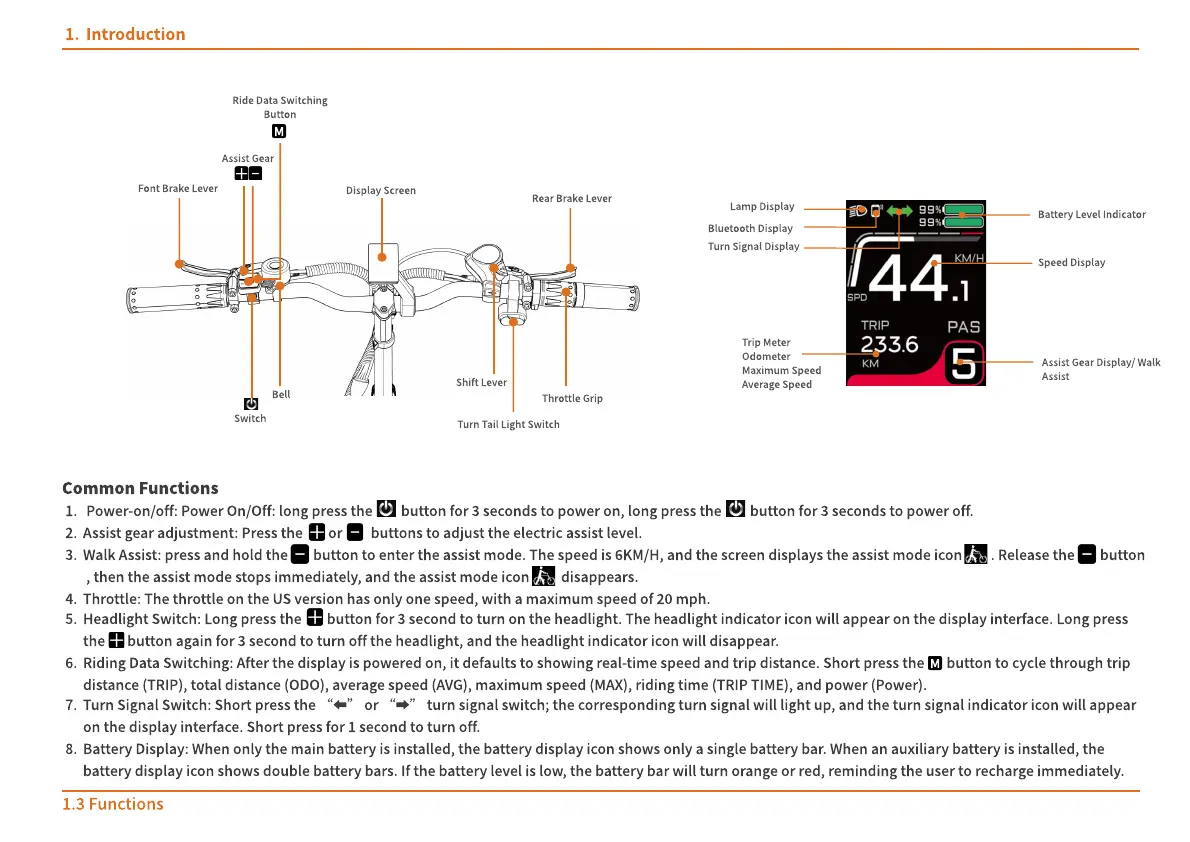
f ont brake l ever
Shift Lever
Throttle grip
Assist g ear
Display s creen
Ride data s witching
button
Turn t ail l ight s witch
Switch
Bell
Rear brake l ever
Battery l evel indicator
Lamp display
Bluetooth display
Speed display
Assist g ear display/ Walk
Assist
Turn signal Display
Trip meter
Odometer
Maximum speed
Average s peed
Introduction
Power-on/off: Power On/Off: long press the button for 3 seconds to power on, long press the button for 3 seconds to power off.
Assist gear adjustment: Press the or buttons to adjust the electric assist level.
Walk Assist: press and hold the button to enter the assist mode. The speed is 6KM/H, and the screen displays the assist mode icon . Release the button
, then the assist mode stops immediately, and the assist mode icon disappears.
Throttle: The throttle on the US version has only one speed, with a maximum speed of 20 mph.
Headlight Switch: Long press the button for 3 second to turn on the headlight. The headlight indicator icon will appear on the display interface. Long press
the button again for 3 second to turn off the headlight, and the headlight indicator icon will disappear.
Riding Data Switching: After the display is powered on, it defaults to showing real-time speed and trip distance. Short press the button to cycle through trip
distance (TRIP), total distance (ODO), average speed (AVG), maximum speed (MAX), riding time (TRIP TIME), and power (Power).
Turn Signal Switch: Short press the
“
⬅
”
or
“
➡
”
turn signal switch; the corresponding turn signal will light up, and the turn signal indicator icon will appear
on the display interface. Short press for 1 second to turn off.
Battery Display: When only the main battery is installed, the battery display icon shows only a single battery bar. When an auxiliary battery is installed, the
battery display icon shows double battery bars. If the battery level is low, the battery bar will turn orange or red, reminding the user to recharge immediately.
Common f unctions
1.3 Functions
M
M


 To Next Page