condition.
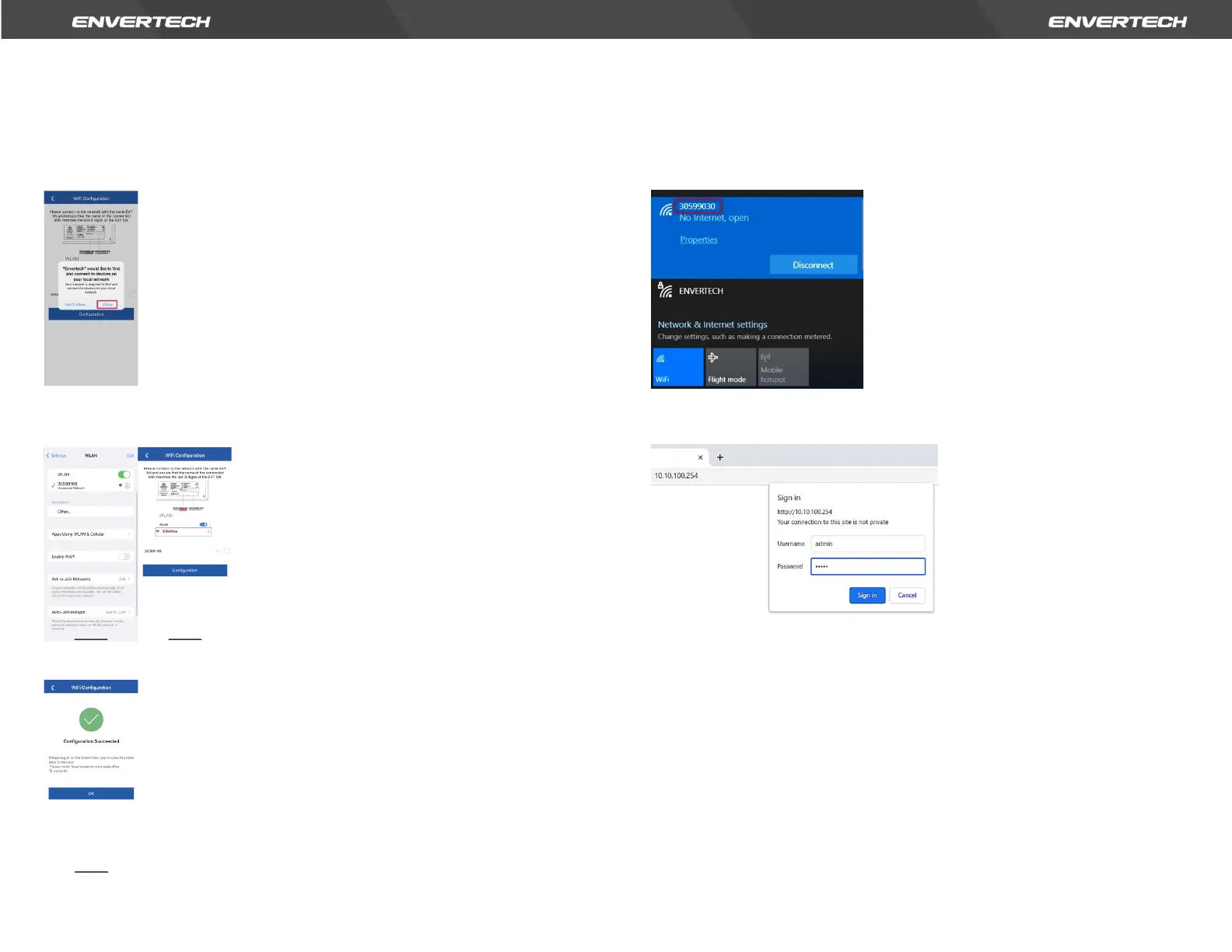
c. Connect the network whose name is as same as your EVT’s SN, and return to
the app. Please allow EnverView app to find and connect to devices on your
local network. If not, it also causes configuration failure.
Note: When configuring Wi-Fi, make sure you keep staying on the current
connection.
d. Click Configuration and wait for success.
Note: If the setting is not successful, wait 5 seconds. Click Configuration again
and check that the EVT400 is as close to the router as possible.
Option 2. Use computer to configure Wi-Fi
1. Go to your computer’s WLAN setting. Connect a network of the same name
as your EVT microinverter Serial Number.
2. Use a browser to open the webpage: http://10.10.100.254 . Log in to the
account with the credentials below. Username: admin Password: admin
3. Click "STA Setting" for the relevant configuration, and click "Scan" to scan
the WI-FI.


 To Next Page