ENVO E50 | E35 SCOOTER MANUAL | VERSION 1.0
22
5. OPERATING YOUR PRODUCT
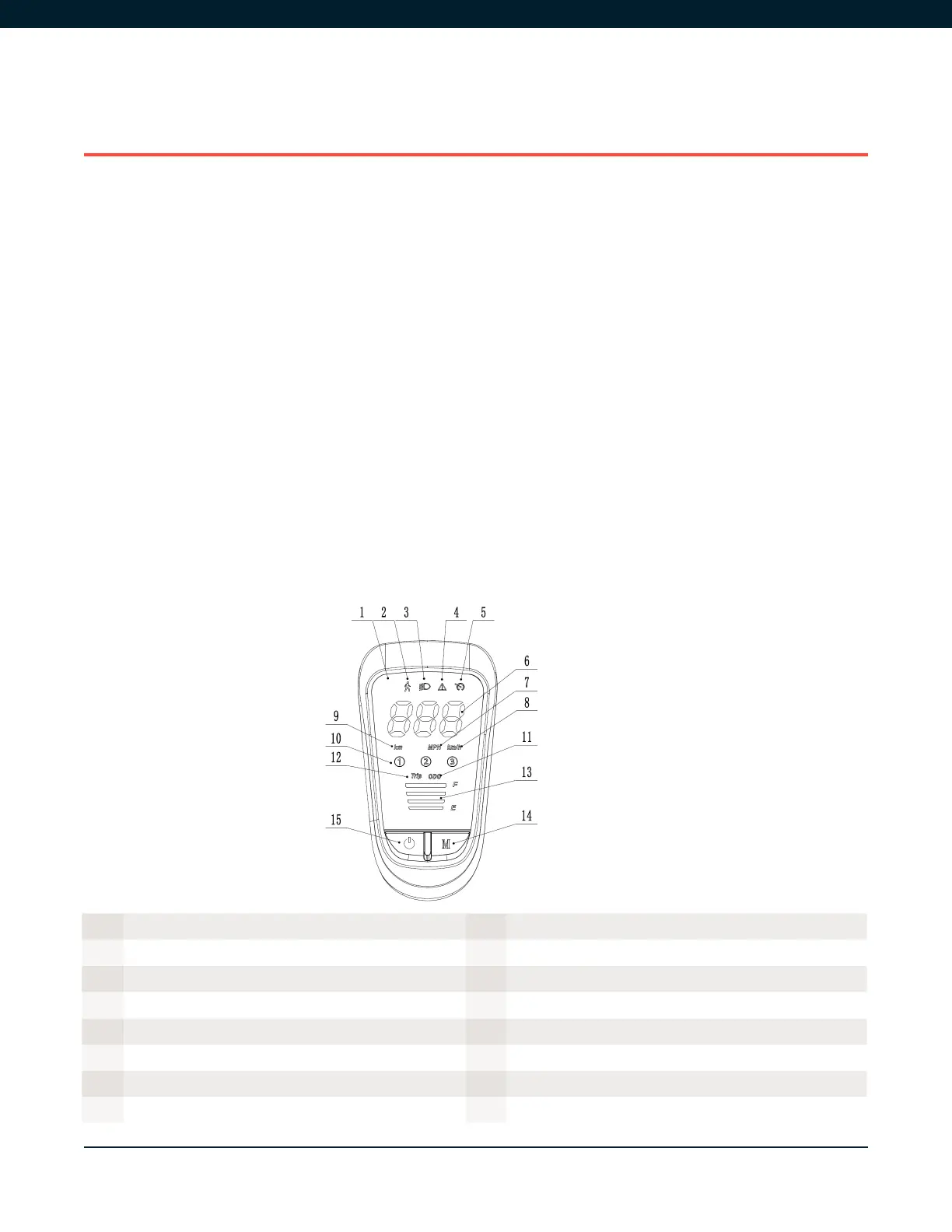
5.1. LCD DISPLAY
• Your ENVO Electric scooter LCD meter monitors ride mode, speed, odometer, trip distance, and
battery energy level. To turn the meter on, press and hold the Power button for 1 second or
longer. The scooter can be turned off by pressing the same Power button for 1 second.
• With the display ON, you are ready to select your ride mode by short pressing the “M” button.
There are three ride modes: Eco, Normal, and Sports and there is an added Walk mode which
limits speed to 2km/h and allow you to walk with your scooter.
• To activate cruise control, long press throttle for 15 seconds.
• To turn on/off the headlight short press the power button.
• Long Press the “M” button to shift between single trip mileage and total mileage of the scooter.
If you have any questions about the parameter settings, please give us a call or visit our help centre
at support.envodrive.com.
Figure 5A
1 LCD Display 9 Total Mileage
2 Walk Mode 10 Ride Mode
3 Headlight Indicator 11 Total Mileage
4 Fault Indicator 12 Trip Mileage
5 Cruise Contro 13 Battery Indicator
6 Speed/Mileage Value 14 Menu button
7 Units in Mile 15 Power Button
8 Units in Km


 To Next Page