EOPTIS SRL
Via Alto Adige, 152 38121 Trento (TN) ITALY
Tel.: +39 0461 260 552 Fax: +39 0461 260 617
www.eoptis.com info@eoptis.com
Page 13 of 29
CLM-194
Rev. 1.05 - 06/2014
Copyright © 2013-2014 EOPTIS SRL
5.2 MEASURE AND REFERENCE ACQUISITION
The acquisition of Measure and Reference colour data is performed through these steps:
1. Connect the device
2. Launch the software
3. Ensure that the sample to be acquired has the characteristics listed in the Sample Preparation section, §3.2
4. Ensure that thfollow the instructions in §7.1.
5. Place the colorimetermeasurement aperture in perfect contact with the sample surface
6. Trigger the acquisition
Hardware-triggered acquisition
Software-triggered acquisition
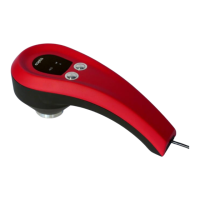
Select the Measure or Reference mode using
the Function (right) button. Hit the Acquire
(left) button to trigger the acquisition.
Click the Measure acquisition button or the
Reference acquisition button.
7. Wait until the ACQ indicator switches off, and the acquisition will be complete
8. Select the desired Operating Mode function and configure its options to analyse the acquired data.
If required, the system allows you to average multiple acquisitions. This feature is useful in the case of samples with
uneven or structured surfaces. See §5.9.3 for details.


 To Next Page