EOPTIS SRL
Via Alto Adige, 152 38121 Trento (TN) ITALY
Tel.: +39 0461 260 552 Fax: +39 0461 260 617
www.eoptis.com info@eoptis.com
Page 19 of 29
CLM-194
Rev. 1.05 - 06/2014
Copyright © 2013-2014 EOPTIS SRL
5.5 COLOUR CLASSIFICATION
The Colour Classification allows the user to select up to 5 colours and check which is the most
similar to a measured sample. This is useful when sorting products with similar but slightly different
colours or when assigning an object to a batch of homogenous colours, using the colour as
classification parameter. Samples can be grouped into sets with a colour shift towards the same
direction (lighter, darker, greenish, bluish, reddish) and therefore improve colour homogeinity by
reducing the colour difference among samples of the same set. With this feature, sorting and
classification processes become much more reliable and accurate than visual inspection.
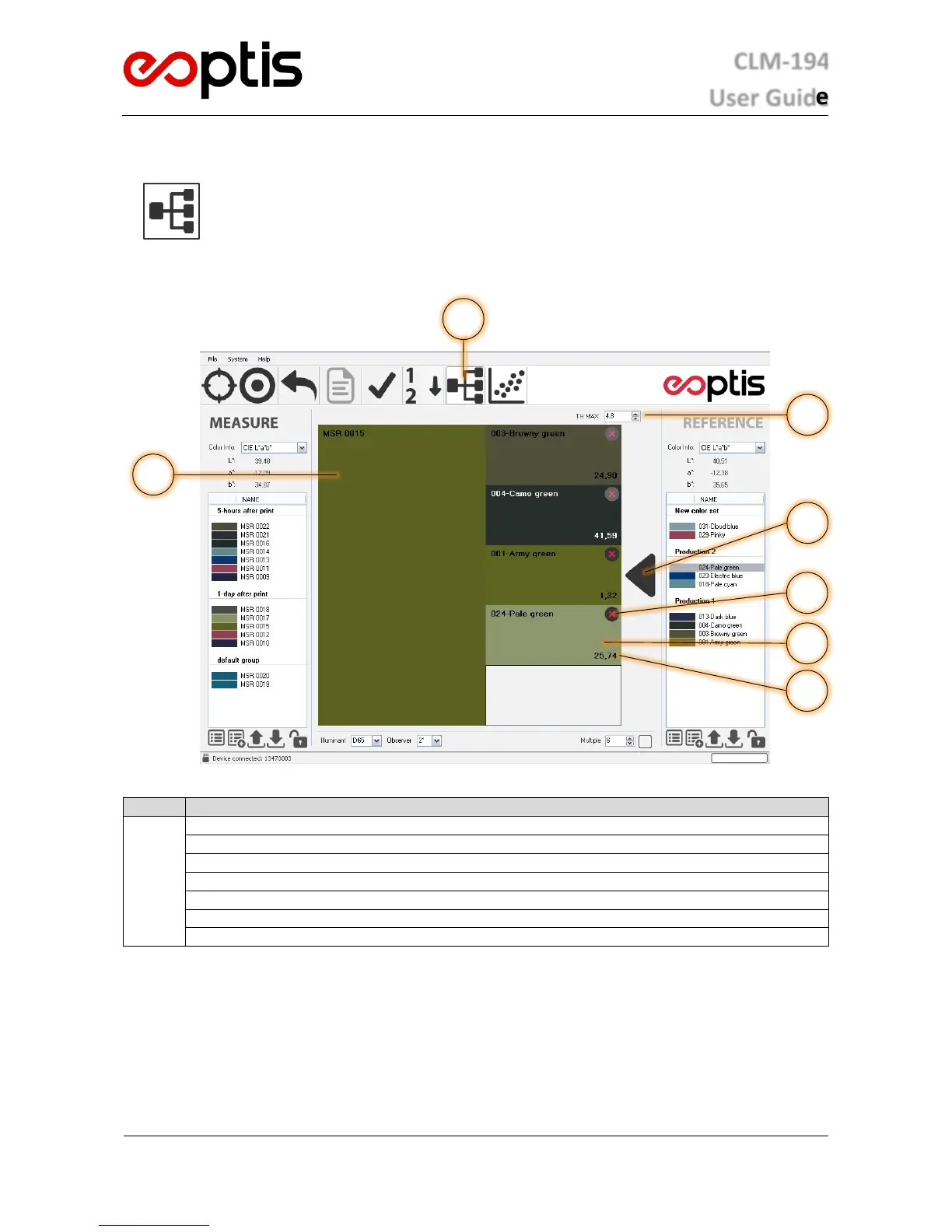
Colour Classification interface
Colour Classification Mode selector
Measure colour display area
Reference colour display area
E*
ab
colour difference between Measure and Reference
Classification Result indicator
5.5.1 HOW TO PERFORM A COLOUR CLASSIFICATION ANALYSIS
1. Select the Colour Classification function from the Operating Mode selector
2. Select up to 5 colors to be used as class identifiers from the References list by dragging them in the Reference
colour display area
3. Set a Maximum Threshold value. This prevents a Measure which exceeds a specified colour difference.
4. Acquire the data of the Measure sample under evaluation. If acquisition has already been performed, any
colour in the Measure list can be used by double-clicking on it.


 To Next Page