EOPTIS SRL
Via Alto Adige, 152 38121 Trento (TN) ITALY
Tel.: +39 0461 260 552 Fax: +39 0461 260 617
www.eoptis.com info@eoptis.com
Page 17 of 29
CLM-194
Rev. 1.05 - 06/2014
Copyright © 2013-2014 EOPTIS SRL
Given a current Measure, the Colour Matching function displays the 5 most similar colours, looking
up the References list or a subset of it. A proprietary or standard database (RAL classic and RAL
design) can be used as the Reference list. The closest matching colors are ranked by increasing
CIELAB colour difference with respect to the current Measure. This information can be used to
select the colour that resembles the measured sample by simply checking a best-candidate colour
palette instead of looking up a large set of physical samples.
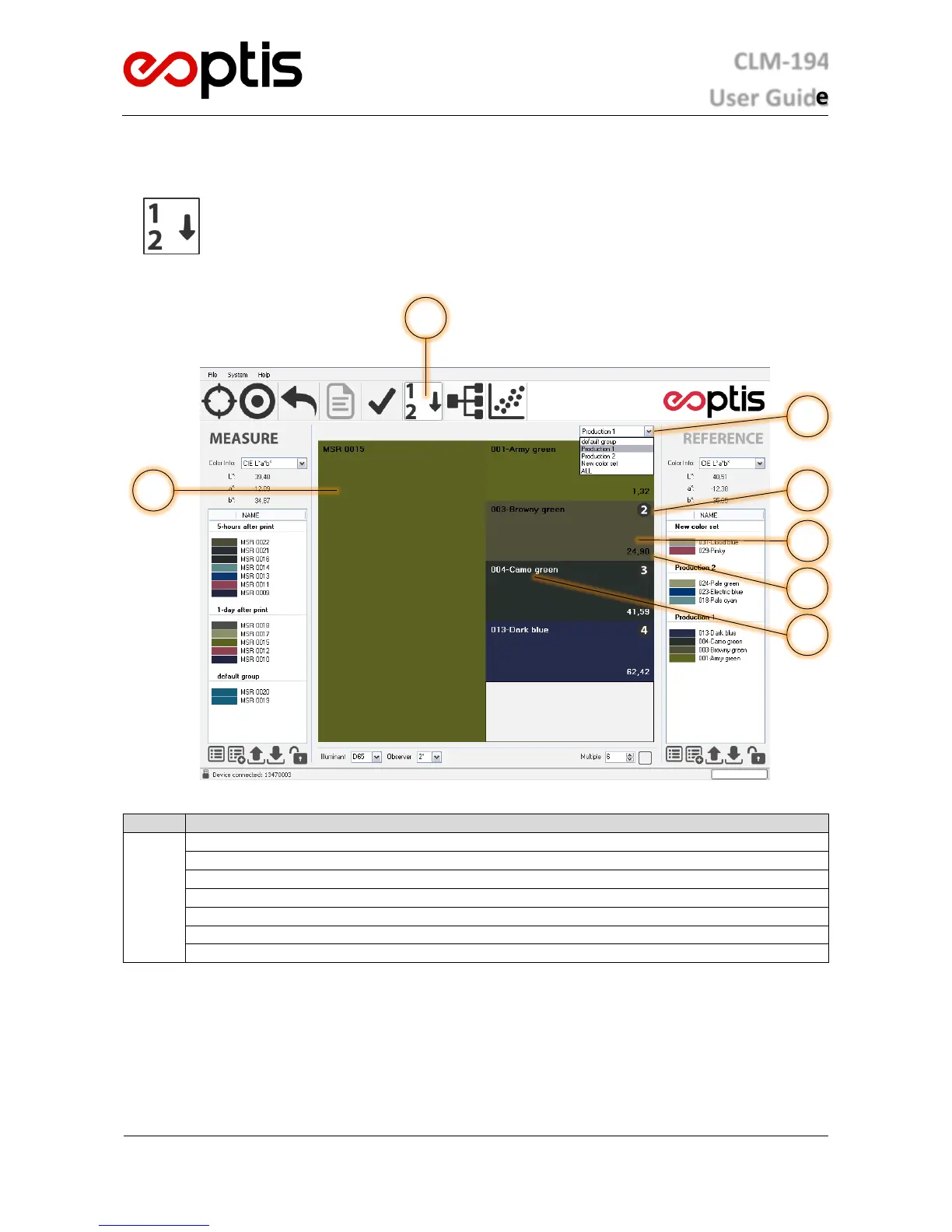
Colour Matching interface
Colour Matching mode selector
Measure colour display area
Reference colour display area (up to 5)
CIELAB colour distance between Measure and Reference
Reference group selector for best match look-up
5.4.1 HOW TO PERFORM A COLOUR MATCHING ANALYSIS
1. Select the Colour Matching function from the Operating Mode selector
2. Select a group from the Reference group selector.
3. Acquire the data of the Measure sample to match. If acquisition has already been performed, any colour in
the Measure list can be used by double-clicking on it.
4. The best matching candidates will be shown.


 To Next Page