Cover Gauge
Cover-set-guide
Nail
Arrow Mark
OFF!
Auto Mode
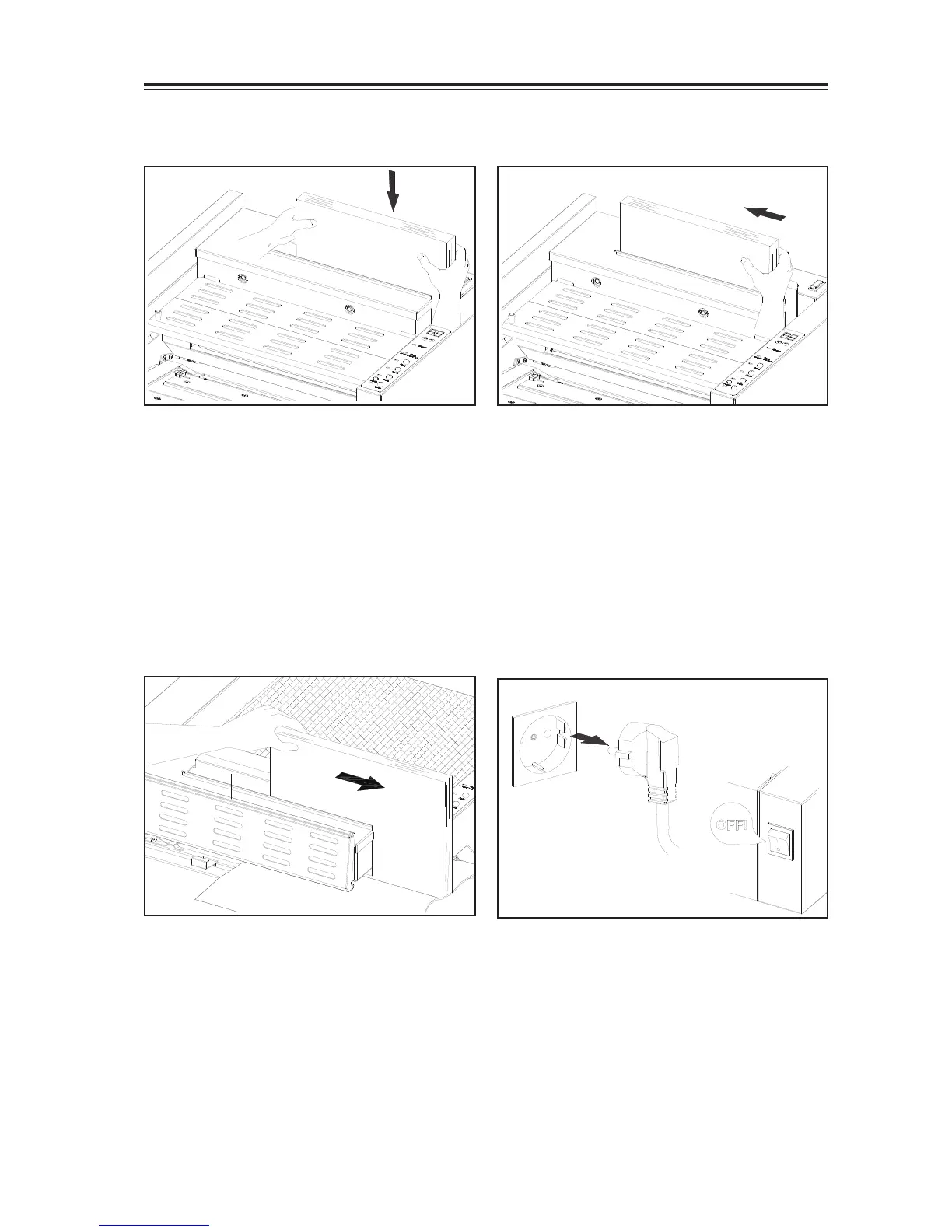
4-2-5 Place Book into the clamper
- Please book in the right hand side of clamper.
-True up book in spine fully in the right hand
side of the clamper.
-The clamper auto sense the thickness of
sheets and close
Cover Gauge
Cover-set-guide
Nail
Arrow Mark
OFF!
Auto Mode
4-2-6 Push book to the left and bind
- Set left hand side edge of book against left
side of the clamper.
- The clamper automatically sense the thickness
of sheets and close.
-Binding automatically starts.
[Warning]
1. Do not put your hand in the clamper.
2. Depress Stop Button can stop the
binding process.
Cover Gauge
Cover Gauge
C
e
n
t
e
r
o
f
c
o
v
e
r
Cover
Auto Mode
4-2-7 Binding finish take out the book
- Clamper travels to the nipper with glue applied
on the book spine.
- Nipper table raise and nips the book with
cover.
- Nipping finish, clamper release the book.
- Pull the book a little incase there is extra glue
in the clamper.
- Slide out the book once from the right hand
side.
- Clamper returns to its home position ready for
next bind.
4-2-8 Turn off the power
Cover Gauge
Cover-set-guide
Nail
Arrow Mark
After you finish the binding job
- Turn off the main switch.
- Detach the power cord from outlet.


 To Next Page