EasyManua.ls Logo

Epever Tracer 4215BN - User Manual

Epever Tracer 4215BN
37 pages
Print Icon
To Next Page IconTo Next Page
Loading...
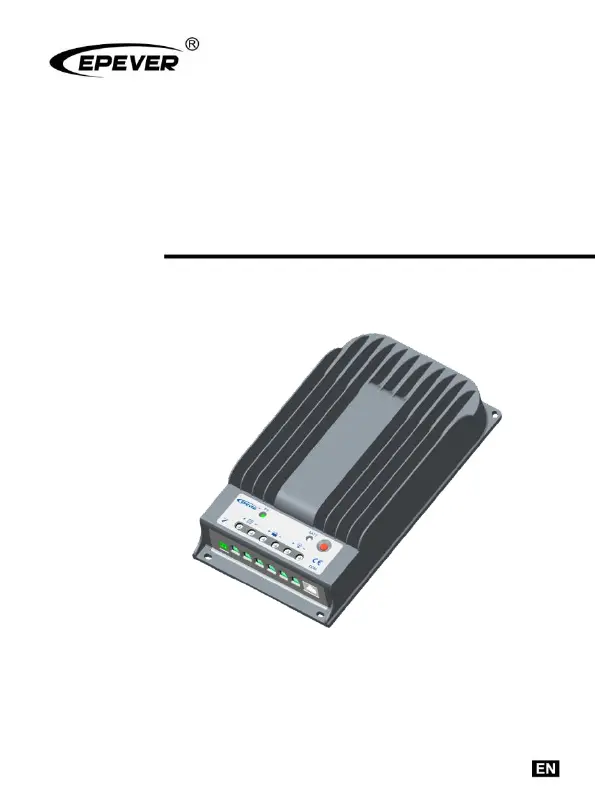
MPPT Solar Charge Controller
User Manual
Model
Tracer4215BN

Questions and Answers

  • D
    dbookerAug 3, 2025
    What to do if Epever Controller load terminals have no output?
    • O
      opetersonAug 3, 2025
      If the load terminals of your Epever Controller have no output, it may be due to an overload or a short circuit. Try removing or reducing the load. Then, press the button on the controller. The controller should resume working after 3 seconds.
  • L
    Lisa NelsonAug 7, 2025
    Why is my Epever Tracer 4215BN flashing all LED indicators, with the battery indicator flashing red?
    • A
      April LeonardAug 7, 2025
      If all the LED indicators on your Epever Controller are flashing, with the battery indicator flashing red, this indicates a system voltage error. Check whether the battery voltage matches the controller's working voltage. You may need to change to a suitable battery or reset the working voltage. Remove all faults and click the button to resume working.
  • H
    Heather MosesAug 11, 2025
    What to do if the battery LED flashes green fast on my Epever Tracer 4215BN?
    • B
      Brooke PhamAug 11, 2025
      If the battery LED on your Epever Controller flashes green fast, it means the battery voltage is higher than the over voltage disconnect voltage (OVD). Check if the battery voltage is too high and disconnect the solar module.
  • C
    Christopher SmithAug 16, 2025
    What does it mean when the battery LED flashes red on my Epever Tracer 4215BN?
    • T
      twolfAug 16, 2025
      If the battery LED on your Epever Controller flashes red, it indicates a battery low voltage disconnect. The controller will automatically cut off the output. The LED indicator will return to green when fully charged.
  • G
    garzabillyAug 20, 2025
    What does it mean if the battery LED flashes orange on my Epever Tracer 4215BN?
    • E
      Erika GloverAug 20, 2025
      If the battery LED on your Epever Controller flashes orange, it indicates battery under-voltage. The load output is normal, and the charging LED indicator will return to green automatically when fully charged.
  • D
    Darryl HoustonAug 25, 2025
    How to fix the charging LED being off on my Epever Tracer 4215BN during the day?
    • T
      Tina DavisAug 25, 2025
      If the charging LED is off on your Epever Controller during the daytime when sunshine properly falls on the PV, it could be due to PV array disconnection. Confirm that the PV and battery wire connections are correct and tight.
  • C
    clarkmicheleAug 28, 2025
    Why are all the indicators off on my Epever Controller even though the wire connections are correct?
    • M
      Mary ClarkAug 29, 2025
      If all the indicators are off on your Epever Controller, even though the wire connections are correct, it could be due to one of two reasons: 1. The battery voltage is lower than 9V. Please check the battery voltage. It needs to be at least 9V to activate the controller. 2. The PV voltage is less than the battery voltage. Check the PV input voltage, which should be higher than the battery.

Summary

Important Safety Instructions

General Safety Information

General safety guidelines and warnings for installation and operation.

General Information

Overview of Tracer BN Series

Introduces the MPPT solar charge controller series and its features.

Key Characteristics

Details physical components and indicators of the controller.

Maximum Power Point Tracking Technology

Explains MPPT technology for optimizing solar energy harvesting.

Battery Charging Stages

Describes the three-stage charging algorithm (Bulk, Constant, Float).

Installation Instructions

General Installation Notes

Provides essential safety precautions and guidelines for controller installation.

PV Array Requirements

Specifies requirements for PV module series connection based on voltage.

Wire Sizing and Connections

Details recommended wire sizes for PV and battery/load connections.

Mounting Guidelines

Covers safe mounting practices and clearance requirements for the controller.

Operation

LED Status Indicators

Explains LED meanings for system status, errors, and faults.

Configuration and Setting Operations

Outlines controller configuration methods via remote, software, or mobile apps.

Battery Parameter Configuration

Details supported battery types and their voltage parameters for setting.

Load Set Modes

Describes load output control modes: Manual, Light ON/OFF, Time Control.

Others

Protection Features

Lists and explains various controller protections (over-current, short-circuit, polarity).

Troubleshooting Common Issues

Provides solutions for common faults indicated by LEDs or system behavior.

Maintenance Procedures

Outlines recommended regular inspections and maintenance tasks.

Annex I Conversion Efficiency Curve

12 V System Efficiency Curves

Shows conversion efficiency for the 12V system at different MPP voltages.

24 V System Efficiency Curves

Shows conversion efficiency for the 24V system at different MPP voltages.

Annex II Dimensions

Tracer4215 BN Physical Dimensions

Provides detailed physical dimensions and mounting hole specifications.

Epever Tracer 4215BN Specifications

General IconGeneral
ModelTracer 4215BN
CategoryController
TypeMPPT
Rated Voltage12V/24V Auto
Rated Charge Current40A
Rated Load Current20A
Max. PV Input Power (12V)520W
Max. PV Input Power (24V)1040W
Efficiency≤98%
DisplayLCD
Weight1.2kg
Battery TypeGel
CommunicationRS485
Operating Temperature+55°C
ProtectionOverload
Self-consumption<10mA

Related product manuals