EasyManua.ls Logo

Epever Tracer2206AN - User Manual

Epever Tracer2206AN
44 pages
Print Icon
To Next Page IconTo Next Page
Loading...
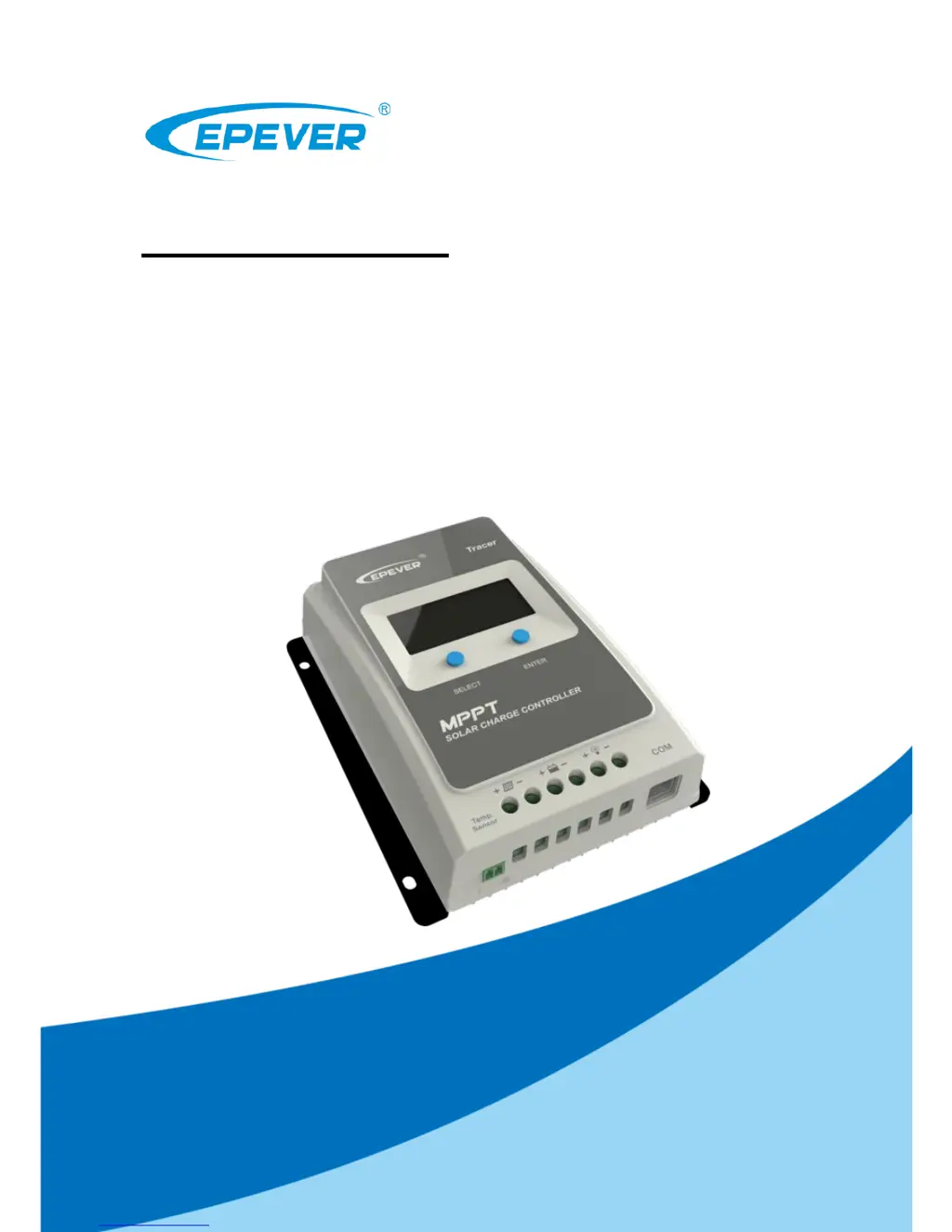
Tracer-AN Series
——MPPT Solar Charge Controller
User Manual
Models:
Tracer1206AN/Tracer2206AN
Tracer1210AN/Tracer2210AN
Tracer3210AN/Tracer4210AN

Questions and Answers

  • J
    Jennifer HardinAug 2, 2025
    How to fix the Epever Tracer2206AN Controller charging LED indicator when it's off during the daytime with proper sunshine on the PV modules?
    • J
      John TranAug 2, 2025
      If the charging LED indicator is off during the daytime when sunshine falls on PV modules properly, confirm that the PV and battery wire connections are correct and tight.
  • J
    Jeffrey RileyAug 7, 2025
    What to do if the Epever Controller load has no output and the load/fault icon blink?
    • J
      Jeffrey BrockAug 7, 2025
      If the load has no output and the load/fault icon is blinking on your Epever Controller, it indicates a load overload. Reduce the number of connected electrical devices, restart the controller, or wait for one night-day cycle (night time > 3 hours).
  • W
    Whitney WellsAug 12, 2025
    Why does the Epever Tracer2206AN Controller battery level show full, with the battery frame and fault icon blinking?
    • C
      Cindy DixonAug 12, 2025
      If the battery level on your Epever Controller shows full, but the battery frame and fault icon are blinking, it signifies a battery over voltage. Check if the battery voltage exceeds the OVD (over voltage disconnect voltage) and disconnect the PV.
  • B
    Brenda GatesAug 16, 2025
    What to do if there is a Load Short Circuit on the Epever Tracer2206AN Controller?
    • H
      hartkylieAug 17, 2025
      If there is a load short circuit, carefully check the load connections and clear the fault. Restart the Epever Controller and wait for one night-day cycle (night time > 3 hours).
  • O
    olsonkimberlyAug 22, 2025
    What does it mean when the Epever Tracer2206AN Controller battery level is empty, battery frame blinks, and fault icon blinks?
    • J
      Jesse HowardAug 22, 2025
      When the battery level shows empty, the battery frame blinks, and the fault icon blinks on the Epever Controller, it indicates that the battery is overheating. The controller will automatically turn the system off. The controller will resume once the temperature declines below 55 ºC.
  • J
    James KempAug 27, 2025
    Why is my Epever Tracer2206AN not working even though the wire connections are correct?
    • D
      Donna DurhamAug 27, 2025
      If your Epever Controller is not working despite correct wiring, the battery voltage may be too low. Check the battery voltage; it needs to be at least 8V to activate the controller.

Summary

Important Safety Instructions

General Safety Information

Essential safety guidelines for installation and operation of the solar charge controller.

Product General Information

Overview of Tracer AN Series Controllers

Detailed description of the Tracer AN series controller features and applications.

Controller Characteristics and Technology

Technical specifications, MPPT technology, and battery charging stages.

Model Designations

Explains how controller models are designated based on their specifications.

Installation Instructions

General Installation Notes and Warnings

Important considerations and warnings before installing the controller.

PV Array Requirements

Guidelines for connecting PV modules, including series/parallel configurations and power limits.

Wire Size and Mounting Guidelines

Specifies recommended wire sizes and instructions for physically mounting the controller.

Operation and Settings

Interface Navigation and Button Functions

Explains the functions of buttons and LCD interface for operation and monitoring.

Fault Indication and Status

Describes fault codes and indicators for diagnosing and resolving operational issues.

System Settings and Parameters

Guides users through setting parameters like battery type, temperature, voltage control, and load modes.

Load Mode Configuration

Details on setting local load modes via PC, APP, or MT50 for various operating scenarios.

Optional Accessories

Information on temperature sensors, communication accessories, remote meter, and data logger.

Protections, Troubleshooting, and Maintenance

Controller Protection Mechanisms

Lists the various protection mechanisms built into the controller against faults and hazards.

Troubleshooting Common Issues

Identifies possible problems, fault indicators, and solutions for the controller.

Routine Maintenance Procedures

Recommended inspection and maintenance tasks for optimal performance and longevity.

Technical Specifications

Electrical and Environmental Parameters

Detailed electrical ratings, operating parameters, and environmental conditions.

Mechanical Specifications

Physical dimensions, mounting details, and weight of the controllers.

Conversion Efficiency Curves

12 V System Efficiency Curves

Graphs showing conversion efficiency for 12V systems at different charging powers.

24 V System Efficiency Curves

Graphs showing conversion efficiency for 24V systems at different charging powers.

Product Dimensions

Tracer1206;1210 AN Dimensions

Detailed physical dimensions and mounting hole specifications for specific models.

Tracer2206;2210 AN Dimensions

Detailed physical dimensions and mounting hole specifications for specific models.

Tracer3210 AN Dimensions

Detailed physical dimensions and mounting hole specifications for specific models.

Tracer4210 AN Dimensions

Detailed physical dimensions and mounting hole specifications for specific models.

Epever Tracer2206AN Specifications

General IconGeneral
BrandEpever
ModelTracer2206AN
CategoryController
LanguageEnglish

Related product manuals