- 50 -
SECTION 5: USING THE LASER DASHBOARD™
General Tab
General Tab
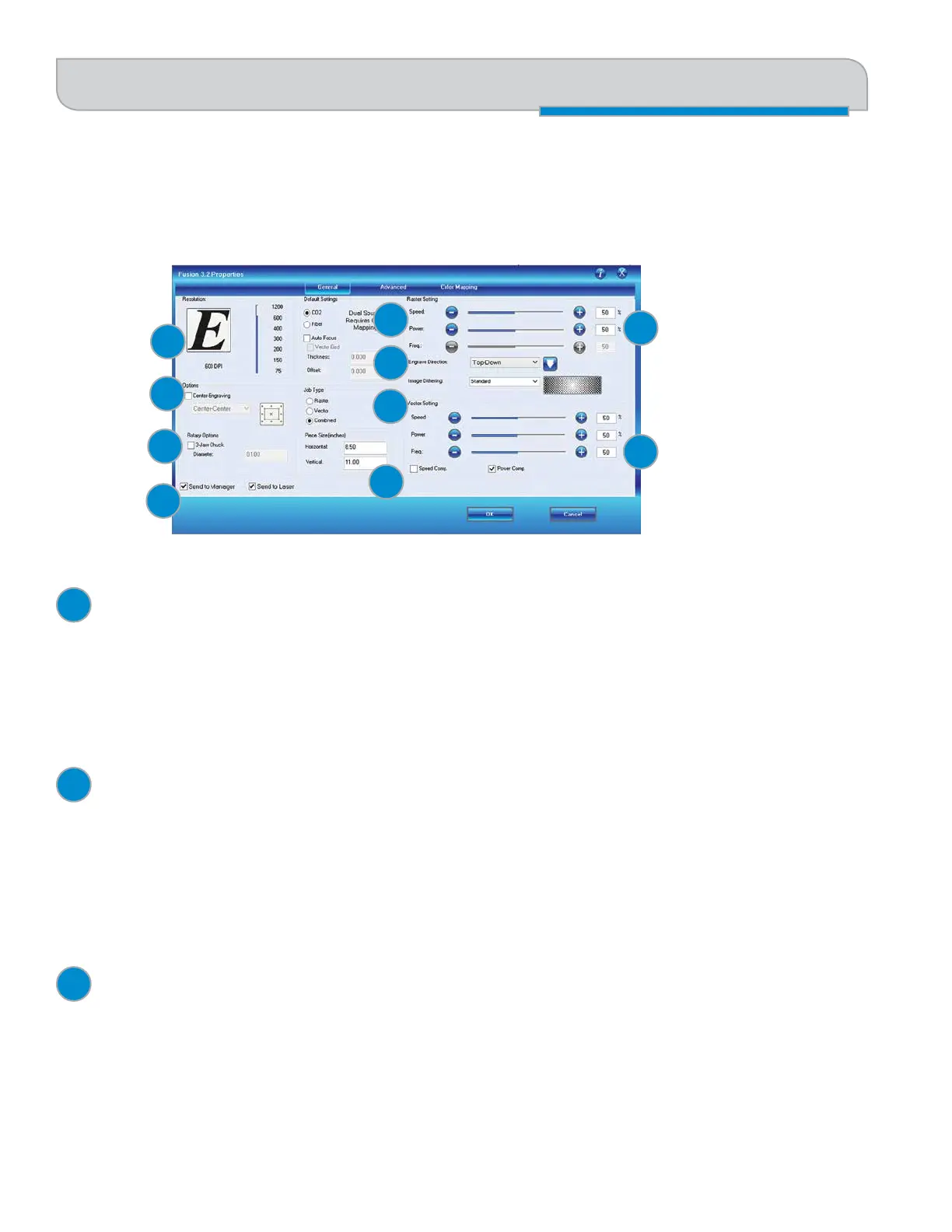
The General Tab is where you will find 90% of the features you will utilize when sending jobs to the laser. Everything from
resolution to speed and power settings are all located on this one page.
Resolution
Set your print resolution from 75 to 1200 DPI. For the best engraving results, use a resolution equal to the resolution in
the raster images within your project setup. The resolution setting in the print driver will affect the engraving time (there
are twice as many engraved lines at 600 DPI as at 300 DPI) and the quality. For a detailed discussion on Resolution, visit
“Resolution” on page 79.
Center Engraving
The Center Engraving Option allows you to define the center of your artwork as the primary reference point (Home
Position) of your engraving or cutting job. The Center Engraving Option has been designed to be used in conjunction with
the Jog feature on the Fusion Control Panel. Center engraving differs from standard printing where the upper left corner
of the page and the upper left corner of the laser table define your primary reference point. For more information, visit
“Center Engraving” on page 106 in the manual.
Rotary Options
Use this check box if you are using the optional 3-Jaw Chuck Rotary Attachment. With this Rotary Attachment you will
need to enter the material’s diameter in this selection. See “3-Jaw Chuck Rotary Attachment” on page 125 for more
information.
7
8
1
2
3
4
5
6
9
10
1
2
3


 To Next Page