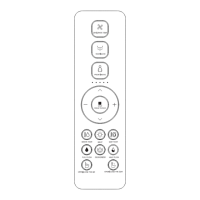
· IR remote control
completes.
displays the corresponding user code and flashes.
remote control and the toilet are matched successfully.
User 1
User 7 User 8 User 9
User 2 User 3 User 4 User 5 User 6
Usage Instruction
· Press and hold " " button and press " " button to turn on or off automatic pre-wetting
function. After the automatic pre-wetting function is turned on, the pre-wetting function will be
performed when the user is detected to be seated. (Only for the toilet with automatic
pre-wetting function.)
· Press and hold the " " button and press the " " button to turn on/off quiet mode.
Quiet mode
Sterilization function
· When no one seated and washing/drying is off, long press " " button to turn on plasma
sterilization function.This function will stop automatically after 2 hours. Under this mode, if any
other button is pressed or user is seated, it will stop automatically. (Only for the toilet with
sterilization function.)
Automatic pre-wetting function
Other operations
07
· Press and hold " " button, and press " " button to turn on/off foot sensor indicator. (Only
for the toilet with foot sensor indicator.)
Foot sensor indicator
· Long press " " button to turn on/off foot sensor function. Foot sensor is deactivated when
the user is seated. (Only for the toilet with foot sensor function.)
Foot sensor function


 To Next Page