49
Troubleshooting
Concentrator plus/Vacufuge® plus
English (EN)
7Troubleshooting
If you cannot remedy an error with the recommended measures, please contact your local Eppendorf
partner. The contact address can be found online at: www.eppendorf.com
.
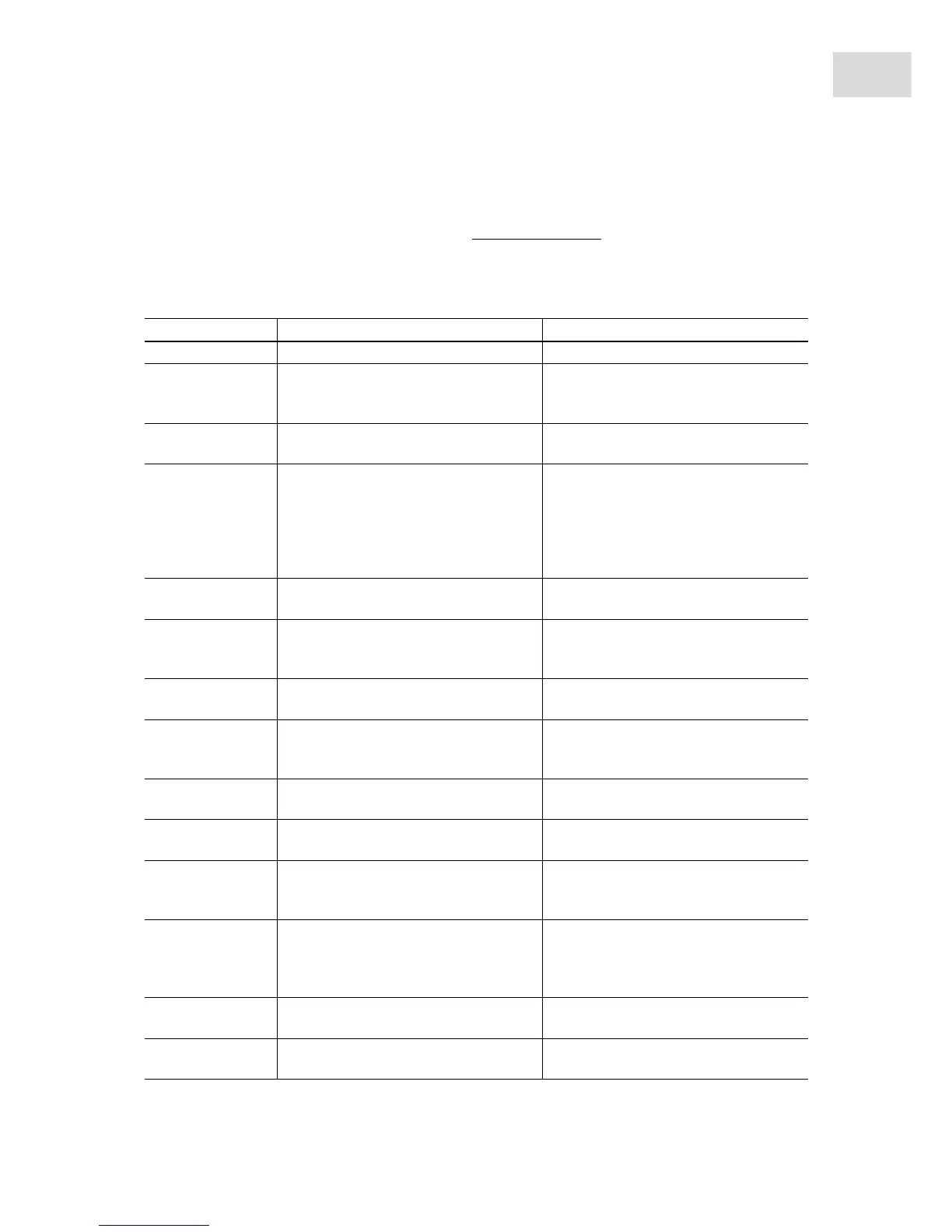
7.1 General errors
Symptom/message Cause Remedy
No display. No mains connection.
Check mains connection.
No display. Power failure.
Check the mains fuse of the device .
Check the mains fuse of the
laboratory.
Lid of the device
cannot be opened.
Rotor is still running.
Wait for rotor to stop.
Lid of the device
cannot be opened.
Power failure. 1. Check the mains fuse of the device
(see Replacing fuses on p. 48).
2. Check the mains fuse of the
laboratory.
3. Activate the emergency lid release
(see p. 51).
Device cannot be
started.
Lid of the device is not closed.
Close device lid.
Device shakes
when it starts up.
Rotor loaded unsymmetrically. 1. Stop the device and load
symmetrically.
2. Restart device.
No noticeable
evaporation.
Damaged sealing ring in the lid of the
device.
Insert new sealing ring (see Other
accessories on p. 59).
Pump does not start
up.
Pump is overloaded.
Thermo switch in the motor winding of
the pump triggered.
Let the pump cool down.
Pump does not start
up.
Overpressure in the exhaust gas line.
Open the exhaust gas line.
No output. Long, thin hoses.
Select short hoses with a large
cross-section.
No output. Condensation in the pump.
Let pump run for a few minutes and
press the mode/vent key several
times.
Temperature value
flashes.
Deviation from set value by ± 5 °C.
Let the remaining heat from the
previous run cool down.
Reduce the excessive ambient
temperature, if applicable.
Temperature value
flashes fast.
Deviation from set value by + 10 °C.
Switch off external heat sources (e.g.,
halogen lamp).
Liquid collects in
the hoses.
Activate the ventilation function.
Check the fall of the hoses.



 To Next Page