Troubleshooting
Concentrator plus/Vacufuge® plus
English (EN)
50
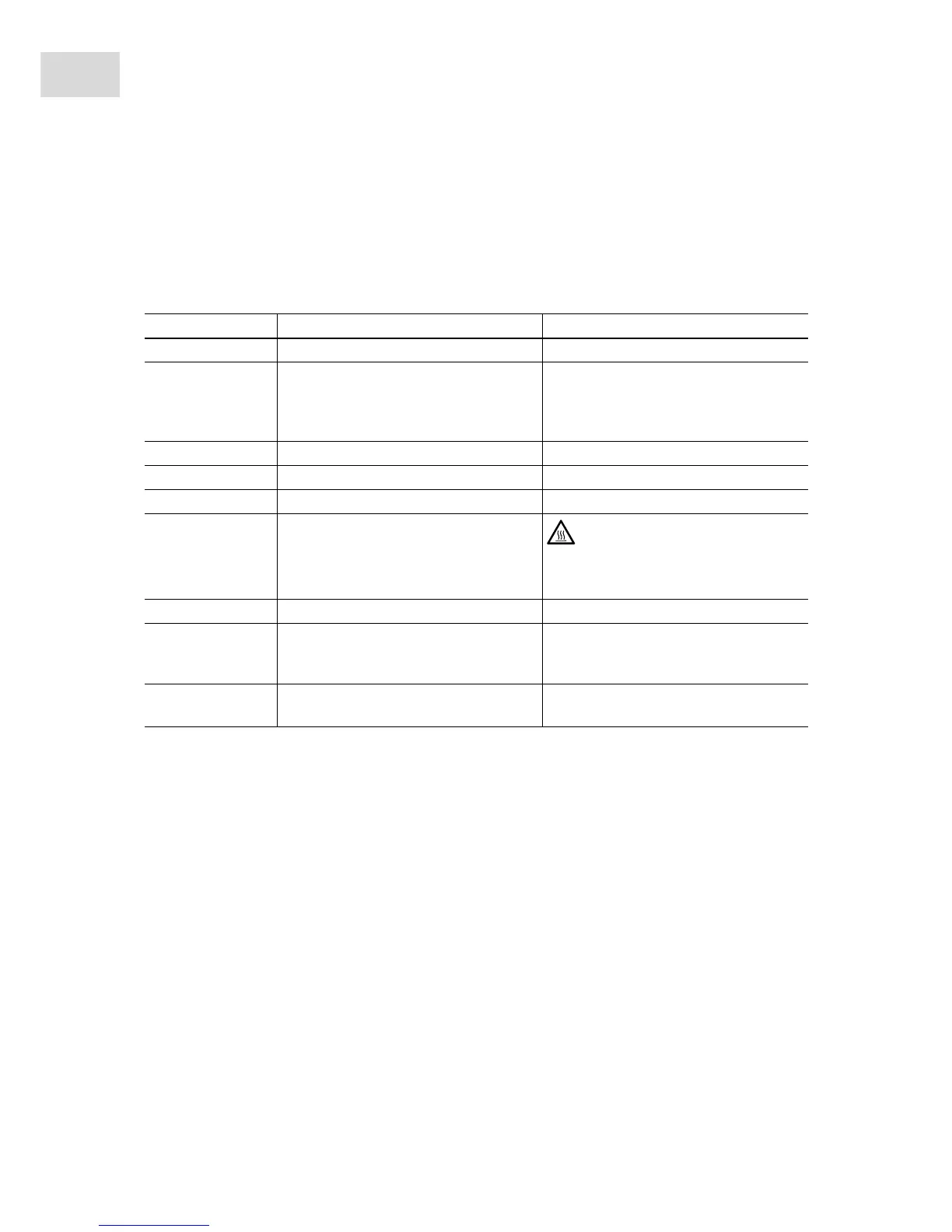
7.2 Error messages
If one of the following error messages appears, proceed as follows:
1. Remove fault (see Remedy).
2. Press the start/stop key to clear the error message.
If required, continue concentration and/or repeat.
Symptom/message Cause Remedy
Error 1 Drive fault.
Contact Service.
Error 2
Error 3
Error 4
Drive blocked or stiff.
Move the rotor by hand, remove any
obstructions.
Check the max. load of rotor.
Check the rotor mounting.
Error 5 Drive fault.
Contact Service.
Error 7 Error in the lid latch.
Contact Service.
Error 8 Temperature sensor error.
Contact Service.
Error 9 Electronics fault.
Caution! The rotor chamber
temperature may be > 72°C.
Contact Service.
Error 10 Heater defective.
Contact Service.
Error 12
Error 14
Error 16
Electronics fault.
Contact Service.
IMBAL Rotor loaded unsymmetrically.
Load the rotor symmetrically and
balance it.



 To Next Page