PCR run
Mastercycler
®
nexus
English (EN)
62
7.2.1 Status view
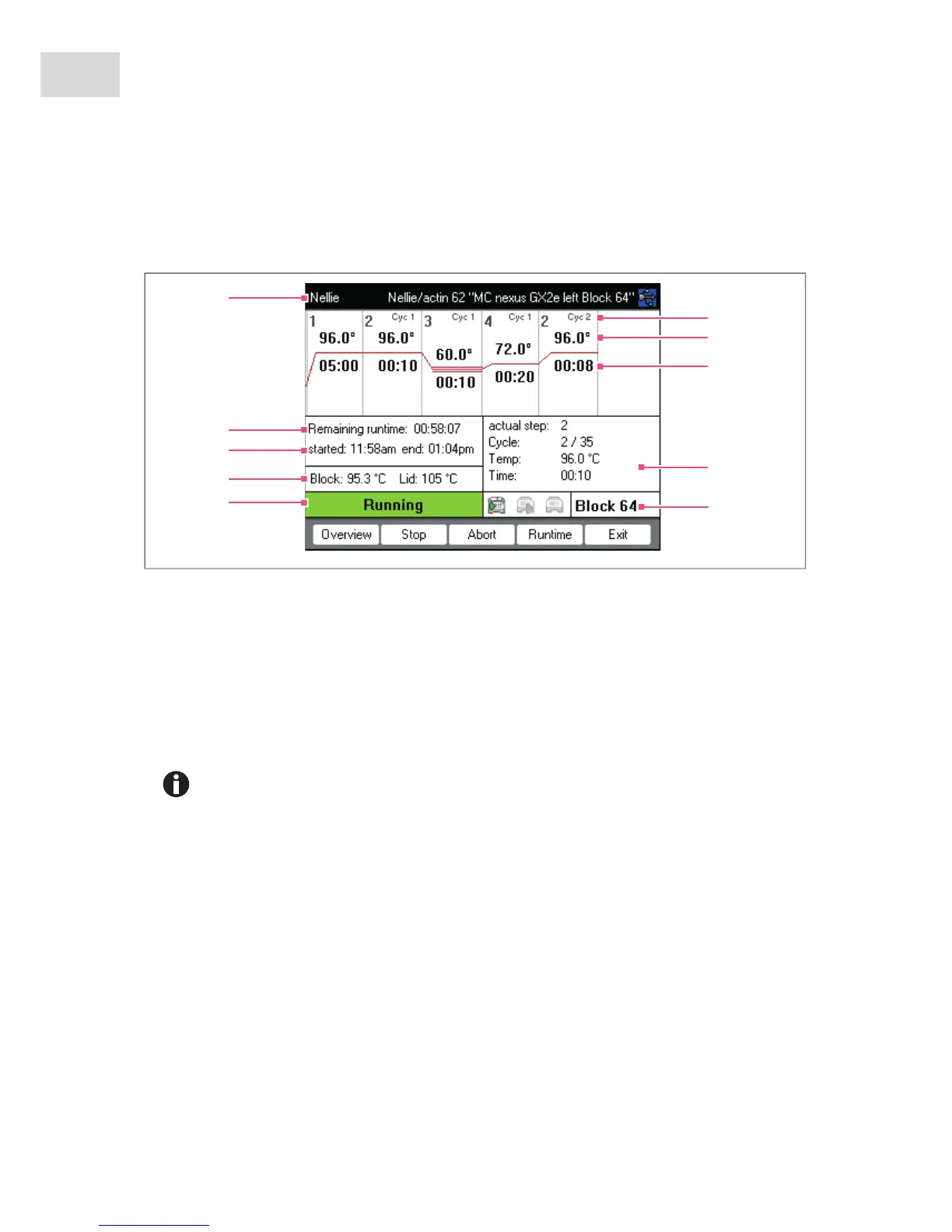
The status view is automatically displayed immediately after a program is started. It shows the progress of
and information on a running program. The currently active step is displayed as a flashing line.
You can exit the status view and return to the navigation tree at any time by pressing the Exit softkey, e.g. to
edit another program or start a program on a different cycler. Use the left/right arrow key to access the
status view of other connected cyclers. The program that was already started is not interrupted as a result.
1User, program name and cycler
2Remaining run time
3Start and end time of the program
4Block and heated lid temperature
5Device status
6Cycle number
7Block target temperature
8 Remaining holding time
9Information on the current program step
10 Specification of the selected cycler
If you have activated the TSP function in the program header (see p. 51), the heated lid is first
brought to the correct temperature before the program run starts. This process is indicated in
the status view by the message TSP heated lid.



 To Next Page