Name Function
D
[Enter] button
If pressed during projection of computer signal images, it
automatically adjusts the Tracking, Sync., and Position to
project the optimum image. When a Configuration Menu
or a Help screen is displayed, it accepts and enters the
current selection and moves to the next level.
E
[w][v] button
Corrects Keystone distortion. s Quick Start Guide
However, when projecting in Slideshow (EB-W10/X10
only), the buttons only have the [
] and [ ] functions.
If pressed when a Configuration Menu or a Help screen is
displayed, these buttons select menu items and setting
values. s p.48
F
[Help] button
Displays and closes the Help screen which shows you how
to deal with problems if they occur. s p.58
G
[Esc] button
Stops the current function. If pressed when a
Configuration menu is displayed, it moves to the previous
menu level.
s
p.48
H
[a][b] button
Adjusts the volume. s Quick Start Guide
However, when projecting in Slideshow (EB-W10/X10
only), the buttons only have the [
] and [ ] functions.
If pressed when a Configuration Menu or a Help screen is
displayed, these buttons select menu items and setting
values. s p.48
I
[Menu] button
Displays and closes the Configuration Menu. s p.48
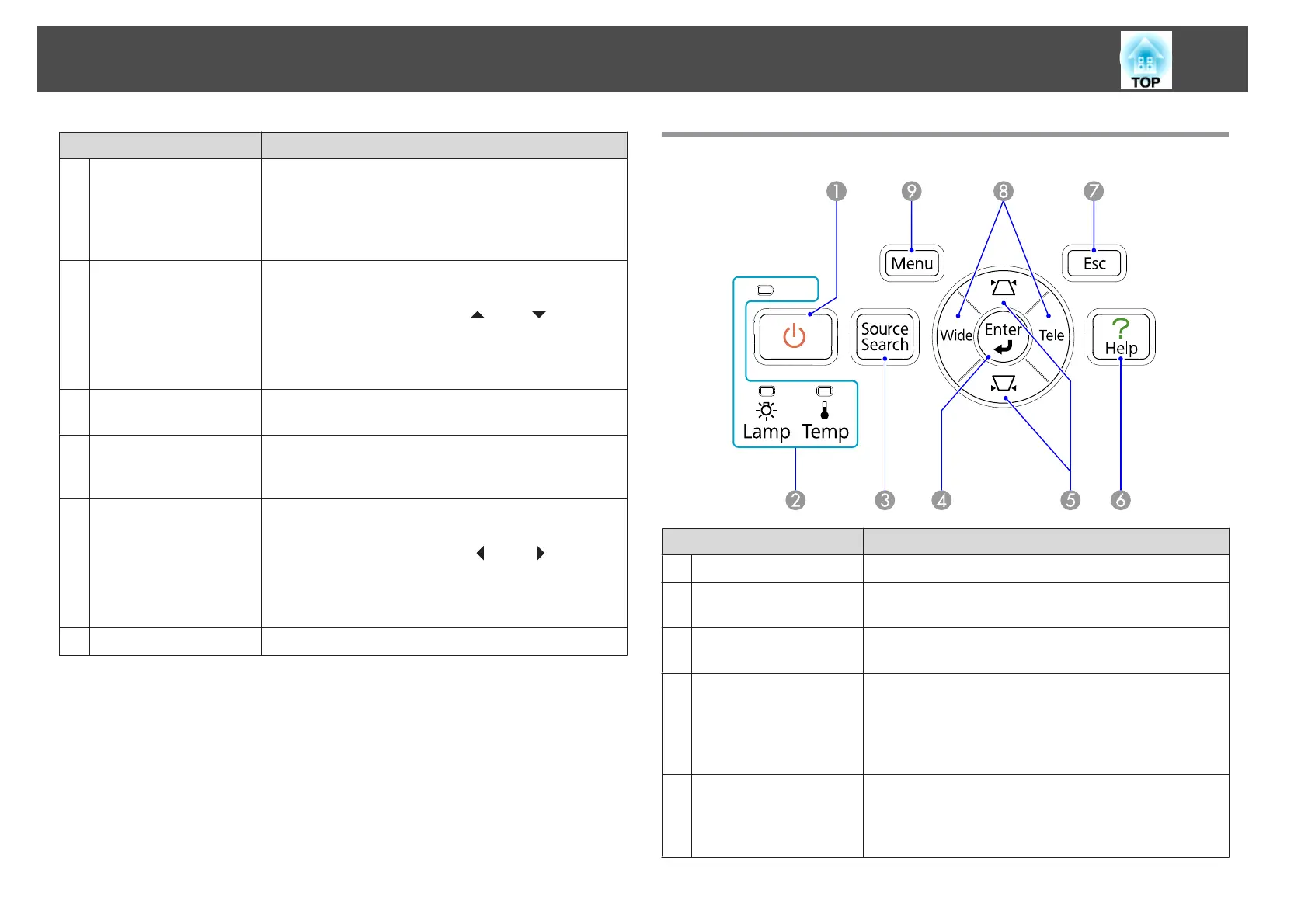
Control Panel (EB-S10/S9/S92)
Name Function
A
[t] button
Turns the projector power on or off. s Quick Start Guide
B
Status indicators
The color of the indicators and whether they are flashing
or lit indicate the status of the projector. s p.59
C
[Source Search]
button
Changes to the next input source that is connected to the
projector and is sending an image. s p.22
D
[Enter] button
If pressed during projection of computer signal images, it
automatically adjusts the Tracking, Sync., and Position to
project the optimum image. When a Configuration Menu
or a Help screen is displayed, it accepts and enters the
current selection and moves to the next level.
E
[w][v] button
Corrects Keystone distortion. s Quick Start Guide
If pressed when a Configuration Menu or a Help screen is
displayed, these buttons select menu items and setting
values. s p.48
Part Names and Functions
14



 To Next Page