EQD
®
6 EQ2288F
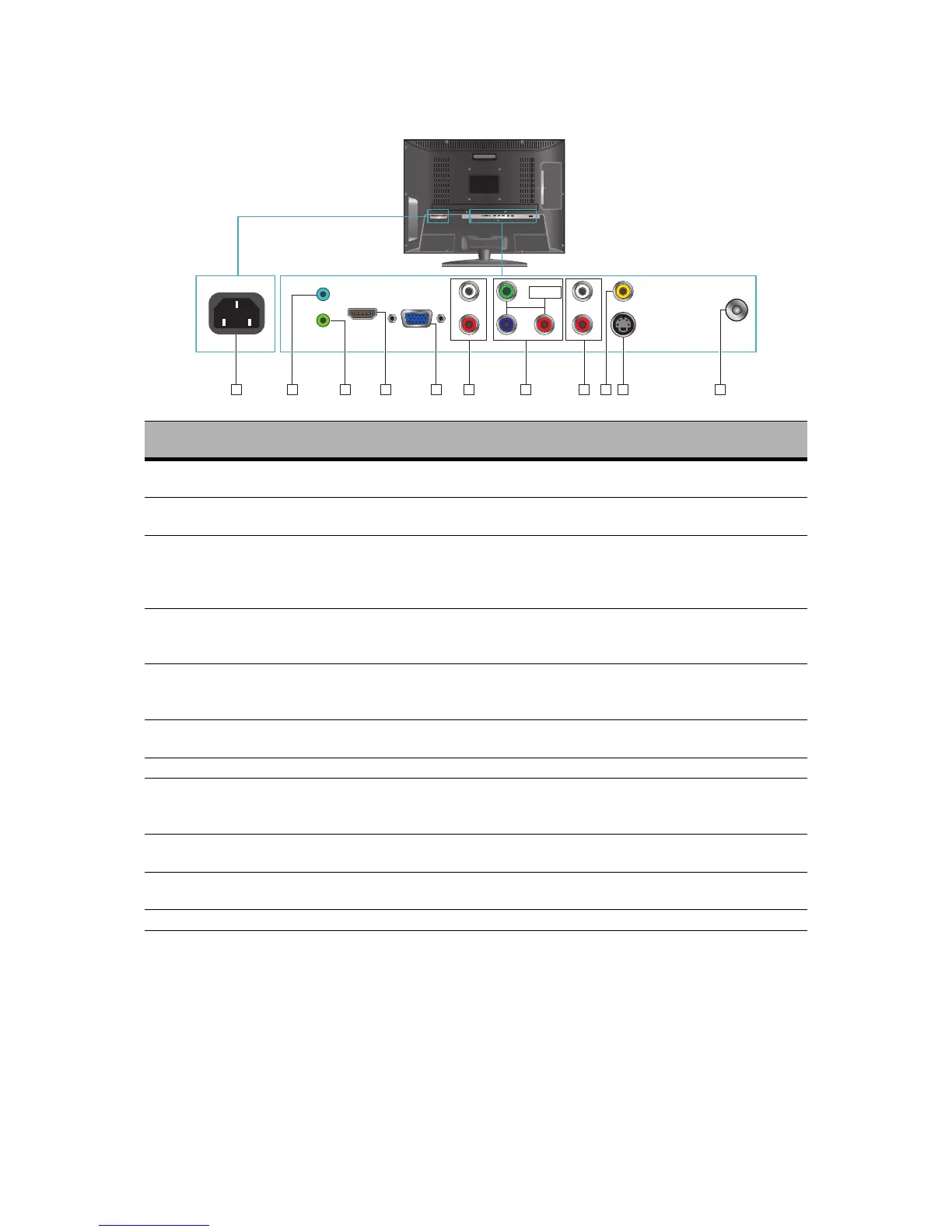
Rear View of the Product
Item Description
1 Power (AC input)
Plug-in the supplied AC Power cord and connect to the AC
input power source.
2 PC Audio In
Connect the RGB Audio In on your computer to the RGB
Audio In on the rear of the LCD TV.
3 Earphone Jack
Connect to your headphones. By connecting the head-
phones, you can listen to the sound from the TV on head-
phones. *If you connect the headphones, the TV speakers
will be muted.
4 HDMI Input Terminal
Connect this port to the HDMI/HDMI-DVI jack of the com-
patible equipment. *If you use HDMI-DVI
connections, please use PC Audio In for audio input.
5 VGA Signal Input
Connect a 15-pin D-sub RGB cable to the RGB output of
your computer and the other end to the RGB input on the
rear of the LCD TV.
6
YPbPr/ Audio Input (left/
right)
Connect the Audio in cable for YPbPr from this jack to the
corresponding connectors on your A/V device.
7 YPbPr Signal Input Connect this jack to the YPbPr output of A/V device.
8
AV/ S-Video Signal
Audio Input
(left/ right)
Connect the Audio in cable for AV/ S-Video from this jack
to the corresponding connectors on your A/V device.
9 Composite Video Input
Connect this jack to the composite video output connec-
tors on your A/V equipment.
10 S-Video Input
Connect the S-Video cable from the compatible device to
this connector on the rear panel of the LCD TV.
11 TV Input Jack Connect this jack to your Cable or VHF/UHF antenna.



 To Next Page