EQD
®
9 EQ2288F
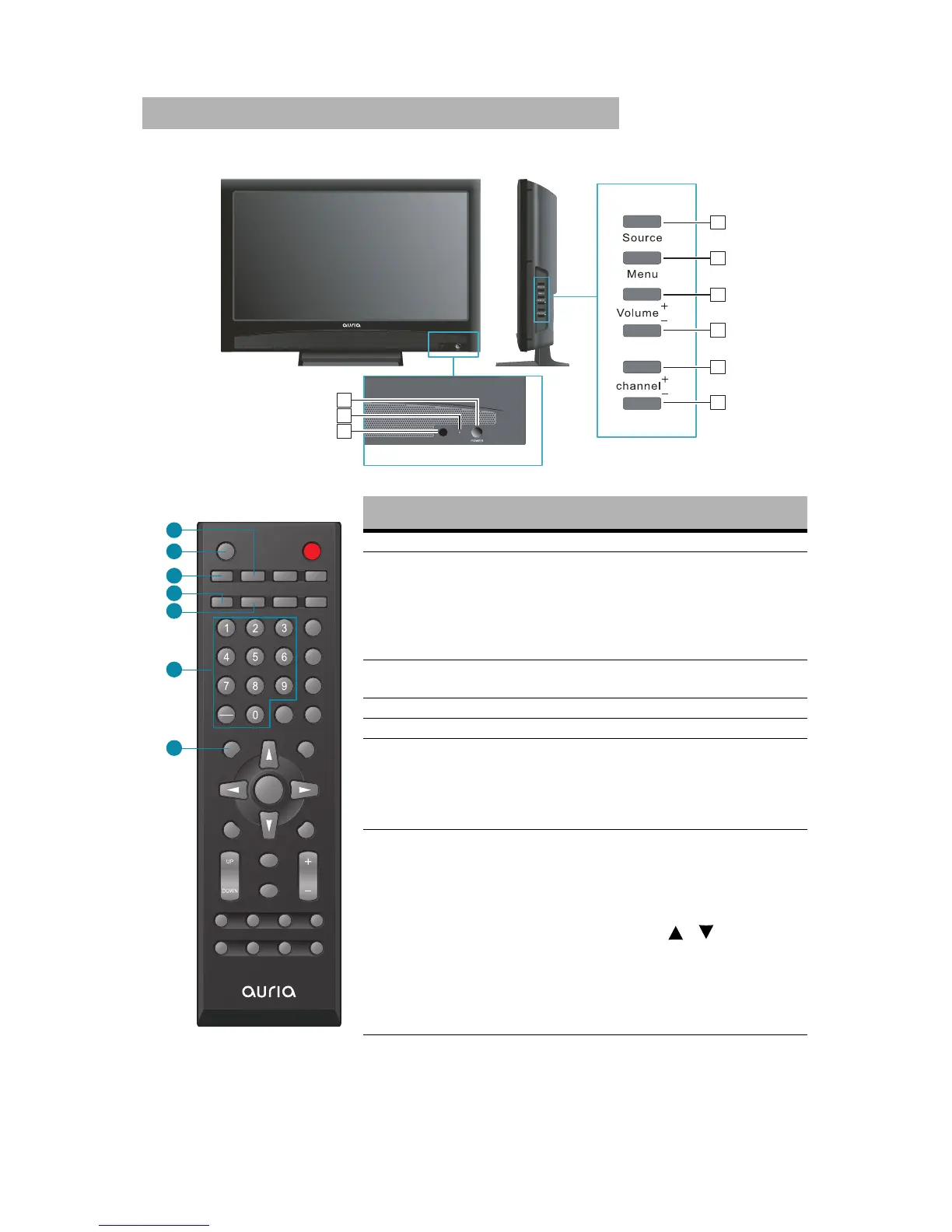
Remote Control and TV Controls
Button Description
1 AV Press to select source to AV mode
2 SLEEP
Press repeatedly to set the off timer. The
function is used to automatically shut off
the LCD TV after a preset period of time
passed. There are several times for
choice – Off, 5 Min, 15 Min, 30 Min, 60
Min, 90 Min, and 120 Min.
3 TV
Press to direct to TV source when in any
other source.
4 WIDE Press to select Video Display format.
5 CC Press to turn Closed Caption On/Off
6
0~9, -
number
buttons
Press 0~9 and “-” to select a channel.
After you input the channel numbers,
press ENTER button to direct to the chan-
nel immediately, or wait for 3 seconds to
change automatically.
7 SOURCE
Press to display the INPUT source list and
select the source with / buttons. To
confirm the selection, press ENTER.
4
6
5
7
8
9
1
2
3



 To Next Page