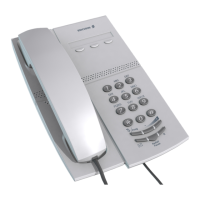
7BusinessPhone – Analog Telephone
Description
1 Programmable keys
Three keys for storing frequently called numbers. You can store one
number per key, see section “Dial-by-Name” on page 22.
Note: If you unplug the telephone, stored numbers will
remain for about 24 hours.
2 Mute / Prog
a. Switch microphone on or off. See section “During Calls” on
page 25.
b. Enter programming mode, see section “Settings” on page 59.
3 Message Waiting key
a. A flashing light indicates a waiting message. See section
“Messages” on page 37.
b. Programmable key for storing of one frequently called number.
See section “Dial-by-Name” on page 22
4 Last number redial / Pause key
a. Redial last number dialled.
b. Insert a pause if you have to wait for dial tone when
programming a number into the memory.
5R-key
Used for example to make an inquiry, to transfer a call or to
establish a conference, see section “During Calls” on page 25.
6 Volume control
To adjust the volume.
7 Message Waiting switch
Switch Message Waiting indication on or off. Also used to reverse
the polarity in case of crossed line cables. See section “Settings”
on page 59.
8 Data port
Data port for connection of a modem, PC or other telephone
equipment.
9 Loudspeaker (beneath handset)
10 Handset with hearing aid function
Please note: The handset may attract and retain small
metal objects in the earcap region.








 To Next Page