7BusinessPhone – Premium Telephone
Description
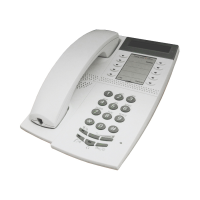
2 Programmable keys
Ten keys for storing frequently called numbers. You can store two
numbers per key (upper and lower), see section “Abbreviated
Numbers” on page 35.
3 Message waiting LED
A flashing light indicates a waiting message. See section “Internal
Messages” on page 26.
Note: This function is only valid for the Dialog 3185 MW
(Article number DBVA 404 4053/208 R1A).
4 Mute
To switch the microphone on or off. See section “During Calls” on
page 14.
5 Handset and speaker volume
To adjust the volume. See section “Audible Adjustments” on
page 52.
6 R-key
Used for example to make an inquiry, to transfer a call or to
establish a conference, see section “During Calls” on page 14. Can
be set to two different modes, see section “Audible Adjustments”
on page 52.
7 Line / Loudspeaker on/off
a. Line key for in and outgoing calls.
b. Loudspeaker on or off. See section “During Calls” on page 14.
8 Program
Storing numbers. See section “Abbreviated Numbers” on page 35.
Setting the clock. See section “Other Useful Facilities” on page 41.
9 Tone
Temporary change to tone dialling. See section “During Calls” on
page 14.
10 Last number redial / Pause key
a. Redial last number dialled.
b. Insert a pause if you have to wait for dial tone.
11 Ringing signal volume
Adjust ringing signal volume. See section “Audible Adjustments” on
page 52.
12 Ringing signal character
Adjust ringing signal character. See section “Audible Adjustments”
on page 52.










 To Next Page