EasyManua.ls Logo

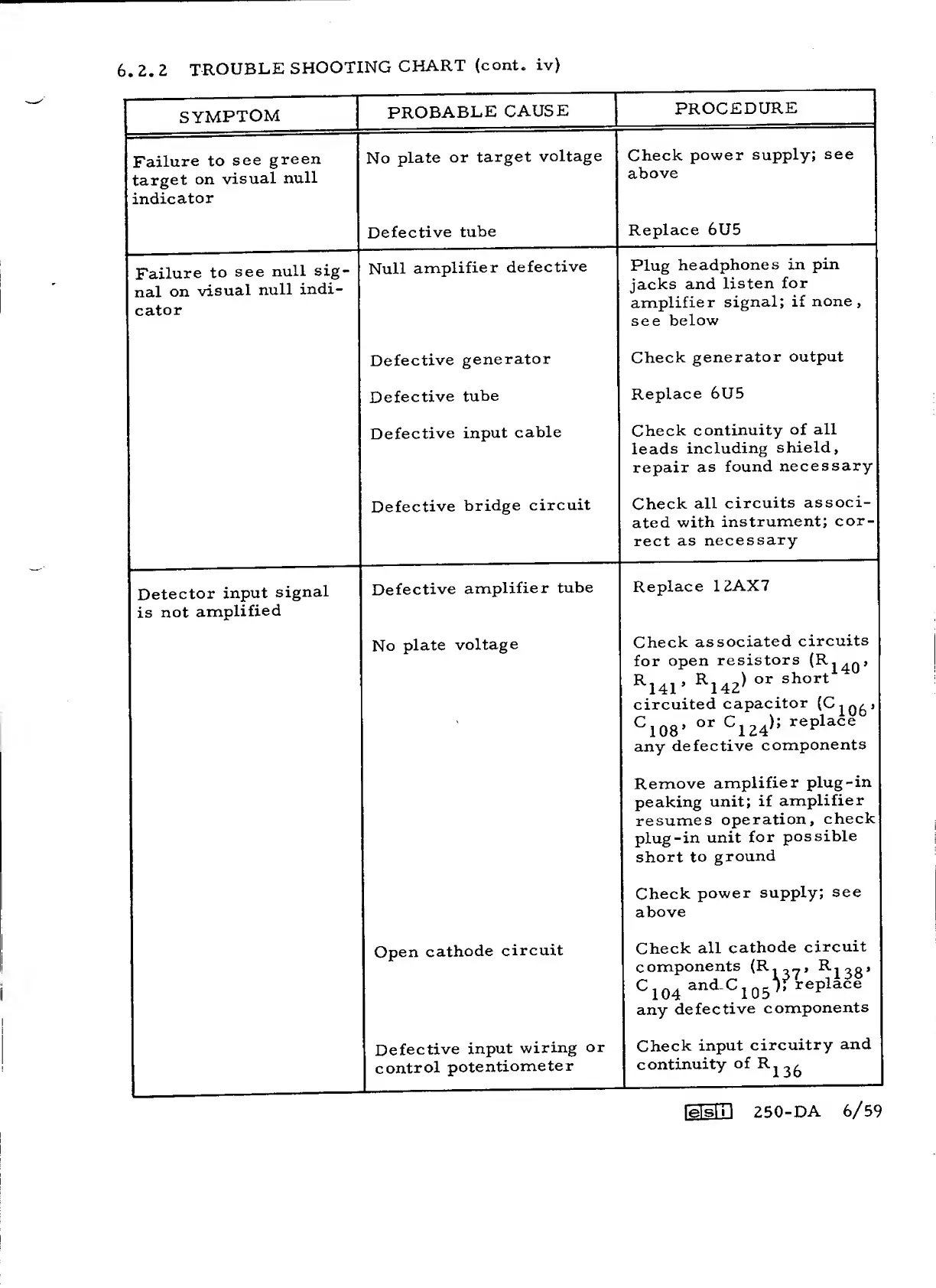
ESI 250-DA - Troubleshooting Chart for Null Indicator and Amplifier Issues

ESI 250-DA
75 pages
Print Icon
To Next Page IconTo Next Page
To Previous Page IconTo Previous Page
Loading...
6
,
2.
2
TROUBLE
SHOOTING
CHART
(cont.
iv)
SYMPTOM
PROBABLE
CAUSE
PROCEDURE
Failure
to
see
green
target
on
visual
null
indicator
No
plate
or
target
voltage
Check
power
supply;
see
above
Defective
tube
Replace 6U5
Failure
to
see
null
sig-
nal
on
visual
null
indi-
cator
Null
amplifier
defective
Plug
headphones
in
pin
jacks
and
listen
for
amplifier
signal;
if
none,
see
below
Defective
generator
Check
generator
output
Defective
tube
Replace 6U5
Defective
input
cable
Check
continuity
of
all
leads
including
shield,
repair
as
found
necessary
Defective
bridge
circuit
Check
all
circuits
associ-
ated
with
instrument;
cor-
rect
as
necessary
Detector
input
signal
is
not
amplified
Defective
amplifier
tube
Replace
12AX7
No
plate
voltage
Check
associated
circuits
for
open
resistors
^141’
^142>
circuited
capacitor
^108’
^124>=
any
defective
components
Remove
amplifier
plug-in
peaking
unit;
if
amplifier
resumes
operation,
check
plug-in
unit
for
possible
short
to
ground
Check
power
supply;
see
above
Open
cathode
circuit
Check
all
cathode
circuit
components
(R._„,
^
130
*
^104
^105
any
defective
components
Defective
input
wiring
or
control
potentiometer
Check
input
circuitry
and
continuity
of B
.2
3
£j
lelsin 250-DA
6/59

Related product manuals