EasyManua.ls Logo

ESP aperta EZTAG3 - Advanced Programming Guide; How to set-up Access Pin Number; How to set-up Access Tags

ESP aperta EZTAG3
16 pages
Print Icon
To Next Page IconTo Next Page
To Previous Page IconTo Previous Page
Loading...
6
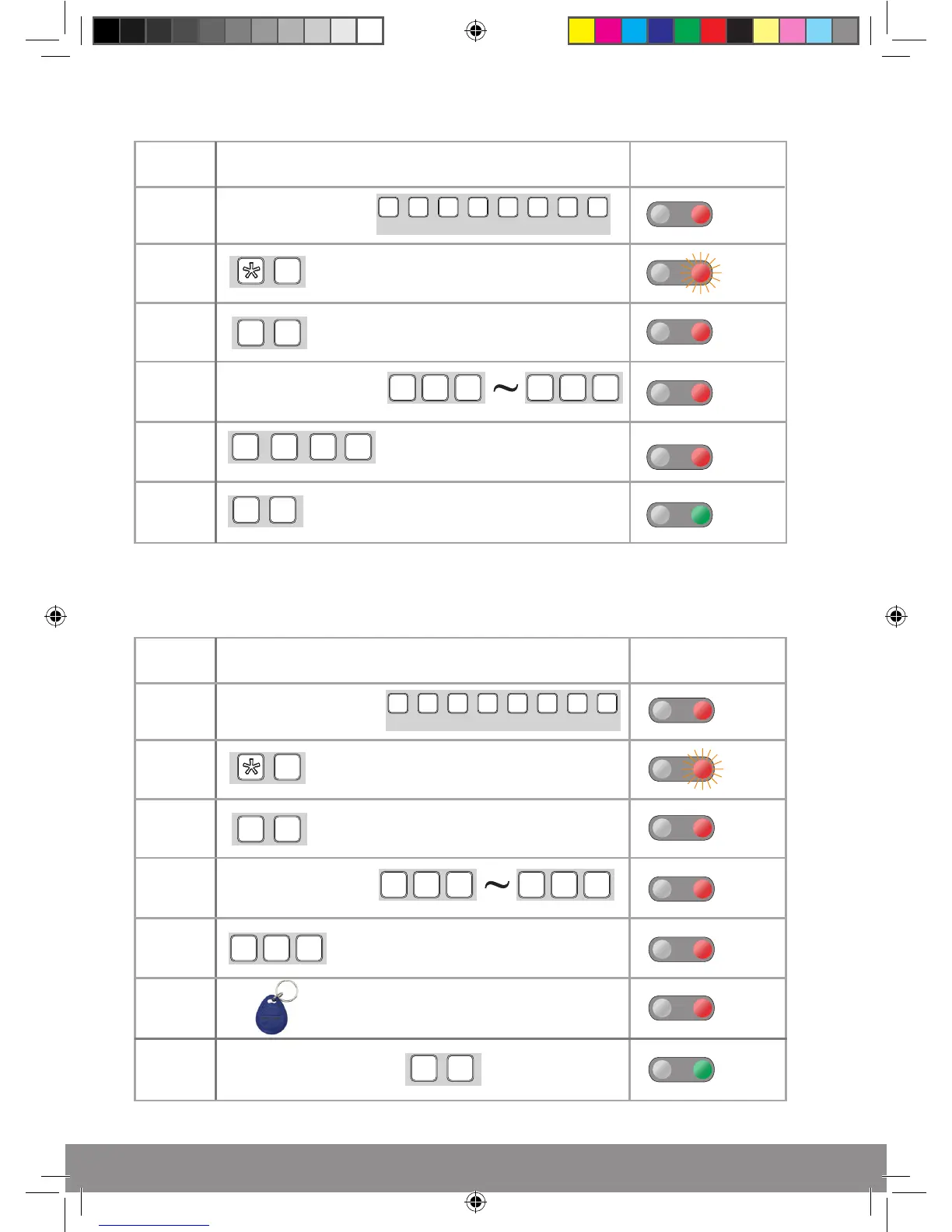
How to set-up Access Pin Number
Action
Step
Number
Keypad
Indication
9
0 2
? ? ? ?
Long
Tone
# #
1
2
3
4
5
6
Long
Tone
Double
Tone
Long
Tone
Enter a 4 digit pin
(1234 not be used)
To end programming
0 0
0
9 9
9
Enter a starting
location number
Enter
Programming
1 2 3 4 1 2 3 4
(Default)
How to set-up Access Tags
Action
Step
Number
Keypad
Indication
9
0 5
Long
Tone
# #
1
2
3
4
5
6
Long
Tone
Long
Tone
Tone
? ? ?
7
Tone
To end
programming
0 0
0
9 9
9
Enter a unused
location number*
Enter
Programming
Enter number of
tags to be registered
*Each tag will use up a location number
1 2 3 4 1 2 3 4
(Default)
Present the tag with the
lowest serial number
All other batch tags
will auto register
EZTAG3 Manual_Layout 1.indd 6 18/11/2016 15:28:09