7
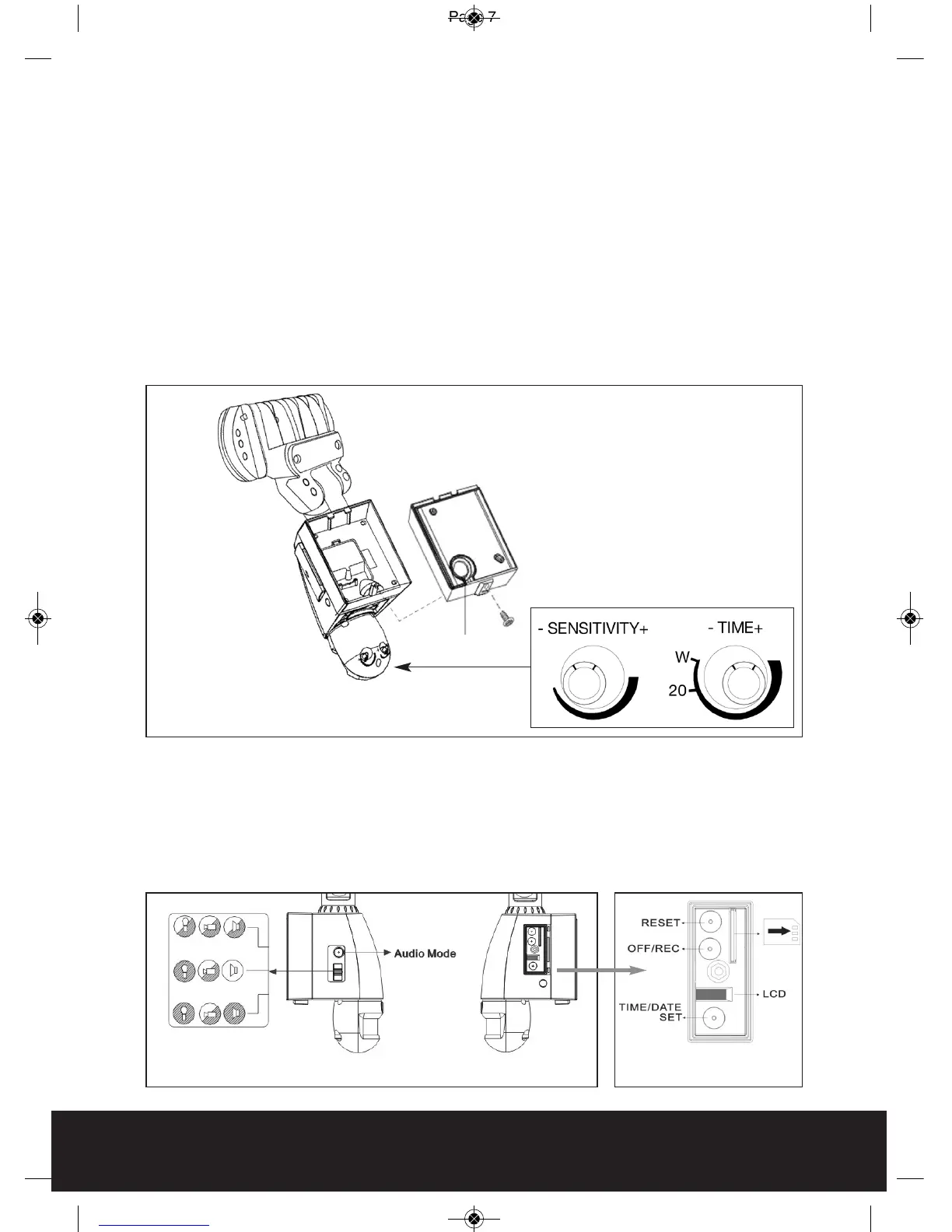
Fig. 7 Fig. 8
3 Position Switch
Step 4 - Adjusting the Settings (see Figs. 6 - 8)
Time control: Turn the time control knob to ”
+
” side to increase the illumination
time (7 minutes max.), turn the control knob to “
-
“ side to reduce the illumination
time (5 seconds min.)
Sensitivity control: Adjust the detector range of Passive Infrared Motion Sensor
(± 2M ~ 10M)
To perform a walk test turn the knob fully to the “
-
“ side until the indicator faces
the "W" mark. When the walk test is completed adjust the knob to the "
+
" side to
your desired lamp on time (we recommend this be at least 20 seconds
to ensure lighting of the area is sufficient for recording - 20 seconds is marked
as "20" on the product).
Selecting working mode:
Mode 1: Floodlight, Camera and Speaker in operation both day and night
Mode 2: Daytime: light is OFF, camera is ON, speaker is ON
Nighttime: light is ON, camera is ON, speaker is OFF
Mode 3: Daytime: light is OFF, camera is ON, speaker is OFF
Nighttime: light is ON, camera is ON, speaker is ON
Fig. 6
AC Cable Outlet



 To Next Page