Chapter 3 Commands
■To Set Up Program Mode Patterns
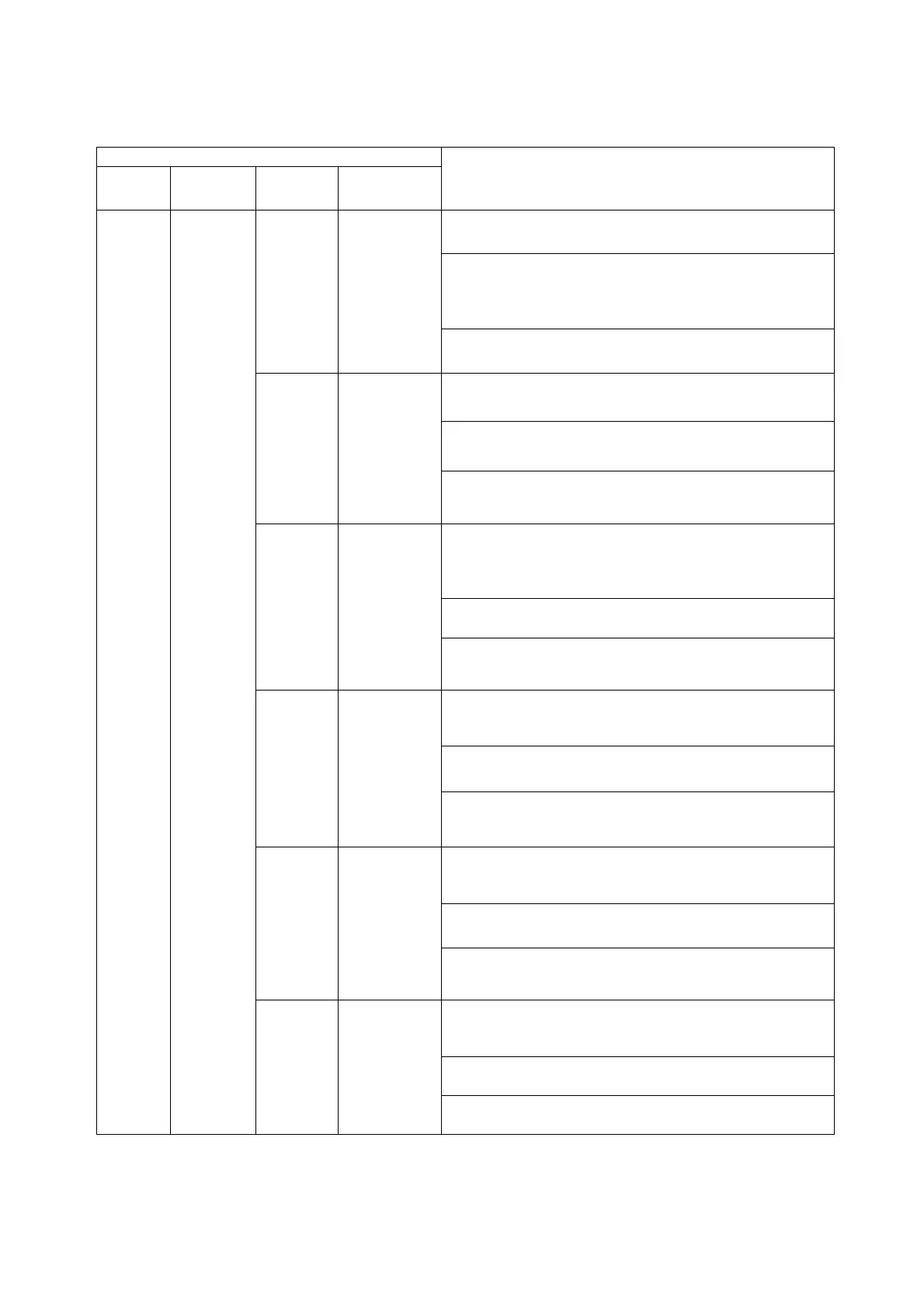
Table 3.35
Program
mode pattern setting command
Setting command
Address
Main
command
Optional
parameter
Setting data
Description/Setting data format/Example
command
<
Description
>
Sets up the current step of the program.
<
Setting data format
>
“temperature,humidity,time,time signal 1,time signal 2”
* Time signals can be omitted from the program. To
do so, set “OFF”.
−
Temperature
Humidity
Time
Time signal 1
Time signal 2
<
Example command
>
“1,PSET,130.0,95,100,OFF,OFF”
<
Description
>
To set the end mode and turn time signal 1 and 2 ON
<
Setting data format
>
“end mode”
End End mode
<
Example command
>
“1,END,ON,ON”
<
Description
>
Sets step Nos. in the pattern to skip. Those steps are
skipped and the pattern advances to the next
applicable step.
<
Setting data format
>
“step No.”
Skip Skip step
No.
<
Example command
>
“1,PSET,SKIP”
<
Description
>
Sets a range of steps to repeat in the pattern.
<
Setting data format
>
“loop start step,loop stop step”
Loop Loops
start/end
step Nos.
<
Example command
>
“1,PSET,LOOP,2,5”
<
Description
>
Sets steps to undergo only humidity exposure in the
dry/wet-bulb mode.
<
Setting data format
>
“humidity exposure-only step No.”
−
Humidity
exposure-only
step No.
<
Example command
>
“1,PSET,85”
<
Description
>
Sets humidity for the saturated mode. (Humidity can
only be set to 100%.)
<
Setting data format
>
“temperature,humidity”
1 to 16 PSET
−
Saturated
mode
humidity
<
Example command
>
“1,PSET,121.0,100,0.0”
* In the unsaturated and saturated modes, the time of step No. 1 can only be set to 0.0 h.
If another time is set, an error is returned.
36



 To Next Page