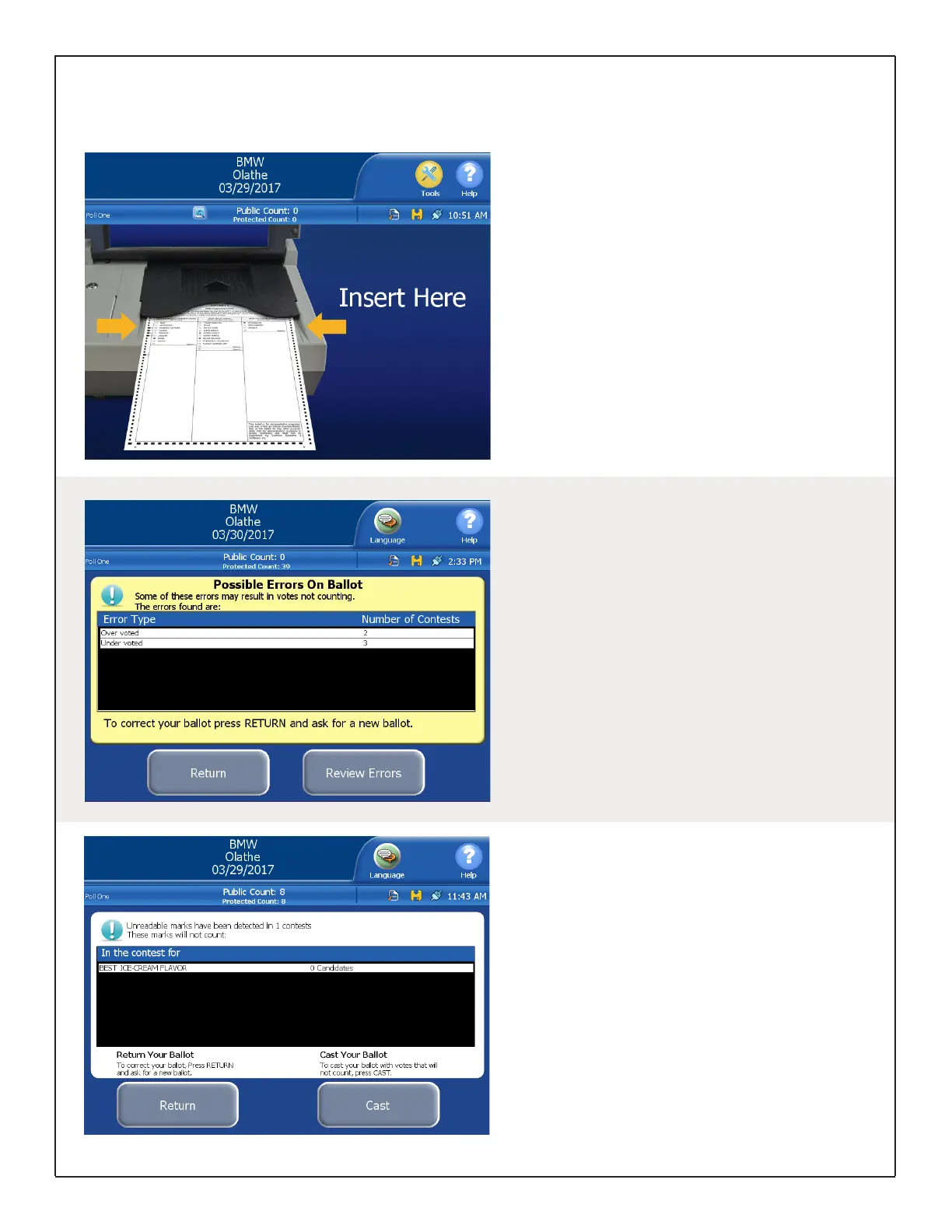
Inserting Ballot for Tabulation
Both paper ballots and printed ExpressVote cards
can be scanned and tabulated with the DS200.
When the DS200 is ready for ballots to be
tabulated, the ballot insertion screen will appear,
providing instructions on how to insert the ballot.
Ballots may be inserted in any orientation. Do not
push the ballot too hard into the scanner; insert
the leading edge into the scanner and allow it to
grab and pull the ballot automatically.
Assisting Voters with the DS200
Ballot Exceptions
If your election is coded to prompt for ballot
exceptions, a message may appear asking
whether the voter wishes to cast their ballot
as is, or return it for corrections. The following
instances may prompt such a message:
·Blank Ballots: no voting marks detected
·Undervoted Ballots: fewer marks than allowed
“Vote For” number
·Overvoted Ballots: more marks than allowed
“Vote For” number
Unreadable Marks on Ballots
An alert message indicating which contest(s)
are impacted may appear if the ballot contains
unreadable marks.
If the ballot is unreadable in its entirety (due to
damage, markings, etc.), the DS200 will return
the ballot automatically and begin beeping.
For any ballot automatically returned, read the
error message on the screen before removing the
ballot. Once the ballot is removed from the tray,
the error message disappears.
DS200 Digital Precinct Scanner | EVS 6.0.2.1 | Poll Worker Guide v 1.1.CBB
Page | 10


 To Next Page