Opening the Poll
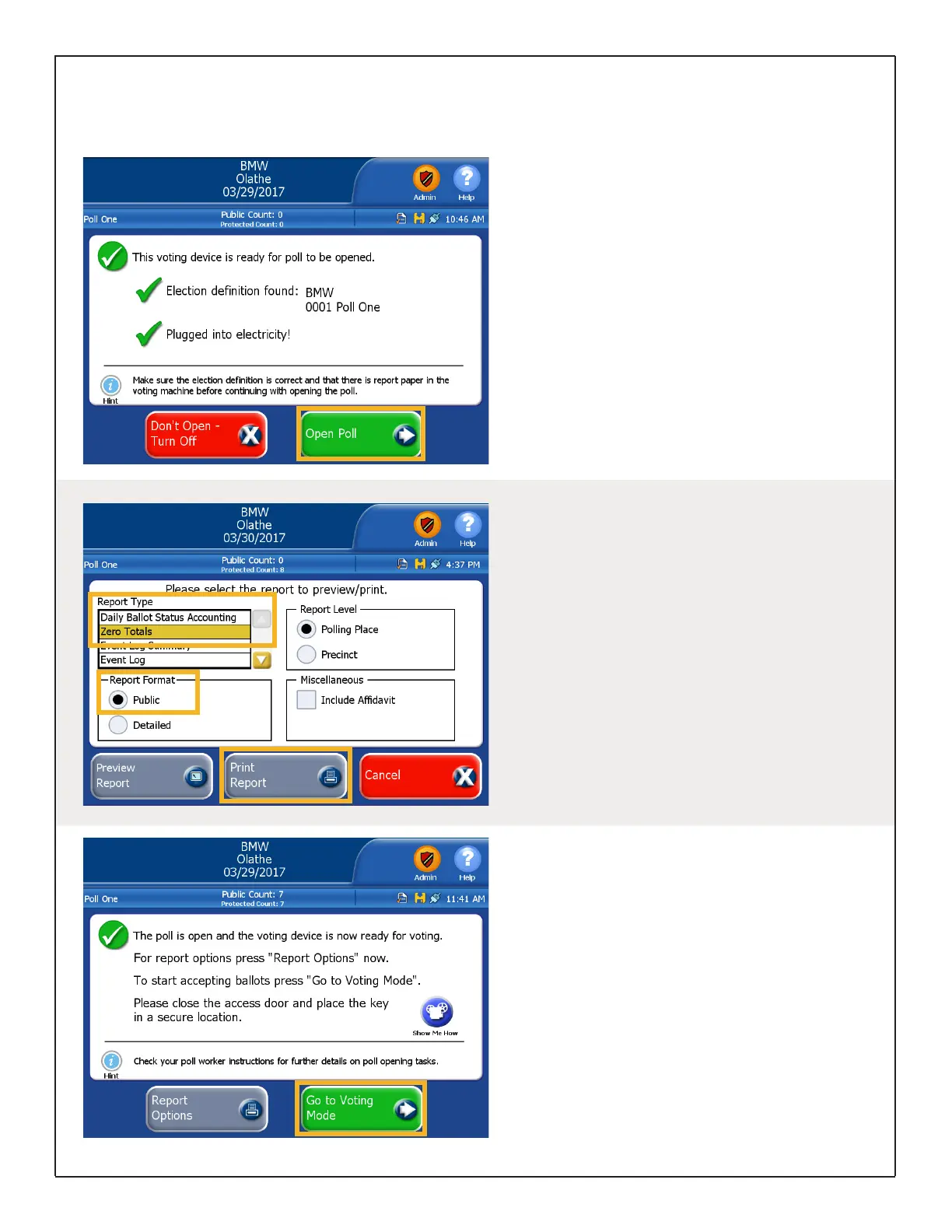
Once the Election Definition is loaded and all
Admin functions are completed you can open
the poll.
If needed, enter the Election Code and touch
Accept. Touch Open Poll.
Allow default reports to complete printing. If you
need to print any additional Zero Totals Reports,
proceed to the next section for instructions.
Opening the Polls for Voting
Printing the Zero Totals
Report
The DS200 should be configured to automatically
print at least one (1) Zero Totals Report when the
poll opens.
Should you need to print additional copies, you
must do so before going to voting mode.
Touch Report Options from the Open Poll
screen and select the Zero Totals Report. Make
sure the Report Format is set to Public and touch
Print Report.
Go to Voting Mode
When you are ready to start scanning ballots for
live voting, touch Go To Voting Mode.
Close and lock the Front Access Compartment
using the barrel key.
Verify the Public Count at the top of the screen
is at “0” before voting starts on the first day of
tabulation or testing. This count will increase by
one each time a ballot is cast.
DS200 Digital Precinct Scanner | EVS 6.0.2.1 | Poll Worker Guide v 1.1.CBB
Page | 9


 To Next Page