Preparing the DS200 for Use
DS200 Scanner Setup
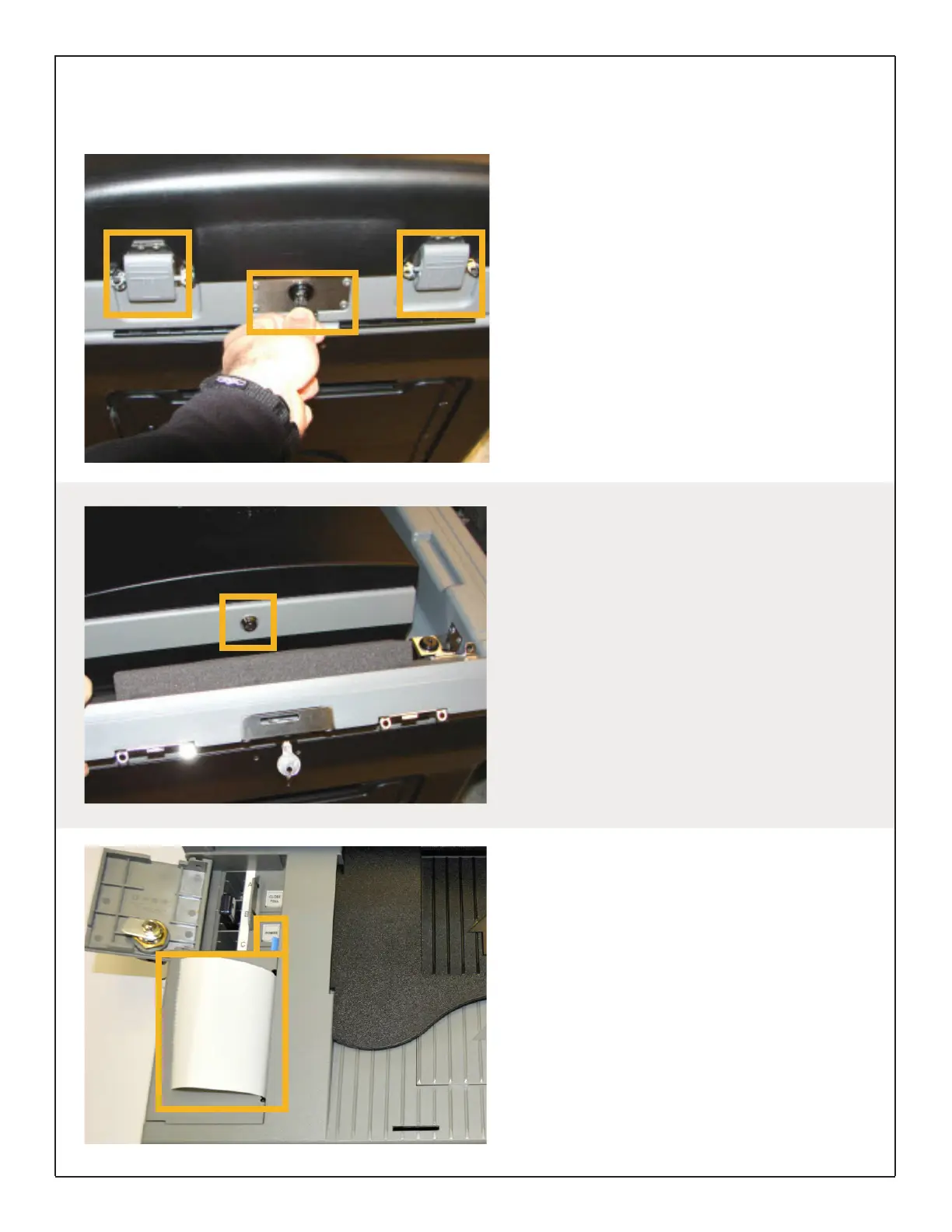
The DS200 Scanner and Ballot Box use two
different keys: a standard silver key and a barrel
key.
The silver ballot box key is used only for the
ballot box locks. The barrel key is used only for
locks on the DS200 scanner. You will need both
keys to open and start the DS200.
Open the front of the carrying case by using the
silver ballot box key and unlatching the two front
tabs.
Powering Up the Scanner
Using the barrel key, open the DS200 touch
screen.
If the machine is plugged in, the scanner should
automatically power on when the screen is lifted.
If the scanner does not automatically power
on, use the barrel key to open the Front Access
Compartment and press the Power button.
Preparing the Printer Tape
The DS200 contains an internal thermal printer
for reports. To change a tape roll, open the Front
Access Compartment and press the blue lever.
Replace the tape roll and pull the end of the
paper out of the tape opening with the treated
side facing the right side of the opening.
(Treated side will leave grey streak when scratched).
Hold the end of the tape roll while pressing firmly
on the printer door to ensure it is locked.
DS200 Digital Precinct Scanner | EVS 6.0.2.1 | Poll Worker Guide v 1.1.CBB
Page | 8


 To Next Page