20
ESS GPS-5 OWNER’S MANUAL
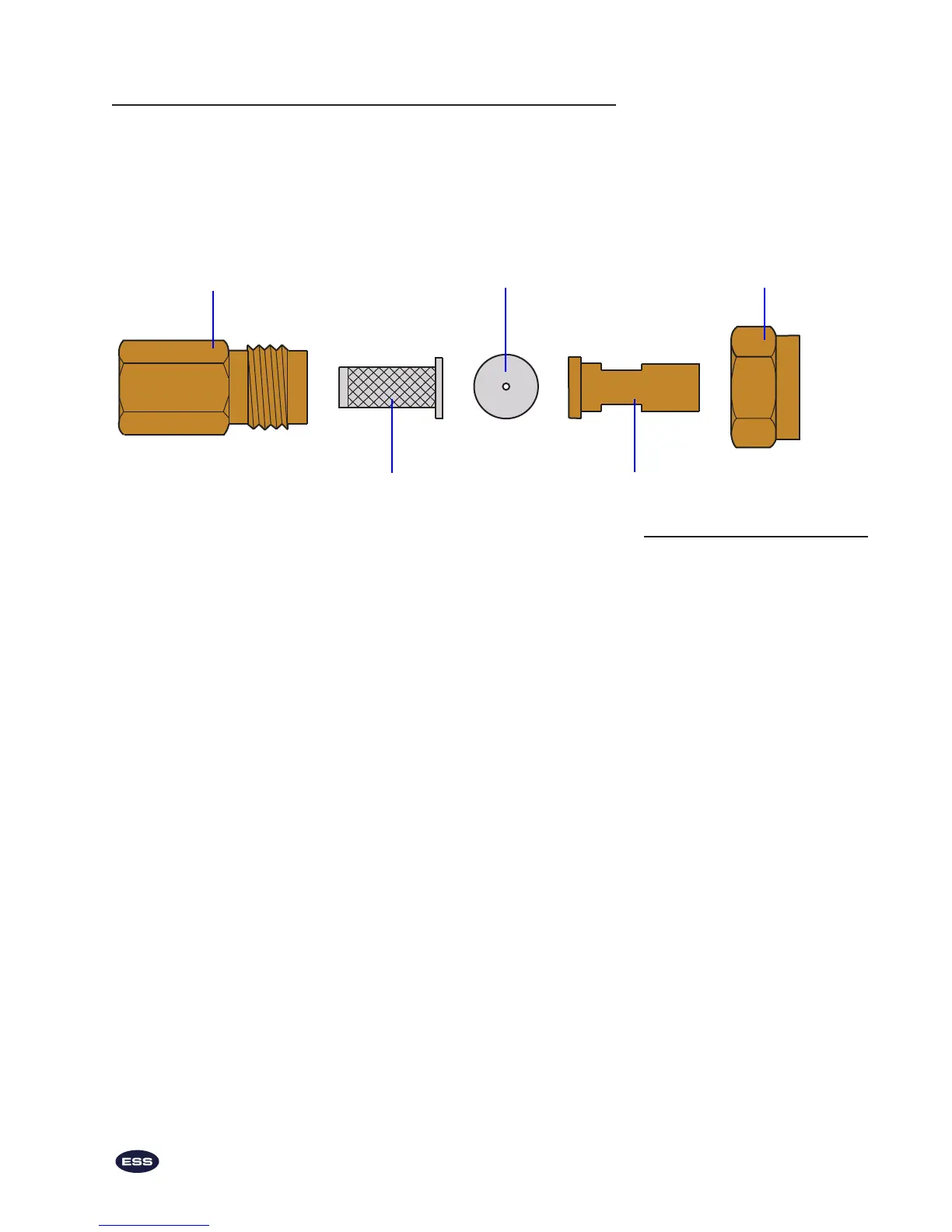
Liquid filter assembly
The liquid lter assembly is located outside the base of the spray gun.
It is composed of these parts: a ⁄” NPT body (Item 12), a strainer
(Item 11), a ow disk (Item 10), an adapter (Item 9) and a cap (Item 8).
The strainer is the active ltering element in the volume of liquid that
ows through the line. There is an extra ow disk and an extra strainer
in the GPS-5 Parts Kit in case the originals are lost or damaged.
To disassemble, clean and reassemble the liquid
lter (see labeled drawing above):
1. Using a ⁄” wrench on the cap (Item 8) and an ⁄” wrench
on the ⁄” NPT body (Item 12), unthread them.
Note: When you disassemble the liquid lter assembly, notice
how the parts t together in order to reassemble them prop-
erly. Be careful not to lose any parts, particularly the ow disk
(Item 10) which is inside the cap. The sprayer will not function
correctly without the ow disk.
2. Remove the strainer (Item 11) from the ⁄” NPT body.
3. If the ⁄” NPT body contains residue, clean it with com-
pressed air or clean water.
4. Clean the strainer with compressed air or clean water. If
residue still remains in the 50 mesh screen, disassemble the
strainer. Unscrew the top brass part from the bottom brass
part. The 50 mesh screen slides o the brass body and can
be cleaned with compressed air or clean water. If residue
still remains, soak the 50 mesh screen and screw the top
brass part back on the lower brass part.
5. If the ow disk is still in the cap, remove it. Check the
aperture of the ow disk for blockage. If there is any, clean
it with compressed air or water. Replace the ow disk so
that the numbers on the disk face the strainer.
6. Replace the strainer in the ⁄” NPT body.
7. Rethread the ⁄” NPT body and the cap.
Liquid Filter Assembly
⁄” NPT Body (Item 12)
Strainer (Item 11)
Flow Disk (Item 10)
Adapter (Item 9)
Cap (Item 8)


 To Next Page