Binding
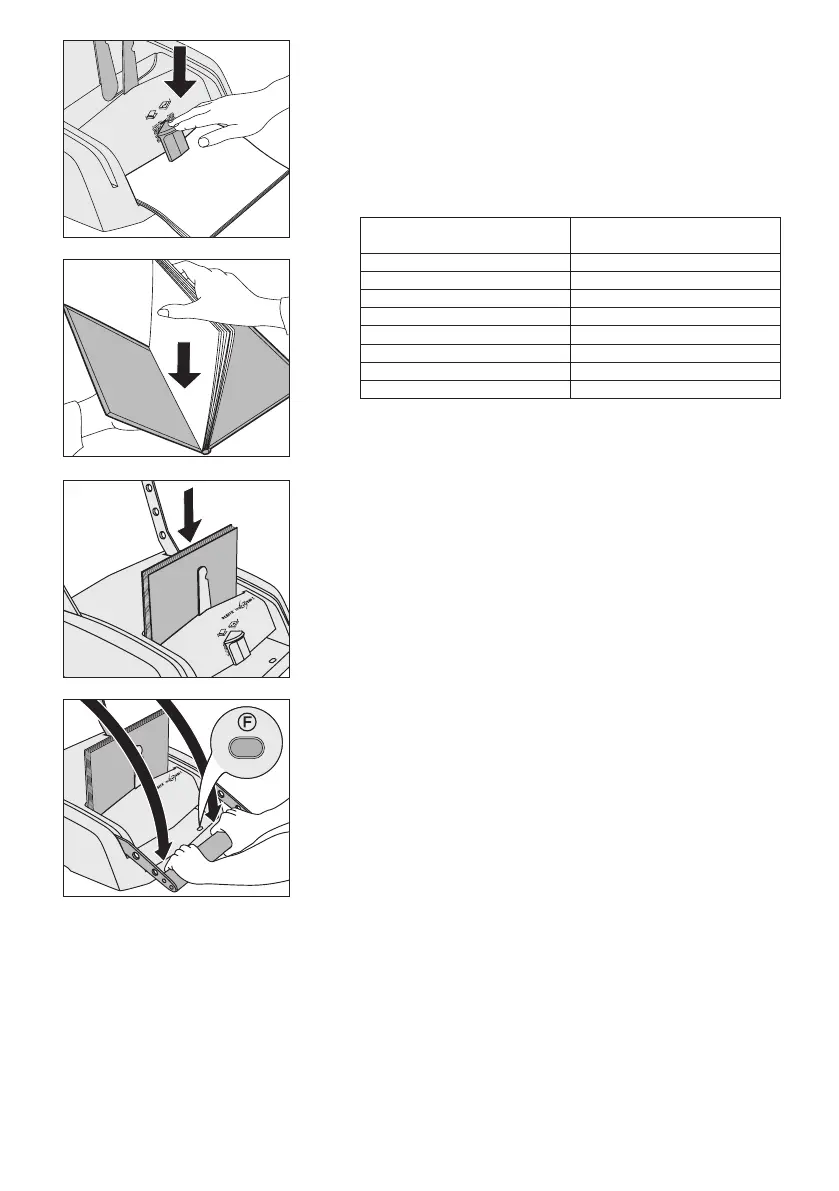
1. Determining the spine width
Place the pages to be bound below the measuring device.•
Press the slide •
E
down and read off the recommended spine
width from the scale.
Let the slider move up again and take out the pages.•
The spine width is indicated on the metal strip in the cover.
Number of pages
(80 g/m²)
Spine width
of binding cover
15–35
3.5 mm
36–70 7 mm
71–105 10.5 mm
106–140 14 mm
141–175 17.5 mm
176–210 21 mm
211–245 24.5 mm
246–280 28 mm
2. Placing pages in the cover
Straightenthepagessothattheedgesareush.•
Insert the pages into the cover.•
Make sure that the gaps between the pages and the upper and •
lower edge of the binding cover are identical.
3. Placing the cover in the machine
Make sure that the binding lever •
A
is pushed up as far as it will
go.
Place the binding cover in the binding tray.•
The document supports
C
and the holder in the binding tray ensure that the
contents sit securely.
4. Binding
Caution, danger of crushing ngers/hands!Whenbinding,
hold the lever with both hands and keep other persons away from
the machine.
Press the binding lever
A
down with both hands once or twice
until the binding indicator
F
is completely green.
Remove the bound book.•
A de-binder, 7389-00-00, is available as a separate item. You can use this
accessory to reopen a bound book up to three times in order to remove or
add pages.
2
1
3
4



 To Next Page
 Loading...