your product
32
your product
33
7
In USB or CD mode, go to the next track (press briefly) / Play forward at accelerated speed
(press and hold).
In FM mode, increase the frequency by 0.05 MHz (press briefly) / Scan forward along the
FM bandwidth to the next station (press and hold).
8 Opening/closing the disc compartment
9 LCD screen
10 USB port for playback
11 3.5 mm jack auxiliary input
12 Volume control knob
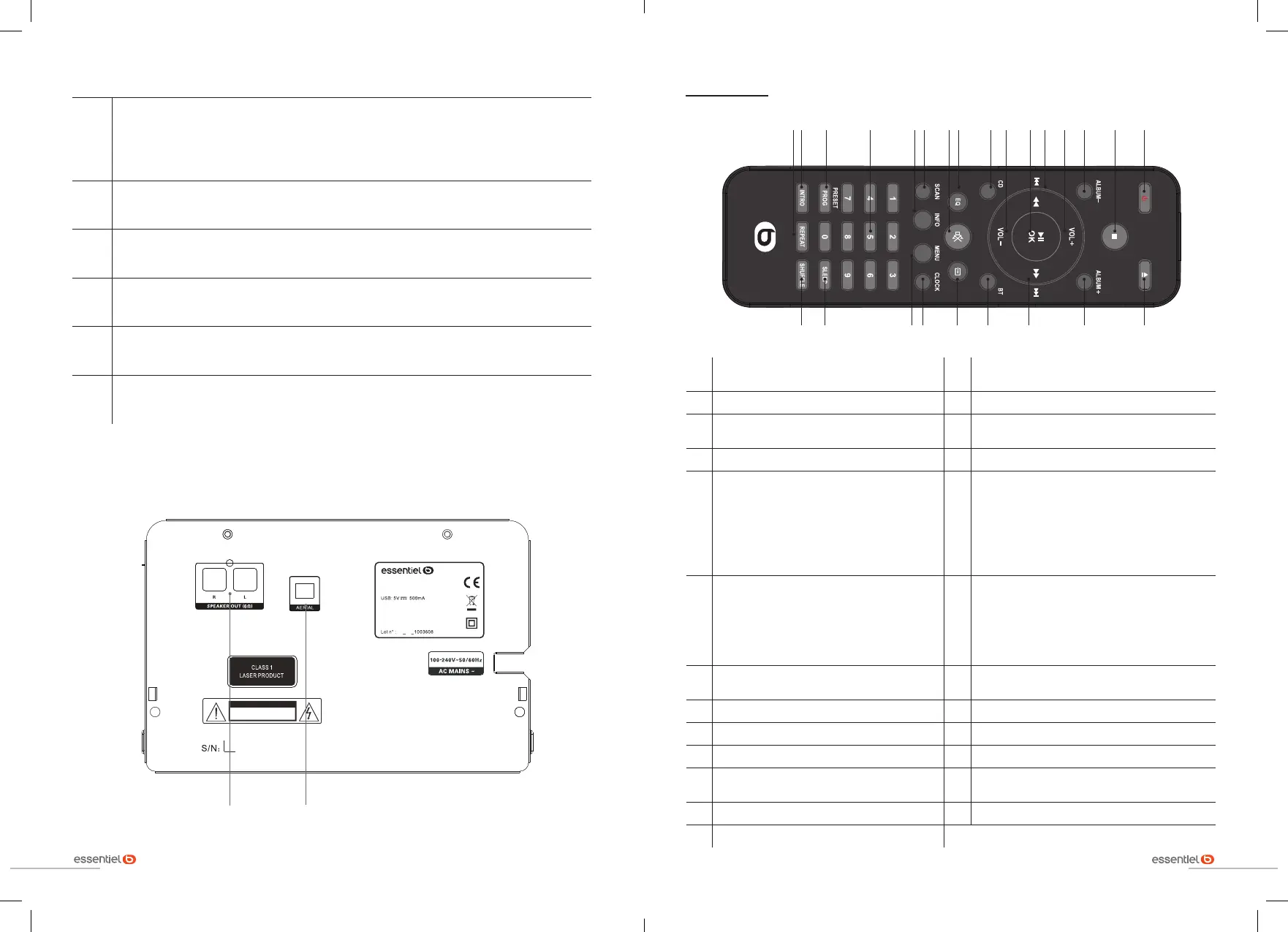
BACK VIEW
ATTEN TI ON
RISQUE DE CHOC ELECTRIQUE
NE PAS OUVRIR
100-240V~50/60H z 20 W
0920
80 07 88 5
MS -E -2 00 -D
Made in P.R.C.
Sourcing & Création
Avenue de la Mo tt e
59810 Lesquin Franc e
Right and left speaker
connectors
FM antenna socket
The remote control
1
Switching the appliance on or switching it
to standby
14
Program in CD play mode / Store an FM/DAB
radio station
2 Stop playback 15 Play the first 10 seconds of each track
3
Access the previous folder in MP3 or CD
playback
16 Define a repeat order
4 Increase the volume 17 Open the disc compartment
5
In USB or CD mode, go to the previous
track (press briefly) / Play backward at
accelerated speed (press and hold) / In
FM/DAB mode, select a radio station
(press briefly) / Scan back along the FM/
DAB+ bandwidth to the previous station
(press and hold)
18 Go to the next folder in MP3 or CD playback
6
Start or pause playback / Confirm an
action in the DAB menus
19
In USB or CD mode, go to the next track
(press briefly) / Play forward at accelerated
speed (press and hold) / In FM mode, select
a radio station (press briefly) / Scan forward
along the FM/DAB+ bandwidth to the next
station (press and hold)
7 Decrease the volume 20
Select the Bluetooth* source / Cancel the
active Bluetooth* connection (press and hold)
8 Select CD source 21 Selecting the playback source
9 Define a sound effect 22 Setting the time
10 Mute the volume 23 Access the menus
11
Start an automatic search in FM or DAB+
mode
24 Select a sleep period
12 Display information in DAB mode 25 Play all tracks in random order
13 Numeric keys 0 to 9
12345678910111213141516
17
1819202122232425


 To Next Page