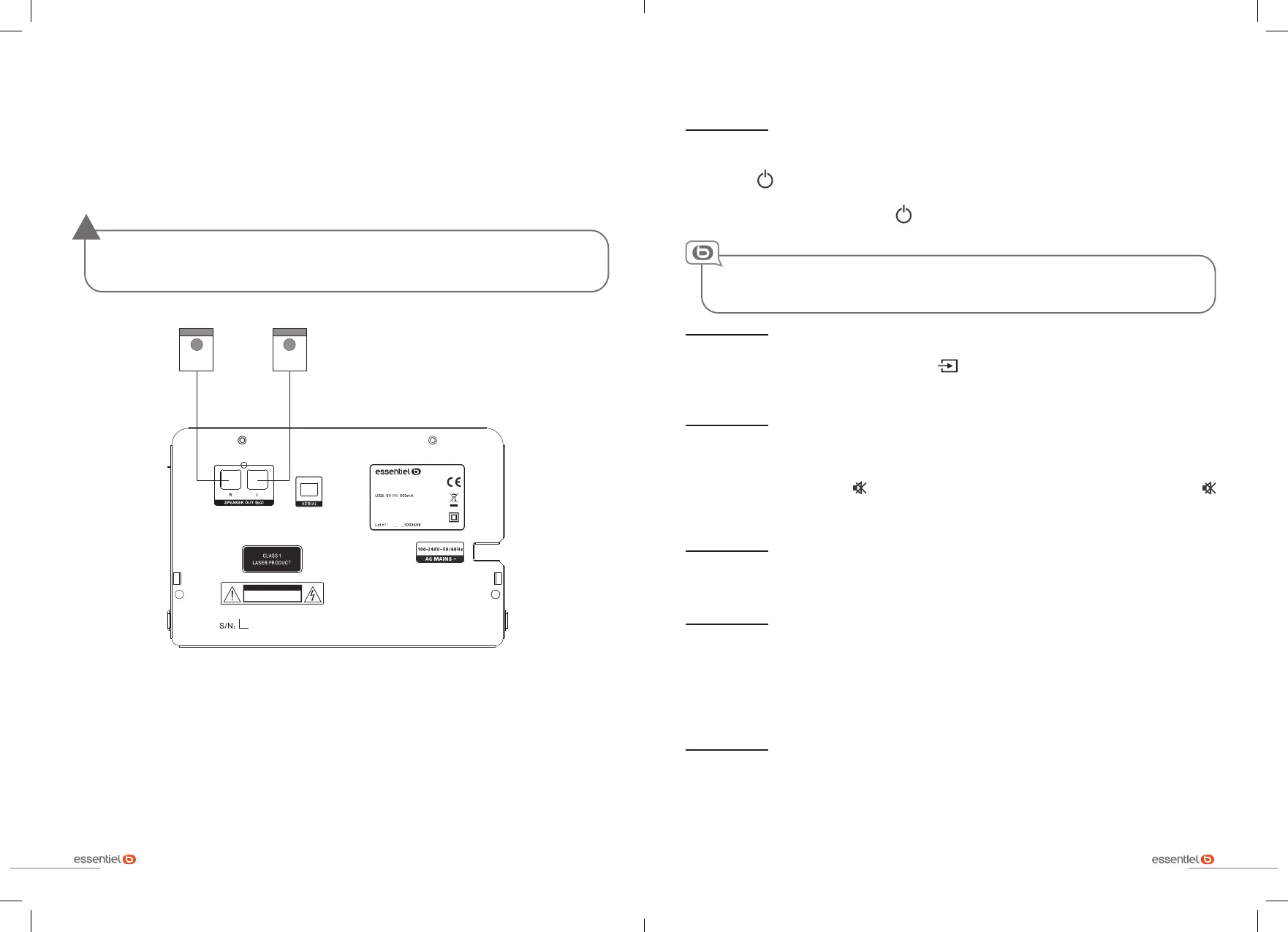
connecting the speakers
38
basic use
39
connecting the speakers
1. Connect the cable from the first speaker to the left connector (L) on the back of the mini-stereo.
2. Do the same for the second speaker by connecting the cable to the right connector (R) on the back
of the mini-stereo.
Use only the supplied speakers. Using other speakers may damage the appliance or affect
the sound quality.
!
ATTENTION
RISQUE DE CHOC ELECTRIQUE
NE PAS OUVRIR
100-2 40 V~50/ 60Hz 20 W
0920
80 078 85
MS -E- 20 0- D
Made in P.R .C.
Sourc in g & Créat ion
Avenu e de la Mot te
59810 L es quin Fr ance
R (droit) L (gauche)
The position of the speakers affects the sound quality. Please keep a distance between the speakers
and the wall of 30 cm to 1m and 100 cm to 120 cm between the two speakers depending on your own
environment.
R (right) L (left)
basic use
Switching the appliance on or off
1. To turn on the mini-stereo, plug the end of the power cord into a wall outlet.
2. Press the button on the remote control or on the appliance. The mini-stereo lights up on the
last active source.
3. To turn off the mini-stereo, press the button on the remote control or on the appliance again.
Your appliance is equipped with an auto sleep function. If no audio signal is detected within
15 minutes (excluding FM/DAB radio), it will automatically go into standby mode.
Select an audio source
Select your playback source by pressing the button on the mini-stereo or press the button
corresponding to the source of your choice on the remote control: DISC, USB, DAB, FM, LINE IN,
BLUETOOTH.
Adjusting the volume
• To increase or decrease the volume, turn the volume dial on the front of the mini-stereo or press the
VOL + and VOL - buttons on the remote control.
• To mute the volume, press the button on the remote control. To reactivate the sound, press the
button again, press the VOL + and VOL - buttons on the remote control or turn the knob on the front
of the appliance.
Modifying the sound effects
Repeatedly press the EQ button on the remote control to select the desired sound effect: ROCK, POP,
FLAT, JAZZ or CLASSIC.
Setting the time
When the mini-stereo is switched on for the first time, it automatically switches to DAB mode and starts
an automatic search for available stations. The time is set automatically.
You can also set the time manually.
To do this,hold down the CLOCK button and then use the number keys (0 to 9). Press the CLOCK
button again to confirm.
Selecting a sleep timer
Press the SLEEP button repeatedly to set an auto sleep timer. At the end of this period, the mini-stereo
will switch off. Select OFF if you want to disable this function.


 To Next Page