Measuring
14
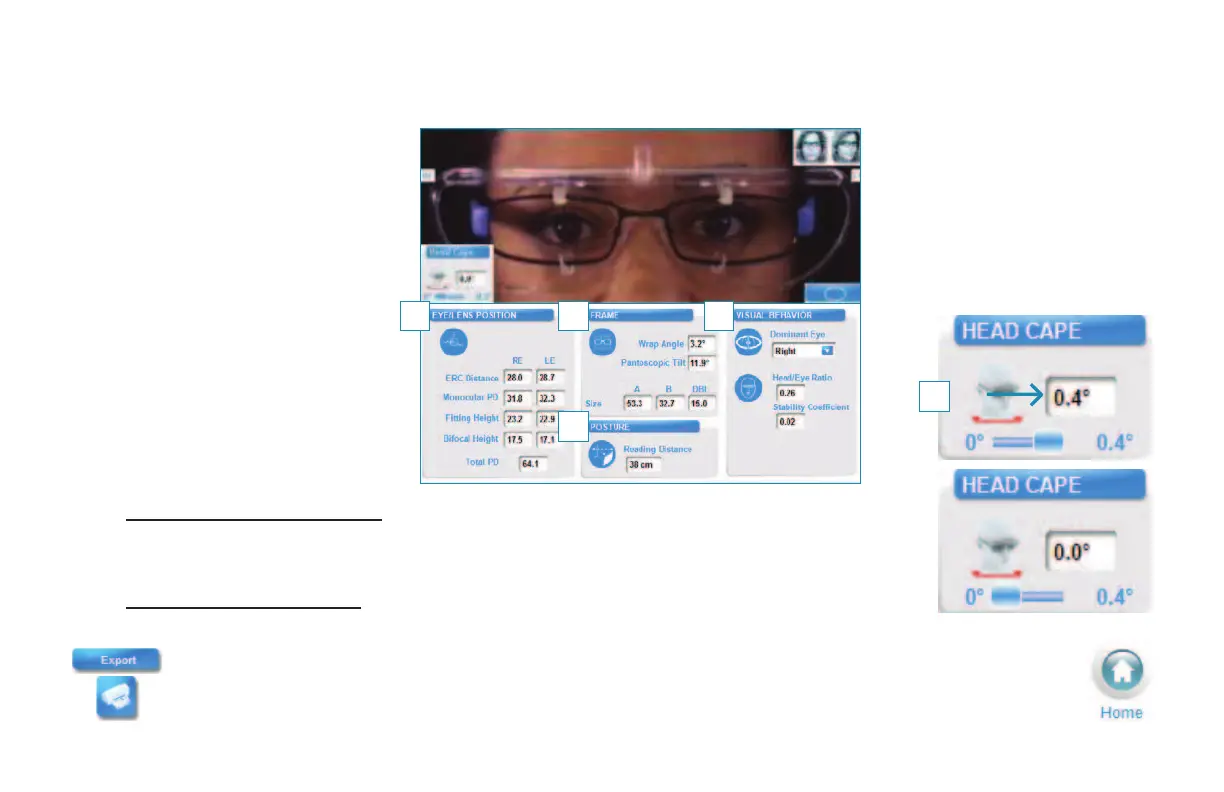
Measurement Results Screen
Measurement Results are
automatically displayed in
4 Personalization Levels:
1 Eye/Lens Position
2 Frame
3 Posture
4 Visual Behavior
1 2
3
4
5 For Essilor personalized designs requiring the Natural Head Posture measurement,
manually set your patient’s head rotation (Head Cape) to the non-zero value. The
measurement results will be adjusted automatically.
For non personalized designs (Essilor or other suppliers), do not activate the Head
Cape measurement.
Measurement data is now ready for PMS/Web Export or Print.
Press the Home button to return to the
Visioffice Home Screen.
5


 To Next Page