6 / 8 P/N 3101773-EN • REV 04 • ISS 05AUG13
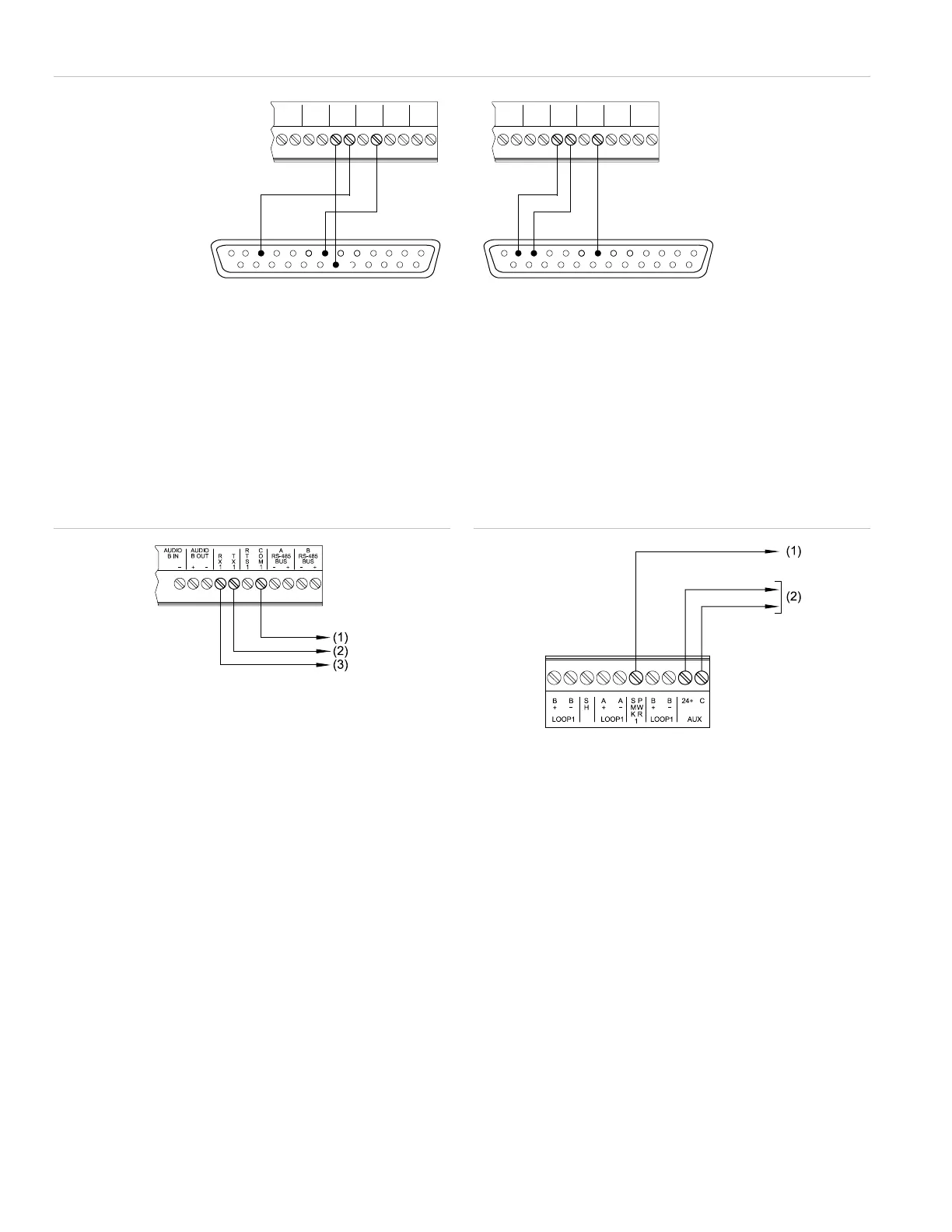
Figure 10: RS-232 wiring for serial printers (TB5)
Legend
(1) Supervised serial printer (3=RX, 7=Common, 20=DTR)
(2) Unsupervised serial printer (2=TX, 3=RX, 7=Common)
(3) Front view of male DB-25 connector
Notes
• Locate a supervised serial printer in the same room as the equipment to which it connects.
• Locate an unsupervised serial printer in the same room of the equipment to which it connects, and enclose wiring in conduit or equivalent
protection against mechanical injury.
• RS-232 wiring is approved for connection of fire alarm or ancillary equipment; however, both applications cannot be supported on the same
connection or wiring.
Figure 11: RS-232 wiring to ancillary devices
Legend
(1) To the COM terminal on listed equipment
(2) To the RxD terminal on listed equipment
(3) To the TxD terminal on listed equipment
Note: RS-232 wiring is approved for connection of fire alarm or
ancillary equipment; however, both applications cannot be supported
on the same connection or wiring.
Figure 12: Smoke power and AUX SLC wiring (TB1/TB2)
Legend
(1) Smoke power to SIGA-UM or SIGA MAB for a two-wire
smoke detector
(2) External equipment with compatible ratings
Note: AUX power wiring used for fire functions cannot be shared with
any device performing ancillary functions.
AUDIOAUDIO AUDIOAUDIO
B INB IN
B OUTB OUT
++ -- ++ --
AA BB
RS-485RS-485
++ -- ++ --
RS-485RS-485 RR
XX
11
TT
XX
11
TT
SS
11
RR
OO
MM
11
CC
BUSBUS BUSBUS
3 3
27
20
7
(3) (3)
(1) (2)


 To Next Page