EN - 47
EN
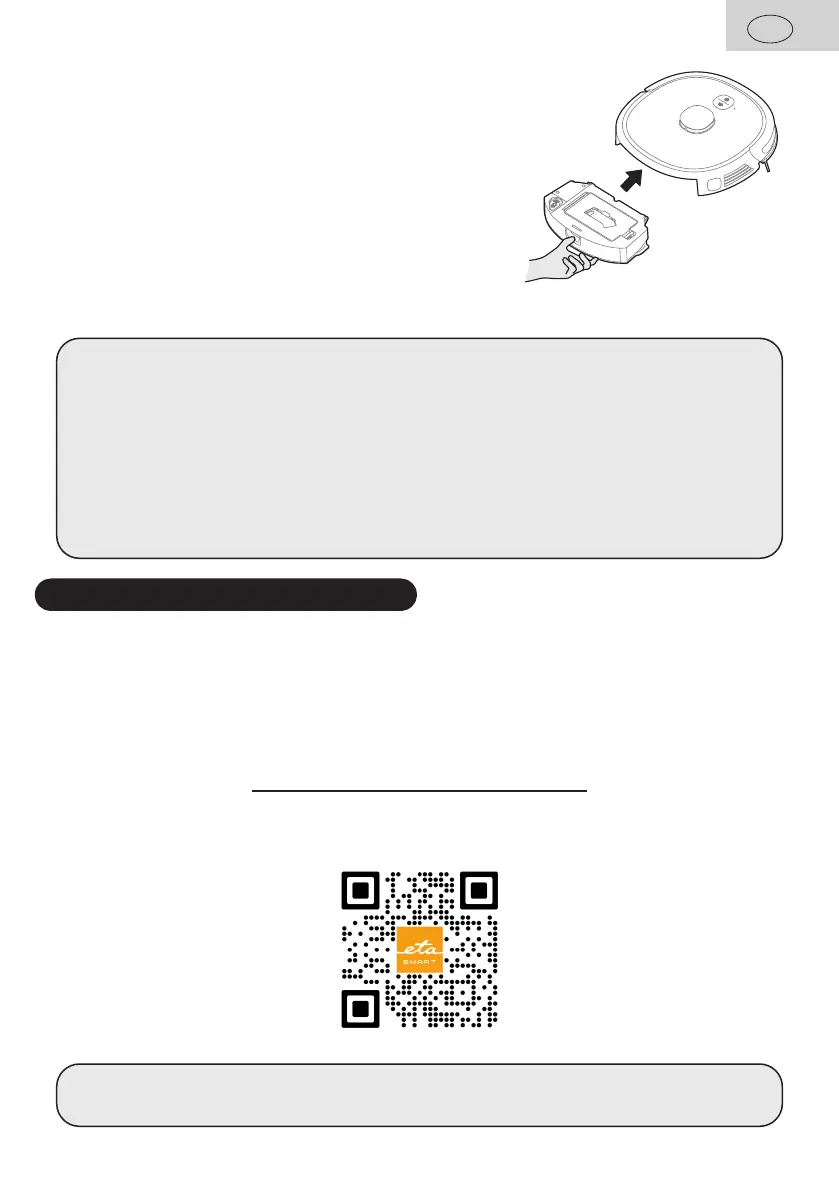
3. Insert container B with mopping attachment F installed
back into the vacuum cleaner.
4. Switch on the device and select the required cleaning mode.
Notes
• When mopping, we recommend cleaning the individual rooms.
• Do not use/pour any detergent in the mop water tank.
• When mopping, check the vacuum cleaner and add water to the moping attachment,
if necessary, or rinse the mop.
• Do not use the mop attachment on carpets and prevent the vacuum cleaner from
hitting the carpet.
• Remove and clean the moping attachment after use. Do not leave it installed on the
vacuum cleaner while charging.
6. APPLICATION ETA SMART
The vacuum cleaner can be operated in simplified mode using buttons on control panel C.
In order to use all device´s functions, you will have to install and use smart app "ETA
SMART", allowing extension of vacuum cleaner functionality and increased user comfort.
All other information, operating instructions of the app, instructions and hints for successful
pairing with home network can be found at:
www.etasince1943.com/robot
The app is available from Apple Store or Google Play database (or use the following QR
code for easy installation:
Note
If QR code is not active, find the app manually (by its name).


 To Next Page