8.5 HD-PH/P (COMMISSIONING THE PUMP)
a. Install the metering pump as described in Chapter 6.0 “PUMP INSTALLATION
”.
b. Place the electrode in the electrode holder.
c. Connect the electrode to the metering pump by means of the male BNC connec-
tor (12), rotating it through 90°C.
d. Position the "FUNCTION SELECTOR" (14) at pH set and then use the screwdriv-
er supplied as part of the kit to adjust the "pH set" trimmer to the desired pH
value.
e. Position the function selector (14) at “pH met”. Use the "ACID/ALK" switch (15)
to select the required type of intervention (acid or alkaline). Example: If the
intervention point is set at pH 9 and an acidification is required, set the switch
to ACID. The pump will then start dosing the additive every time the pH rises
above 9. If it is desired to alkalinize the system, set the switch to ALK, in which
case the pump will come into operation every time the pH drops below 9.
f. Since the temperature of the liquid exerts an influence on the measured pH
value, set the " temperature compensation trimmer" (5) to the temperature exist-
ing in the system to obtain an automatic correction of the pH value ascertained
40
ENG
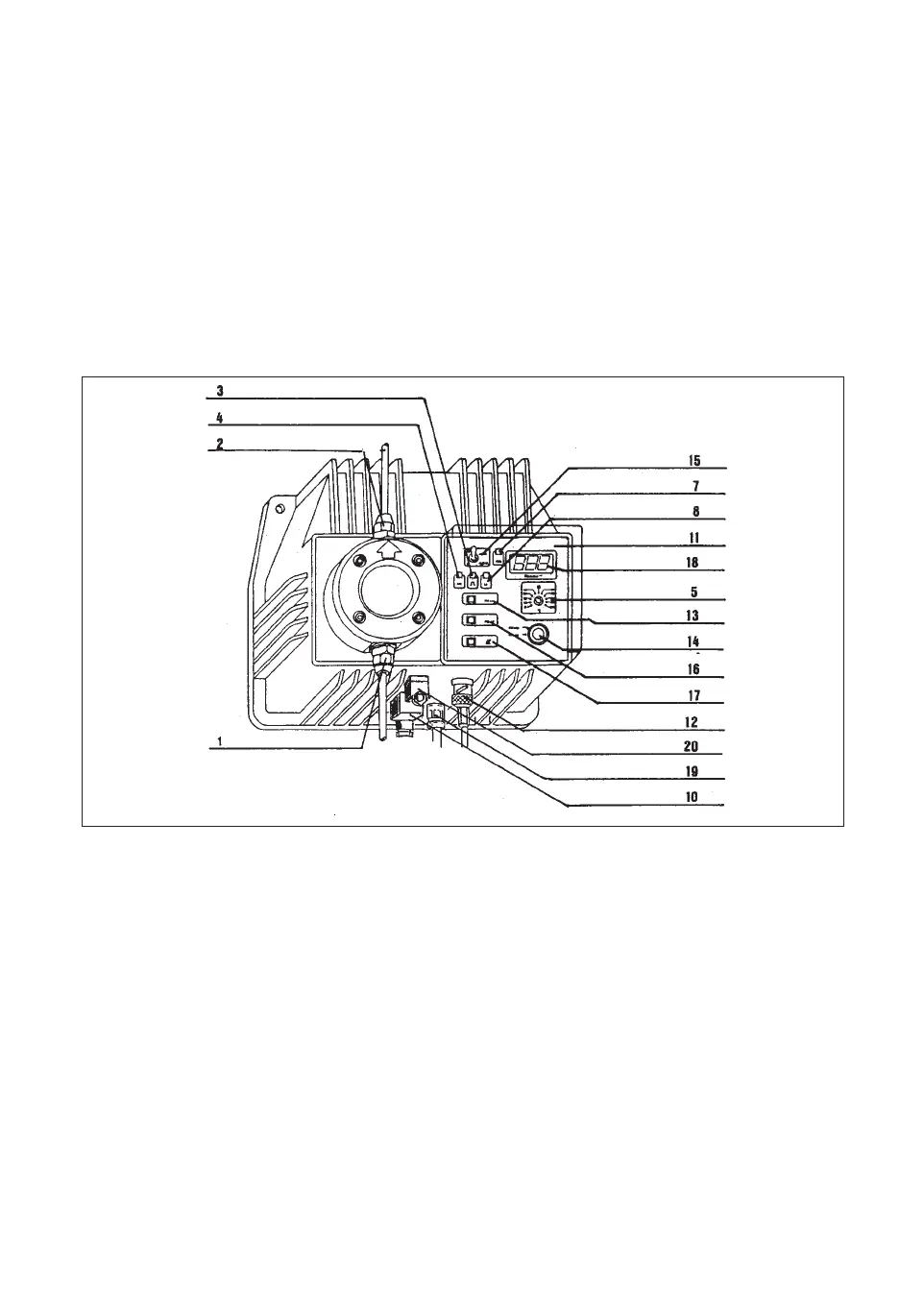
1 Suction hose connector nipple
2 Delivery hose connector nipple
3 Stroke Led,red
4 Power Led, green
5Temperature compensation knob
7Warning signaling Led, red
8 Level signaling Led, yellow
10 Level probe connector
11 Control panel
12 Electrode cable connector
13 Set-point selector “pH set”
14 Functions selector
“pH met” display the measured
pH value
“pH set” display set-point value
15 Acid/Alk switch
16 Calibration trimmer “pH/mV”
17 Calibration trimmer “
∆
0”
18 Display
19 Supply cable
20 Auxiliary output connector
fig.12



 To Next Page