Manual EKS Electronic-Key Adapter USB
Page 24/34 Subject to technical modifications 2094485-05-07/19
7.3 Uninstalling the EKS USB drivers under Windows
®
The user must be logged on as an administrator in order to uninstall the EKS USB drivers.
possible only if an Electronic-Key adapter is plugged in.
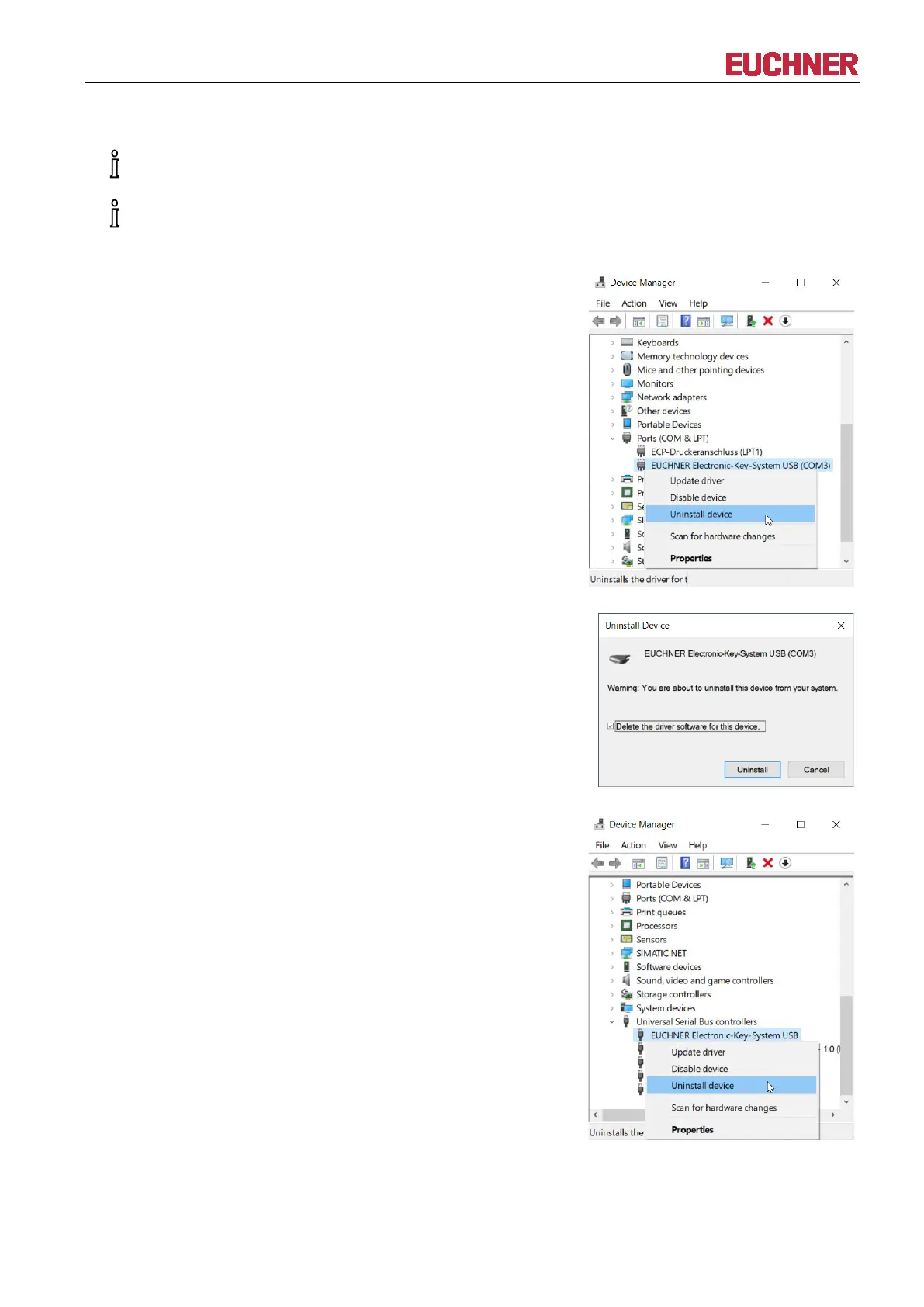
Begin the uninstalling process by opening the Device Manager.
Find the entry EUCHNER Electronic-Key-System USB (COM#)
in the Ports (COM & LPT) list.
Select Uninstall device from the context menu.
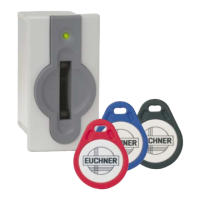
Confirm that you wish to uninstall EUCHNER Electronic-Key-
System USB (COM#) by ticking Delete the driver software for
this device.
Click Uninstall.
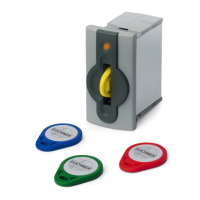
Find the entry EUCHNER Electronic-Key-System USB in the
Universal Serial Bus controllers list.
Select Uninstall device from the context menu.


 To Next Page