Manual EKS Electronic-Key Adapter USB
Page 26/44 Subject to technical modifications 094485-04-11/13
7.2 Installation of the EKS USB drivers under Windows
®
7
To start the installation, have the driver software order no. 094376 at hand in a folder or on a CD.
For installation from zip file, extract it to a folder of the computer now (e.g. to C:\Temp\)
or alternatively
For installation from CD, insert the CD now.
In the routine described in the following, first a driver for the EUCHNER Electronic-Key-System USB is installed
and then a driver for the virtual serial COM port.
The user must be logged on as an administrator in order to instal
l or uninstall the drivers.
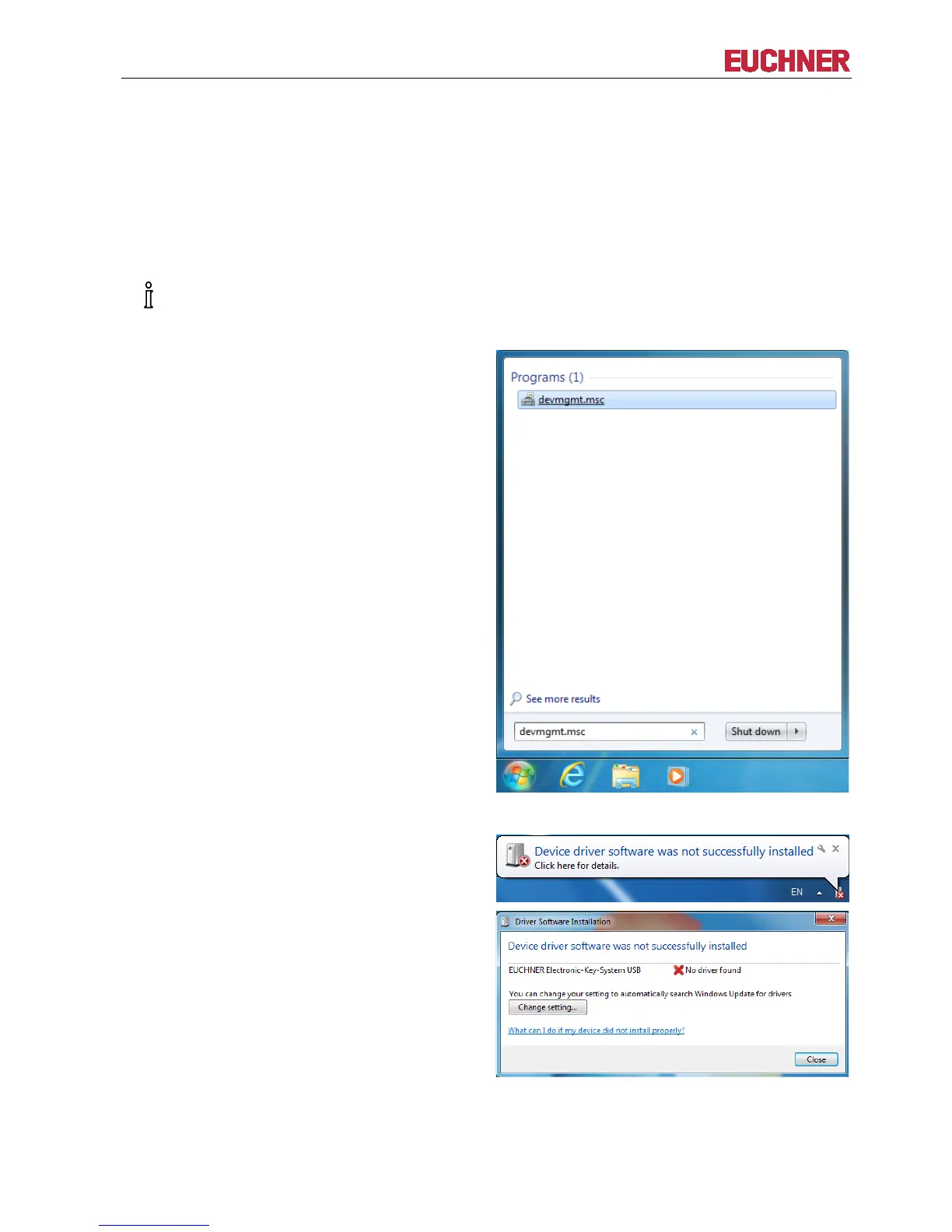
Start driver installation by launching the Device
Manager via Windows Start… and entering the
following in the Search programs and files box:
devmgmt.msc
Click on devmgmt.msc
The EKS USB device driver will be installed in the first step.
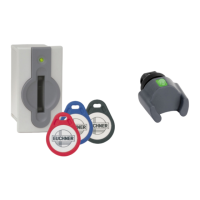
Now plug the Electronic-Key adapter into a
unoccupied USB port. Windows will now typically
display a message in the task bar stating that it is
looking for device driver software. The EUCHNER
Electronic-Key-System USB driver will not be
installed automatically. Instead, this is done
manually as follows. Close this window if
necessary.


 To Next Page