Manual EKS Electronic-Key Adapter USB
Page 34/44 Subject to technical modifications 094485-04-11/13
7.4 Uninstalling the EKS USB drivers under Windows
®
The user must be logged on
as an administrator in order to uninstall the EKS USB drivers.
This is possible only if an Electronic
-Key adapter is inserted.
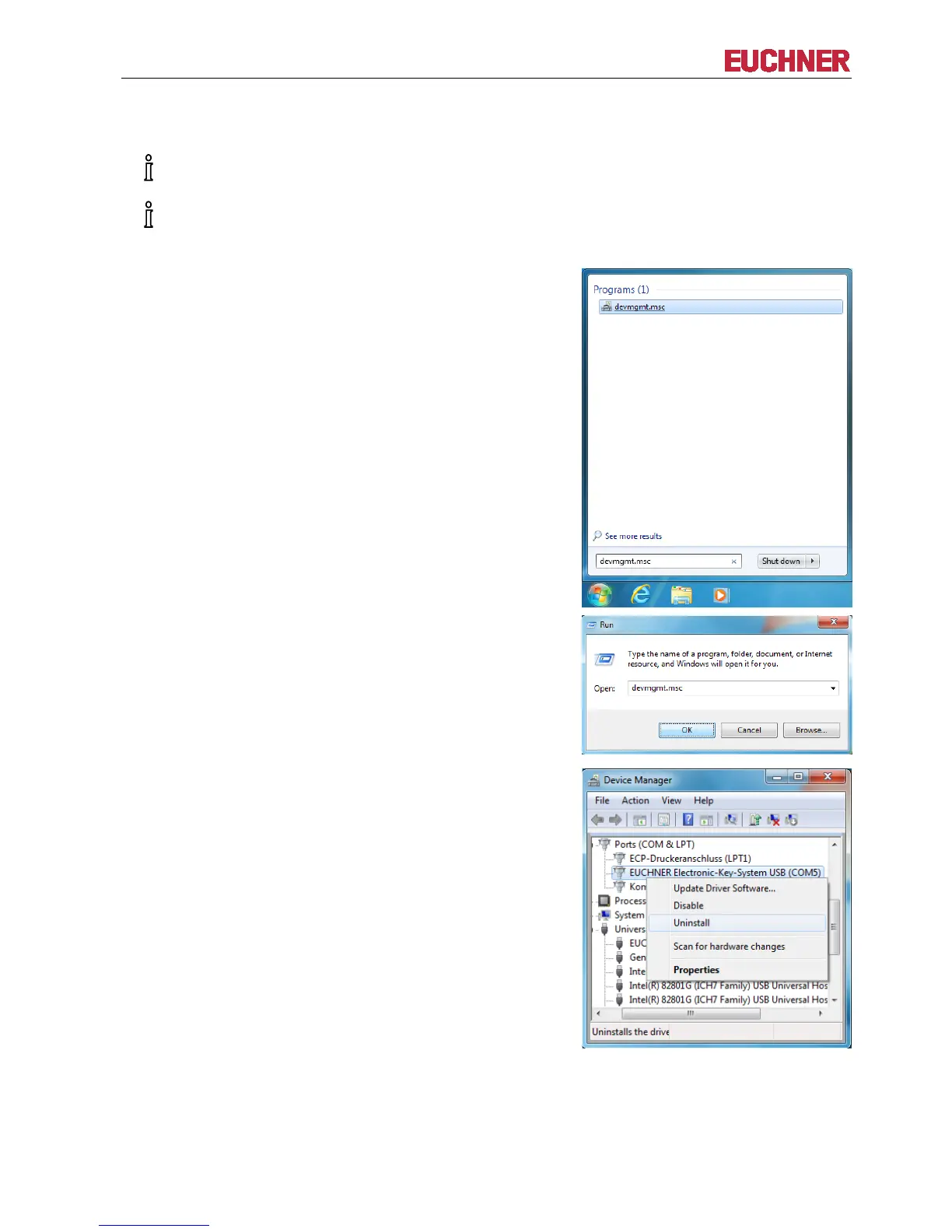
Start the uninstalling process by launching the
Device Manager via Windows Start… and
entering the following in the Search programs and
files box: devmgmt.msc
Click on devmgmt.msc
Start the uninstalling process by launching the
Device Manager via Windows Start/Run… and
entering the following in the Open box:
devmgmt.msc
Click on OK
Find the following entry in the Ports (COM & LPT)
list: EUCHNER Electronic-Key-System USB
(COM#).
Right-click on the entry and select Uninstall


 To Next Page