EasyManua.ls Logo

Eumig Automatic P8 - Projection

Eumig Automatic P8
24 pages
Print Icon
To Next Page IconTo Next Page
To Previous Page IconTo Previous Page
Loading...
13
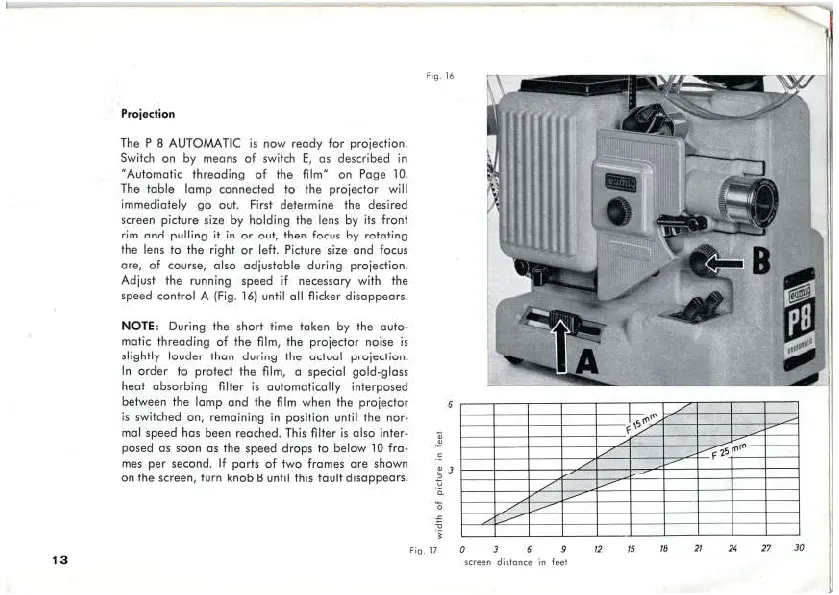
Projection
The
P 8
AUTOMATIC
is
now
ready
for
proieetion.
Switch
on by
means
of
switch
E,
as
deseribed
in
"Autematie
threading ef
the
film”
en Page
10.
The
table
lamp
connarted
to
the
projiecter
will
immediately
go
out.
First
determine
the
desired
sereen
picture
size
by
holding
the
lens
by
its
front
rim
and
pulling
it
in
or
out,
hen
focus
by
rofating
the
lens
to
the
right
or
left.
Picture
size
and
focus
are,
of
course,
also
adjustable
during
projection.
Adijust
the
running
speed
if
necessary
with
the
speed
control
A
(Fig.
16)
until
all
fliker
disappears.
NOTE:
During
the
short
time
taken
by
the
aufa-
matic threading
of
the
film,
the
projector
noise
is
slightly
louder
than
during
the actual
projerfion.
In
order
to
proteet
the
film,
a
special
geld-glass
heat
ubsorbing
filter
is
autematically
interposed
between
the
lamp
and
the
film
when
the
projecter
is
switched
on,
remaining
in
position
until
the
nor-
mal
speed
has
been
reached.
This
filter
is
also
inter-
posed
as
soon
as
the
speed
drops
to
belaw
10
fra-
mes
per
second,
If
parts
of
two
frames
are
shown
on
the
screen,
turn
knob
B
until
this
Fault
disappears.
widih
of
picture
im
feet
Fig,
IT
O 3 6 2
seraan
distance
in
feet
2
TS

Related product manuals