EasyManua.ls Logo

Eumig Automatic P8 - Automatic threading of the film

Eumig Automatic P8
24 pages
Print Icon
To Next Page IconTo Next Page
To Previous Page IconTo Previous Page
Loading...
Fig.%
Fin.
10
Automatic
threading
of
the
film
Having
trained
your
P
8
AUTOMATIC
on
the
screen
and
set
the
projector
to
the
correct
height,
you tan
proceed
to
thread
the
film.
An
error-free
functioning
of
the
automatic
fhreader
is
only
then
guaranteed
when
the
film
end
has
been
properly
prepared,
that
is,
trimmed
in
the
correct
way.
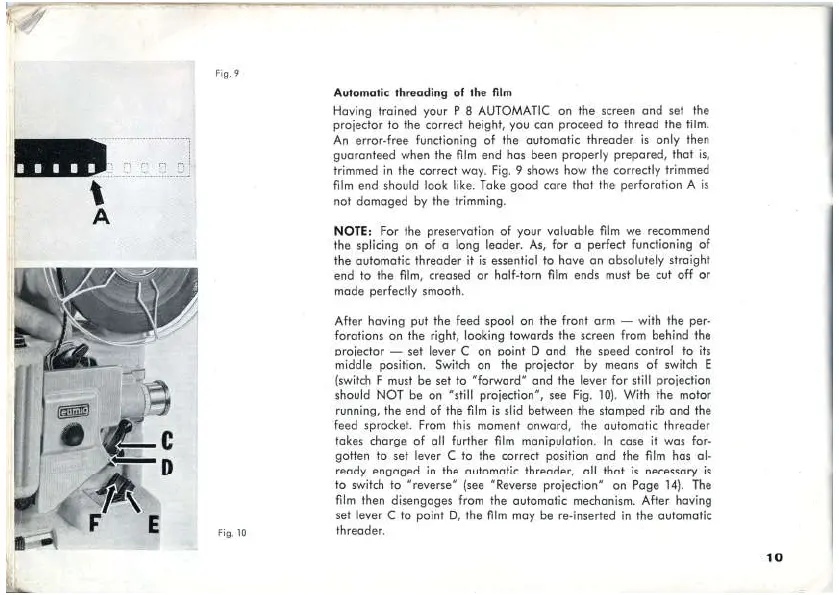
Fig.
9
shows
how
the
correctly
trimmed
film
end
should
look
like.
Take
goed
care
that
the
perforatien
A
is
not
damaged
by
the
trimming.
NOTE:
For
the
preservation
of
yeur
valuable
film
we
recommend
the
splicing
on
of
a long
leader.
As, for
a
perfect
functioning
of
the
automatic
Hhreader
it is
essential
to
have
an
absolutely
straight
end
to
the
film,
creased
or
half-tarn
film
ends
must
be
cut
off
or
made
perfectly
smooth.
After
having
put
the
feed
spool
on
the
front
arm
with
the
per-
foratfions
on
the
right,
laaking
towards
the
sereen
from
behind
the
projector
set
lever
on
point
D
and
the
speed
control
to
its
middle
position.
Switdh
on
fhe
projecter
by
means
of switch
E
(switch
F
must
be
set
to
"forward"
and
the
lever
for
still
projection
should
NOT
be
on
“still
projecfien”,
sea
Fig.
10).
With
the
meter
running,
he
end
of
the
film
is
slid
between
the
stamped
rib
and
the
feed
sprocket.
From
this
moment
onward,
the
automatic
threader
takes
charge
of
all
further
film
manipulation.
In
case
if
was
for-
goten
to
set
lever
C
to
the
correct
pasitian
and
fhe
film
has
al-
ready
engaged
in
Hhe
automatic
threader,
all
that
is
necessary
is
to
switch
fo
“reverse”
(see
“Reverse
projection"”
on
Page
14).
The
film
then
disengages
from
the
automatic
mechanism.
After
having
set
lever
C
to
point
D,
the
film
may
be
re-inserted
in
Hhe
automatic
thraader,
10

Related product manuals