EasyManua.ls Logo

Eumig Automatic P8 - Visible reverse projection; Still projection

Eumig Automatic P8
24 pages
Print Icon
To Next Page IconTo Next Page
To Previous Page IconTo Previous Page
Loading...
Fig.
14
Fig.
IS
Fig.
2
If
you
are
expecting
guests,
if
is
advisable
to
have
a
trial
run
to
make
any
necessary
adjustments
far
picture
size,
focus,
speed
and
framing.
Then
all
you
have
to
do
is
to
switch
on
the
projiector.
Af
the
end
of
he
performance
vou
just
switch
off
the
projiector,
and
the
table
lamp
will
automatically
come
on
again.
Fig.
17
shows
the
relationship
between
picture
size
and
screen
distance
when
using
tha
focal
lengths
range
of
the
EUPRO-ZOOM
(15—25
mm.).
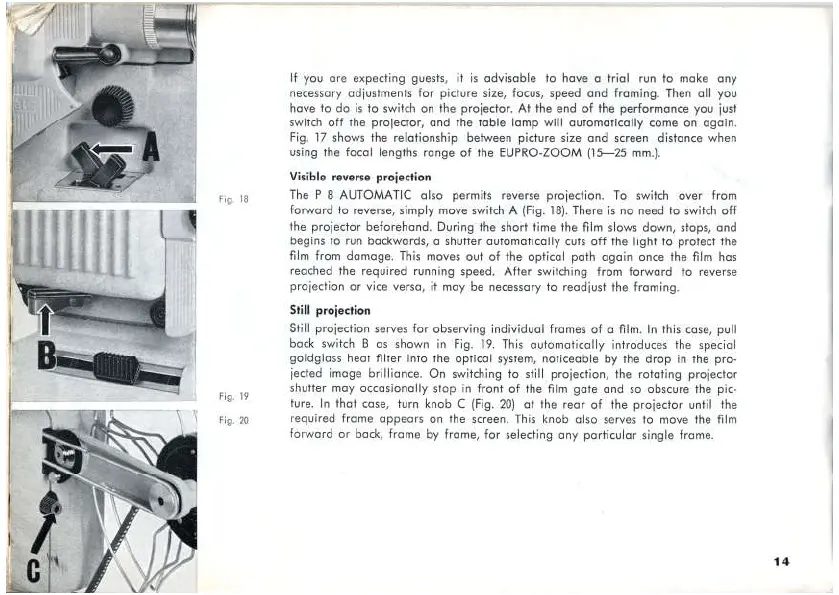
Visible
reverse
proiection
The
P
B
AUTOMATIC
also
permits
reverse
projection.
To
switch
over
From
forward
to
reverse,
simply
move
switch
A
(Fig.
18).
There
is
no
need
to
switch
off
the
projecter
beforehand.
During
the
short
time
the
film
slows
down,
stops,
ond
begins
to
run
backwards,
a
shutter
automatically
cuts
off
the
light
to
protect
the
film
from
damage.
This
moves
out
of
the
optical
path
again
once
the
film
has
reached
the
reauired
running
speed,
After
switdhing
from
forward
to
reverse
proiection
or
vice
versa,
it
may
be
necessary
to
reediust
the
framing.
Still
projection
Still
proiection
sarves
far
observing
individual
frames
of a
film.
In
fhis
case,
pull
back
switch
B
as
shown
in
Fig.
19.
This
outomatically
introduces
Hhe
special
goldglass
heat
filter
into
the
optical
system,
noticeable
by
the
drop
in
the
pro-
jected
image
brilliance.
On
switching
to
still
projection,
the
rotafing
projector
shutter
may
eccasionally
stop
in
front
of
the
film
gate
and
so
obscure
the
pic-
ture.
In
that
case,
turn
knob
C
(Fig.
ZO)
at
the
rear
of
the projector
until
the
reguired
frame
appears
on
the
screen.
This
knob
also
serves
to
move
Ihe
film
farward
or
back,
frame
by
frame,
For
selecting
any
particular
single
frame.
14

Related product manuals