Using your oven touch control panel
Euromaid 750mm Oven OPERATING INSTRUCTIONS FOR FULL TOUCH CONTROL PANEL 7
Configuration setting
Press the “Info” key for 5 seconds to set the mode. Then press the “Info” again to select Mode 1, Mode 2, Mode 3,
Mode 4, Mode 5, Mode 6. Once selecting the mode, user can press / to select option 1, 2 or 3.
Mode Description Option 1 Option 2 Option 3
Mode 1 Time display Display always Display when oven is
working
Mode 2 “Beep” sound after the
time count down
Short Medium Long
Mode 3 Duration of time setting Short Medium Long
Mode 4 Cooling fan working
time after oven nishes
cooking
Short Medium Long
Mode 5 Display brightness Dark Medium Bright
Mode 6 “Beep” sound when
selecting the function
mode
No Yes
After user nish the selection of “Info” mode, press the key to conrm.
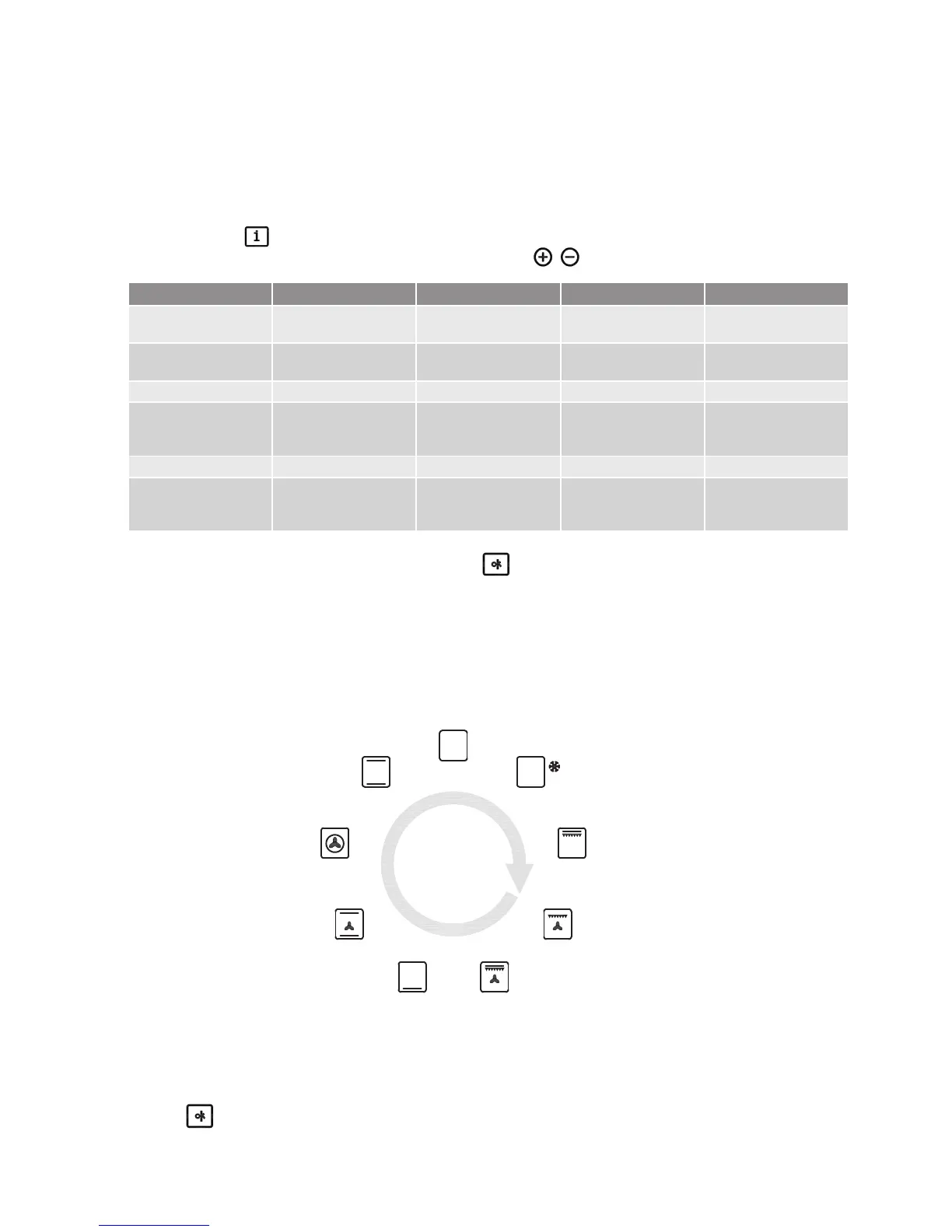
Cooking mode symbol
The sequence of cooking modes displayed in the screen as below:
Child-safety lock
Press the buttom for 5 sec after you switch o the oven
On
Defrost
Full
Grill
Half Fan
Grilling
Full Fan
Grilling
Conventional
(bottom element)
Fan Assisted
(Bake) Cooking
Fan Forced
Cooking
(Convection)
Static Bake


 To Next Page